cancel
Showing results for 
Search instead for 
Did you mean: 

Try your skills in the Power BI Dataviz World Championship! Round one ends June 26. Join now

Reply
Anonymous
Not applicable

Change R Visual to Custom Chart?

Hey Guys,


Need help with an issue we've got.

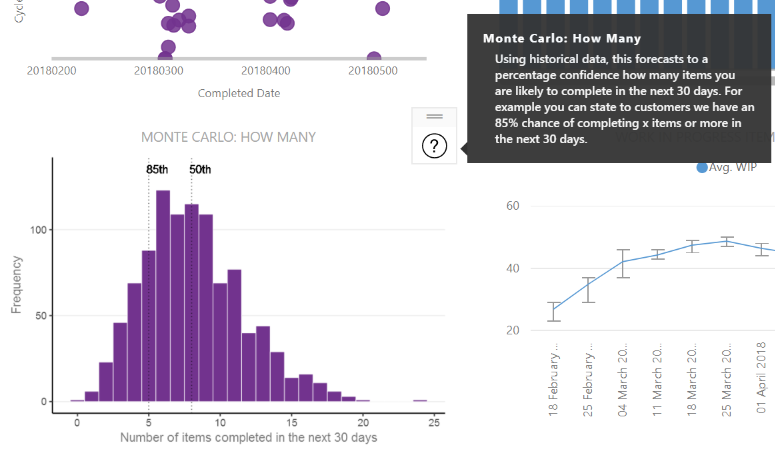
We've created an awesome monte carlo simulation visualisation using R which simulates the number of items forecast to be completed in the next 30 days to a % confidence. 

image (24).png

 
However when publishing to web we've found the issue around 'publish to web does not currently support R visuals'. 


Question is, does anyone know easy it would be to convert what we've done into a custom chart which we could then publish? Or any other work around to get this visibile in the web?


1 REPLY 1
v-piga-msft
Resident Rockstar
Resident Rockstar

Hi @Anonymous,


In Power BI, only the line chart have the forecast line feature in analysis pane and the X Axis should be the date type. If you want to create the chart like yours above with forecast in power bi, it seems that there may be no options for us to get that.


Untitled.png


For the custom visual, I found one that similar to yours, you could have a reference of this Histogram Chart.


Best Regards,

Cherry

Community Support Team _ Cherry Gao
If this post helps, then please consider Accept it as the solution to help the other members find it more quickly.

Helpful resources

Announcements
Fabric Data Days is here Carousel

Fabric Data Days 2026

Don't miss out on Data Days, June 15 through August 7. Learn Fabric, Power BI, SQL, AI and more.

May Power BI Update Carousel

Power BI Monthly Update - May 2026

Check out the May 2026 Power BI update to learn about new features.

Power BI DataViz World Championships carousel

Power BI DataViz World Championships - June 2026

A new Power BI DataViz World Championship is coming this June! Don't miss out on submitting your entry.