Join us at FabCon Atlanta from March 16 - 20, 2026, for the ultimate Fabric, Power BI, AI and SQL community-led event. Save $200 with code FABCOMM.
Register now!The Power BI Data Visualization World Championships is back! Get ahead of the game and start preparing now! Learn more
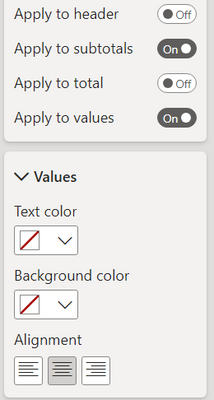
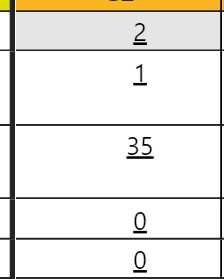
I have a matrix visual with a column defining the rows and columns, and a single measure for the value in each cell. Under 'Specific Column' for this measure, I have clicked the center alignment, but the matrix is not properly centering the text as it is further to the right. Some of the measure values have newline varchar(10) characters, but I'm not sure if that is causing the issue. Does anyone know why this is happening?
UPDATE: Issue was due to there being conditional format icons in some of the cells. Is there a way to have it centered properly even though there is an icon?
Hi @Jojo197
Have you tried center-aligning the other columns that don't have invisible characters? If they align just right then the cause could be the invisible characters. Can't you just remove them?
Hi @danextian , because it's a matrix with a measure for the values field, there is only one column (the measure) that I can center align. And the newline character is required for the report I am working on as otherwise it would be unreadable (not shown in the screenshot though)
The Power BI Data Visualization World Championships is back! Get ahead of the game and start preparing now!
| User | Count |
|---|---|
| 39 | |
| 35 | |
| 33 | |
| 32 | |
| 27 |
| User | Count |
|---|---|
| 136 | |
| 96 | |
| 77 | |
| 67 | |
| 65 |