cancel
Showing results for 
Search instead for 
Did you mean: 

The Power BI Data Visualization World Championships is back! Get ahead of the game and start preparing now! Learn more

Reply
Anonymous
Not applicable

Category displaying total value for all members of the group rather than individual values ...?

Hello,


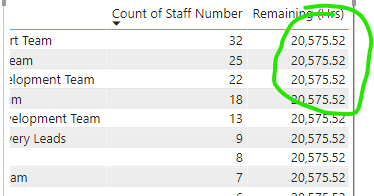
Both new to the community and the Power BI tool!  Have created a couple of basic reports and was recently asked to add a further category (just about the time of the Sept update) and I've gone from diagram one to diagram two!  Am stumpted as to what needs to be updated to correct this ...


AngusMOUH_0-1632479444915.png 

AngusMOUH_1-1632479622168.png


 ... I've checked all the relationships, restarted the entire report, double checked the originating data.  Any assistance would be most appreciated. 


AngusM - Oxford University Hospitals UK


1 ACCEPTED SOLUTION
Anonymous
Not applicable

Hi @Anonymous ,


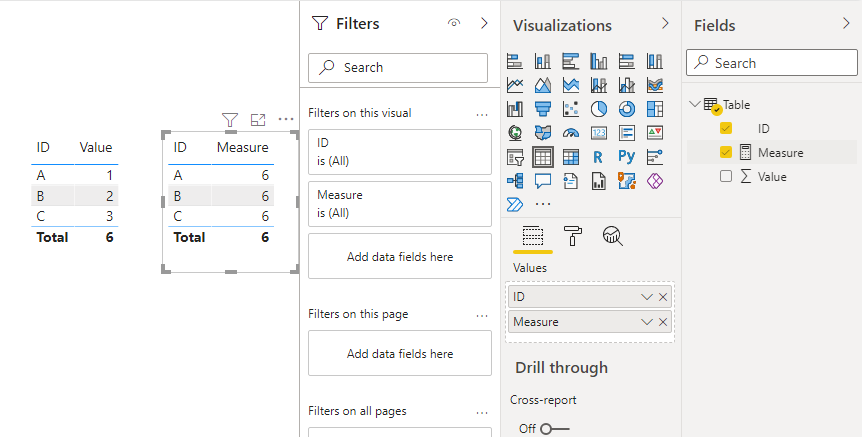
Is Remaining (Hrs) a measure, a column or a calculated column? If it is a measure or calculated column, it may be because your function is used incorrectly.


Example:

Measure = CALCULATE(SUM('Table'[Value]),ALLSELECTED('Table'))

12.png


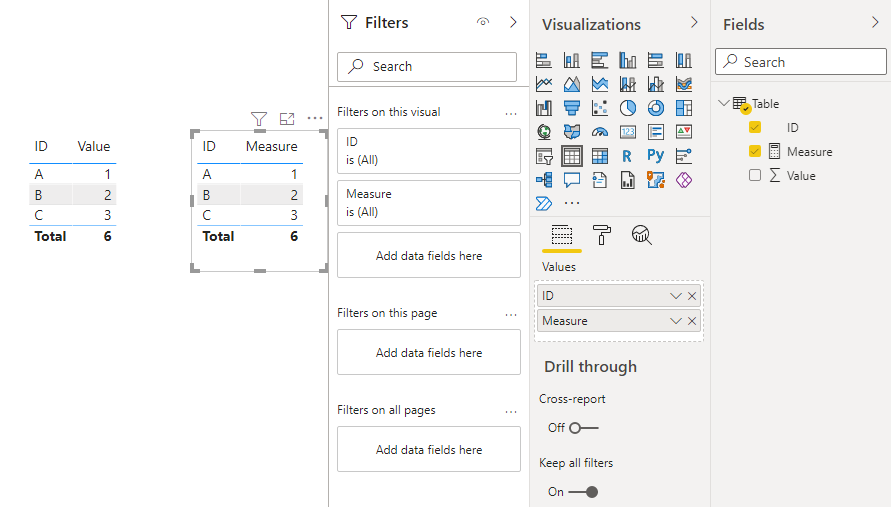
You should use ALLEXCEPT instead.

Measure = CALCULATE(SUM('Table'[Value]),ALLEXCEPT('Table','Table'[ID]))

13.png


Best Regards,

Stephen Tao


If this post helps, then please consider Accept it as the solution to help the other members find it more quickly.

View solution in original post

4 REPLIES 4
Anonymous
Not applicable

Hi @Anonymous ,


Is Remaining (Hrs) a measure, a column or a calculated column? If it is a measure or calculated column, it may be because your function is used incorrectly.


Example:

Measure = CALCULATE(SUM('Table'[Value]),ALLSELECTED('Table'))

12.png


You should use ALLEXCEPT instead.

Measure = CALCULATE(SUM('Table'[Value]),ALLEXCEPT('Table','Table'[ID]))

13.png


Best Regards,

Stephen Tao


If this post helps, then please consider Accept it as the solution to help the other members find it more quickly.

PaulDBrown
Community Champion
Community Champion

Can you show a depiction of the model (relevant tables) and post the code for the measures please?


Did I answer your question? Mark my post as a solution!
In doing so, you are also helping me. Thank you!

Proud to be a Super User!
Paul on Linkedin.


amitchandak
Super User
Super User

@Anonymous , As per the second screenshot. The table having remaining hrs, do not have a relationship with current unit or the relationship is inactive

Share with Power BI Enthusiasts: Full Power BI Video (20 Hours) YouTube
Microsoft Fabric Series 60+ Videos YouTube
Microsoft Fabric Hindi End to End YouTube
Anonymous
Not applicable

@amitchandak thank you for that, much appreciated.  All relationships are based on the staff ID numbers that are unique identifiers and are contained in all the table extracts ... 


Helpful resources

Announcements
Power BI DataViz World Championships

Power BI Dataviz World Championships

The Power BI Data Visualization World Championships is back! Get ahead of the game and start preparing now!

December 2025 Power BI Update Carousel

Power BI Monthly Update - December 2025

Check out the December 2025 Power BI Holiday Recap!

FabCon Atlanta 2026 carousel

FabCon Atlanta 2026

Join us at FabCon Atlanta, March 16-20, for the ultimate Fabric, Power BI, AI and SQL community-led event. Save $200 with code FABCOMM.