cancel
Showing results for 
Search instead for 
Did you mean: 

The FabCon + SQLCon recap series starts April 14th at 8am Pacific. If you’re tracking where AI is going inside Fabric, this first session is a can't miss. Register now

Reply
Riddlemirror
Frequent Visitor

Card Visualization Latest Value

Dear All.

I have a card visualization that will show the status "Achieved" or "Not Achieved" depending on the Month filter selected by the user. 

When the filter is selected, it displays the data correctly according to the month. But when there is no filter, it displays blank. How can I fix it so that if there is no filter selected, the card displays the value of the last month. (e.g. Sep 2020 for now)


Sample Table:


MonthValue
JanAchieved
FebNot Achieved
MarAchieved
Apr Achieved
May Achieved
Jun Achieved
Jul Achieved
AugNot Achieved
SepNot Achieved
1 ACCEPTED SOLUTION
v-yingjl
Community Support
Community Support

Hi @Riddlemirror ,

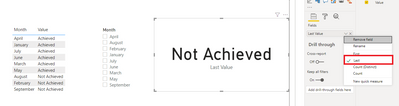
Sorry for replying late. You can put the value field in the card visual and set it as the last value so that it will show the latest month value by default.

last value.png


Best Regards,
Yingjie Li

If this post helps then please consider Accept it as the solution to help the other members find it more quickly.

View solution in original post

3 REPLIES 3
v-yingjl
Community Support
Community Support

Hi @Riddlemirror ,

Sorry for replying late. You can put the value field in the card visual and set it as the last value so that it will show the latest month value by default.

last value.png


Best Regards,
Yingjie Li

If this post helps then please consider Accept it as the solution to help the other members find it more quickly.

amitchandak
Super User
Super User

@Riddlemirror , try with help from 2 measures


measure =
var _max = format(today(),"MMM")
return
calculate(Max(Table[value]) , Table[Month] =+max)


final measure = if(isfiltered(Table[Month]),Max(Table[value]), [measure])

Share with Power BI Enthusiasts: Full Power BI Video (20 Hours) YouTube
Microsoft Fabric Series 60+ Videos YouTube
Microsoft Fabric Hindi End to End YouTube

Hi.


Thank you for the reply.


It tells me there is a syntax error on this one:

😶


"The syntax for ')' is incorrect" 


var _max = format(today(),"MMM")
return
calculate(Max(Table[value]) , Table[Month] =+max)

Helpful resources

Announcements
New to Fabric survey Carousel

New to Fabric Survey

If you have recently started exploring Fabric, we'd love to hear how it's going. Your feedback can help with product improvements.

Power BI DataViz World Championships carousel

Power BI DataViz World Championships - June 2026

A new Power BI DataViz World Championship is coming this June! Don't miss out on submitting your entry.

Join our Fabric User Panel

Join our Fabric User Panel

Share feedback directly with Fabric product managers, participate in targeted research studies and influence the Fabric roadmap.

March Power BI Update Carousel

Power BI Community Update - March 2026

Check out the March 2026 Power BI update to learn about new features.