FabCon is coming to Atlanta
Join us at FabCon Atlanta from March 16 - 20, 2026, for the ultimate Fabric, Power BI, AI and SQL community-led event. Save $200 with code FABCOMM.
Register now!- Power BI forums
- Get Help with Power BI
- Desktop
- Service
- Report Server
- Power Query
- Mobile Apps
- Developer
- DAX Commands and Tips
- Custom Visuals Development Discussion
- Health and Life Sciences
- Power BI Spanish forums
- Translated Spanish Desktop
- Training and Consulting
- Instructor Led Training
- Dashboard in a Day for Women, by Women
- Galleries
- Data Stories Gallery
- Themes Gallery
- Contests Gallery
- QuickViz Gallery
- Quick Measures Gallery
- Visual Calculations Gallery
- Notebook Gallery
- Translytical Task Flow Gallery
- TMDL Gallery
- R Script Showcase
- Webinars and Video Gallery
- Ideas
- Custom Visuals Ideas (read-only)
- Issues
- Issues
- Events
- Upcoming Events
The Power BI Data Visualization World Championships is back! Get ahead of the game and start preparing now! Learn more
- Power BI forums
- Forums
- Get Help with Power BI
- Desktop
- Card Visual
- Subscribe to RSS Feed
- Mark Topic as New
- Mark Topic as Read
- Float this Topic for Current User
- Bookmark
- Subscribe
- Printer Friendly Page

- Mark as New
- Bookmark
- Subscribe
- Mute
- Subscribe to RSS Feed
- Permalink
- Report Inappropriate Content
Card Visual
Card Visual filters: After publishing the report, applied filters don’t seem to work properly, the visual displays as-is with filters still applied. This normally happens after the report is published & is refreshed either through a schedule or manually from dateset, my applied card visual filters have values "True" or "False", upon my investigation I noticed new filter values: "-1" & "0" instead of "True" or "False" and that is the reason why the originally applied filters don’t work anymore then I was forced to reapply the filters on the cloud for the same report and this time around my new filter values are “-1” or “0” instead of “True” or “False”. Is there specific reason why this is happening?
Solved! Go to Solution.
- Mark as New
- Bookmark
- Subscribe
- Mute
- Subscribe to RSS Feed
- Permalink
- Report Inappropriate Content
HI @MatlolHG
This might be because of the data present in that column or measure whihc is an invalid True/False.
I always use 1 and 0 for that case and create a function to display true for 1 and false for 0
IF([COL]=1,"True","False")
- Mark as New
- Bookmark
- Subscribe
- Mute
- Subscribe to RSS Feed
- Permalink
- Report Inappropriate Content
Hello @pranit828
Sorry for the delay in response
As you advised,
I added a new conditional column to change the desktop attribute values from "True" or "False" to "0" or "-1" and reised the report.
Power Query Used: Table.AddColumn(-"Filtered Rows", "ColumnName", each if [ColumnName] á true then 0 else if [ColumnName] á false then -1 else null)
- Mark as New
- Bookmark
- Subscribe
- Mute
- Subscribe to RSS Feed
- Permalink
- Report Inappropriate Content
Hi @Anonymous ,
Could you please provide the field or mesure which applied on card visual and its formula in order to make troubleshooting? Besides that, please provide the screen shot about the setting of Filter pane.Thank you.
Best Regards
Rena
- Mark as New
- Bookmark
- Subscribe
- Mute
- Subscribe to RSS Feed
- Permalink
- Report Inappropriate Content
Hi @yingyinr
Although I marked the problem "resolved" I still have this question, why is the card visual converting text values to numeric values
1. Data attributes values
2. Applied filters before publishing the report to the cloud
3. Filter values after publishing the report
Point 3) above demonstrate why the applied filters were not effective after publishing the report to the cloud
- Mark as New
- Bookmark
- Subscribe
- Mute
- Subscribe to RSS Feed
- Permalink
- Report Inappropriate Content
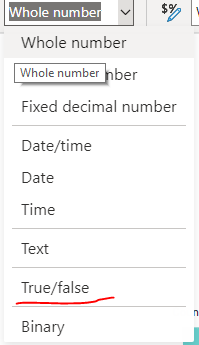
Hi @Anonymous
Can you please check if you have the data type as below. IF not please change and retry
- Mark as New
- Bookmark
- Subscribe
- Mute
- Subscribe to RSS Feed
- Permalink
- Report Inappropriate Content
Hi @pranit828
Thanks for the response, I get visual error when changing data type to "True/False" Error: The function count cannot work with values type boolean
- Mark as New
- Bookmark
- Subscribe
- Mute
- Subscribe to RSS Feed
- Permalink
- Report Inappropriate Content
HI @MatlolHG
This might be because of the data present in that column or measure whihc is an invalid True/False.
I always use 1 and 0 for that case and create a function to display true for 1 and false for 0
IF([COL]=1,"True","False")
- Mark as New
- Bookmark
- Subscribe
- Mute
- Subscribe to RSS Feed
- Permalink
- Report Inappropriate Content
Hello @pranit828
Sorry for the delay in response
As you advised,
I added a new conditional column to change the desktop attribute values from "True" or "False" to "0" or "-1" and reised the report.
Power Query Used: Table.AddColumn(-"Filtered Rows", "ColumnName", each if [ColumnName] á true then 0 else if [ColumnName] á false then -1 else null)


- Mark as New
- Bookmark
- Subscribe
- Mute
- Subscribe to RSS Feed
- Permalink
- Report Inappropriate Content
- Mark as New
- Bookmark
- Subscribe
- Mute
- Subscribe to RSS Feed
- Permalink
- Report Inappropriate Content
Hi amitchandak
Can you please elaborate a little bit, remeber this reports is published to the cloud and it's scheduled to automatically refreshes, once it's refreshed applied filters ffrom the desktop doesn't work anymore because the original filter values changes to either "-1" or "0", if I have to clear the cache, where do I do that on the published report?
Helpful resources

Power BI Dataviz World Championships
The Power BI Data Visualization World Championships is back! Get ahead of the game and start preparing now!

Power BI Monthly Update - December 2025
Check out the December 2025 Power BI Holiday Recap!

FabCon Atlanta 2026
Join us at FabCon Atlanta, March 16-20, for the ultimate Fabric, Power BI, AI and SQL community-led event. Save $200 with code FABCOMM.

| User | Count |
|---|---|
| 38 | |
| 35 | |
| 33 | |
| 32 | |
| 29 |


| User | Count |
|---|---|
| 134 | |
| 96 | |
| 78 | |
| 67 | |
| 65 |


