
This time we’re going bigger than ever. Fabric, Power BI, SQL, AI and more. We're covering it all. You won't want to miss it.
Learn moreLevel up your Power BI skills this month - build one visual each week and tell better stories with data! Get started
Hi
I can't get Today () to work when I use a DatesinPeriod measure.
It just returns a blank value.
What am i doing wrong?
Here is the measure I created.
Solved! Go to Solution.
Hi @amitchandak
Thanks again for your help.
I got it to work - i was missing the .[date] after chosing the datesinperiod date
I aslo get blank result when i try this
@Sean-OReilly , Hope you have data for last 2 month, Also prefer to use a date table joined with date of your table
Rolling 2 = CALCULATE( sum(MK_Job_LedgerEntries[Total_Cost_LCY]) ,DATESINPERIOD('Date'[Date],today() ,-2,MONTH))
Why Time Intelligence Fails - Powerbi 5 Savior Steps for TI :https://youtu.be/OBf0rjpp5Hw
https://amitchandak.medium.com/power-bi-5-key-points-to-make-time-intelligence-successful-bd52912a5b...
To get the best of the time intelligence function. Make sure you have a date calendar and it has been marked as the date in model view. Also, join it with the date column of your fact/s. Refer :radacad sqlbi My Video Series Appreciate your Kudos.
HI @amitchandak
Thanks for the prompt reply, its very much appreciated.
I definitely have costs in lasty 2 months and i have extended this out to 6 months and 1 year and still blank.
I can't seem to get Datesinperiod working at all for me.
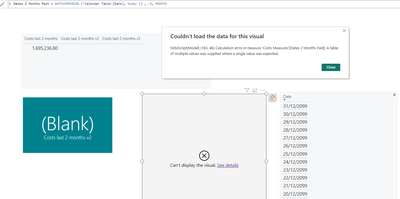
I tried to create a new Calender Table and the only thing in it is Date and then when i use the below I get the following error?
Hi @amitchandak
Thanks again for your help.
I got it to work - i was missing the .[date] after chosing the datesinperiod date
Check out the April 2026 Power BI update to learn about new features.
Sign up to receive a private message when registration opens and key events begin.
If you have recently started exploring Fabric, we'd love to hear how it's going. Your feedback can help with product improvements.
| User | Count |
|---|---|
| 36 | |
| 28 | |
| 28 | |
| 20 | |
| 18 |
| User | Count |
|---|---|
| 65 | |
| 35 | |
| 33 | |
| 25 | |
| 24 |