Join us in Barcelona for FabCon and SQLCon, September 28 - October 1, 2026.
This is best Fabric, Power BI, SQL and AI community event. How do we know? The last event sold out! Save €200 with code FABCMTY200.
Register now- Power BI forums
- Get Help with Power BI
- Desktop
- Service
- Report Server
- Power Query
- Mobile Apps
- Developer
- DAX Commands and Tips
- Custom Visuals Development Discussion
- Health and Life Sciences
- Power BI Spanish forums
- Translated Spanish Desktop
- Training and Consulting
- Instructor Led Training
- Dashboard in a Day for Women, by Women
- Galleries
- Data Stories Gallery
- Themes Gallery
- Contests Gallery
- QuickViz Gallery
- Quick Measures Gallery
- Visual Calculations Gallery
- Fabric Apps Gallery
- Notebook Gallery
- Translytical Task Flow Gallery
- TMDL Gallery
- R Script Showcase
- Webinars and Video Gallery
- Ideas
- Custom Visuals Ideas (read-only)
- Issues
- Issues
- Events
- Upcoming Events
The Fabric community is upgrading! Read all of the details including the timeline and what you can expect. Learn more
- Power BI forums
- Forums
- Get Help with Power BI
- Desktop
- Cannot create relationships
- Subscribe to RSS Feed
- Mark Topic as New
- Mark Topic as Read
- Float this Topic for Current User
- Bookmark
- Subscribe
- Printer Friendly Page


- Mark as New
- Bookmark
- Subscribe
- Mute
- Subscribe to RSS Feed
- Permalink
- Report Inappropriate Content
Cannot create relationships
Hi Power BI Community!
I need help from you on creating relationships between data.
I am working on multiple excel files in power BI and I want to create relationships with one another.
I am trying to track revenue by client numbers.
I have a data in Power BI with a master client data with all client numbers.
I have another file in Power BI with revenue data with client numbers.
In Power BI, all client numbers is in text format and when I try to create relationships with the two.
It shows an error and does not create relationships.
I also tried with number format but that did not work as well.
I checked the data in excel file to make sure that these numbers are correct.
I encountered an issue with relationship management before as well.
How can I solve the above issue?
Appreciate your support!
Many thanks,
H
Solved! Go to Solution.
- Mark as New
- Bookmark
- Subscribe
- Mute
- Subscribe to RSS Feed
- Permalink
- Report Inappropriate Content
Hi @hidenseek9,
When creating relationship using your sample data, I get the following error message, as the message mentions, one of the columns you use to create relationship must have unique values.
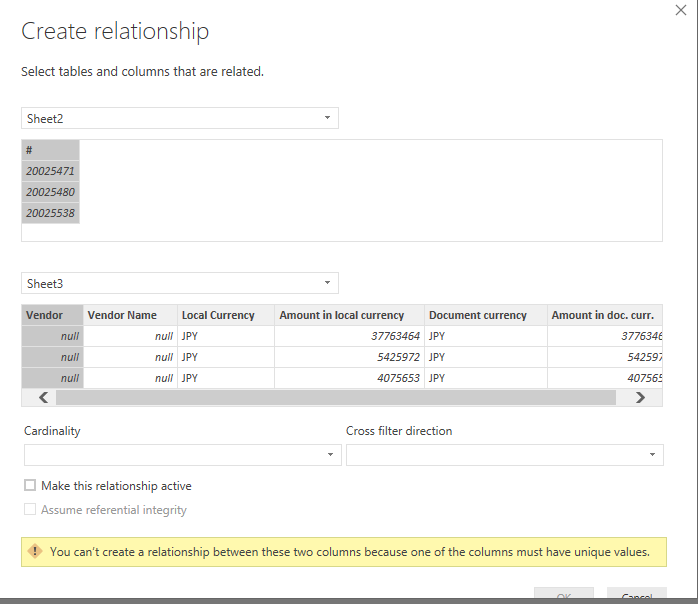
In your scenario, you can remove duplicates(20191666) in your MasterFile as shown in the following screenshot, then create replication between the two tables.
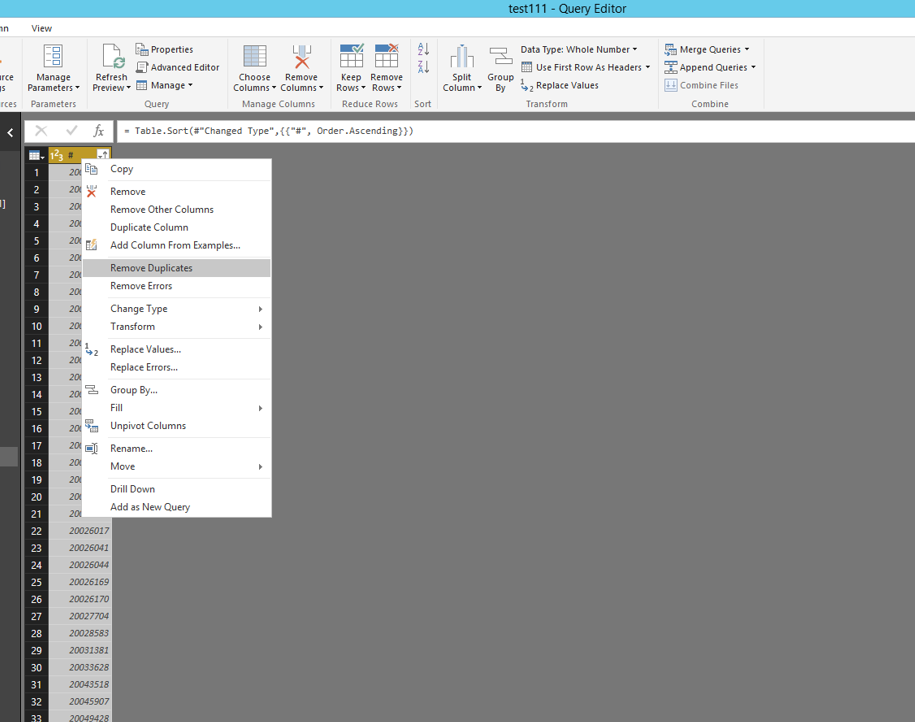
If you want to reserve duplicates in MasterFile, please create another new table using the following DAX(replace table name with your own), then create relationship between the new table and MasterFile, and create relationship between the new table and actual data file.
NewTable =
FILTER(
DISTINCT(
UNION(
DISTINCT(Sheet2[#]),
DISTINCT(Sheet3[Vendor])
)
),
NOT(ISBLANK(Sheet2[#]))
)
Thanks,
Lydia Zhang

- Mark as New
- Bookmark
- Subscribe
- Mute
- Subscribe to RSS Feed
- Permalink
- Report Inappropriate Content
Hi @hidenseek9,
Do you use the "Remove Duplicates" option I mentioned in the second screenshot to remove duplicates? If so, you should be able to create relationship between original tables. "Remove Duplicates" option is available in Query Editor of Power BI Desktop.
Thanks,
Lydia Zhang

- Mark as New
- Bookmark
- Subscribe
- Mute
- Subscribe to RSS Feed
- Permalink
- Report Inappropriate Content
Hi @hidenseek9,
I am trying to test your scenario but I am unable to reproduce the above error message. Could you please share sample data of your tables and post a screenshot about your scenario?
Thanks,
Lydia Zhang
- Mark as New
- Bookmark
- Subscribe
- Mute
- Subscribe to RSS Feed
- Permalink
- Report Inappropriate Content
@Anonymous
Thank you for your reply!
Basically, I am trying to create a relationship with below two numbers.
I have checked in excel file that a master data file has all the numbers
in the actual data, but somehow a relationship cannot be created.
Hope below screenshots help.
Many thanks,
H


- Mark as New
- Bookmark
- Subscribe
- Mute
- Subscribe to RSS Feed
- Permalink
- Report Inappropriate Content
Hi @hidenseek9,
I create sample data in my excel, I can successfully create relationship after import the data to Power BI Desktop. Could you please share your Excel file so that I can test? You can upload Excel file to OneDrive and post shared link of the Excel file here.
Thanks,
Lydia Zhang
- Mark as New
- Bookmark
- Subscribe
- Mute
- Subscribe to RSS Feed
- Permalink
- Report Inappropriate Content
- Mark as New
- Bookmark
- Subscribe
- Mute
- Subscribe to RSS Feed
- Permalink
- Report Inappropriate Content
Hi @hidenseek9,
I am not able to access the data. Please generate the shared link that starts with https.
Thanks,
Lydia Zhang
- Mark as New
- Bookmark
- Subscribe
- Mute
- Subscribe to RSS Feed
- Permalink
- Report Inappropriate Content
@Anonymous
I tried to share the excel link but power BI said that
with HTML link, I cannot send a message.
Is there any other way to share a file here?
Thanks,
H
- Mark as New
- Bookmark
- Subscribe
- Mute
- Subscribe to RSS Feed
- Permalink
- Report Inappropriate Content
Hi @hidenseek9,
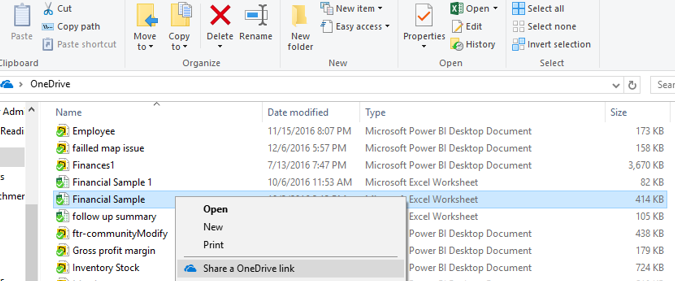
How do you share your Excel file? Right-click your excel file and select "Share a OneDrive link", then paste the link in this forum.
Thanks,
Lydia Zhang
- Mark as New
- Bookmark
- Subscribe
- Mute
- Subscribe to RSS Feed
- Permalink
- Report Inappropriate Content
- Mark as New
- Bookmark
- Subscribe
- Mute
- Subscribe to RSS Feed
- Permalink
- Report Inappropriate Content
Hi @hidenseek9,
You uploaded two same files, please also upload another different file.
Thanks,
Lydia Zhang
- Mark as New
- Bookmark
- Subscribe
- Mute
- Subscribe to RSS Feed
- Permalink
- Report Inappropriate Content
- Mark as New
- Bookmark
- Subscribe
- Mute
- Subscribe to RSS Feed
- Permalink
- Report Inappropriate Content
Hi @hidenseek9,
When creating relationship using your sample data, I get the following error message, as the message mentions, one of the columns you use to create relationship must have unique values.
In your scenario, you can remove duplicates(20191666) in your MasterFile as shown in the following screenshot, then create replication between the two tables.
If you want to reserve duplicates in MasterFile, please create another new table using the following DAX(replace table name with your own), then create relationship between the new table and MasterFile, and create relationship between the new table and actual data file.
NewTable =
FILTER(
DISTINCT(
UNION(
DISTINCT(Sheet2[#]),
DISTINCT(Sheet3[Vendor])
)
),
NOT(ISBLANK(Sheet2[#]))
)
Thanks,
Lydia Zhang
- Mark as New
- Bookmark
- Subscribe
- Mute
- Subscribe to RSS Feed
- Permalink
- Report Inappropriate Content
@Anonymous
Thank you for your reply.
I deleted the duplicate (20191666) from the master file.
However, the relationship still cannot be created...unfortunately.
Do you have any idea why that may be?
A good news is that when I created a new table just as you suggested,
I was able to create a relationship.
I have a tough time understanding the DAX equation on the new table you suggested.
I am pretty sure the table you suggested is exactly what I need, though I need to check.
Many thanks,
H
Thank you so much for your help.
- Mark as New
- Bookmark
- Subscribe
- Mute
- Subscribe to RSS Feed
- Permalink
- Report Inappropriate Content
Hi @hidenseek9,
Do you use the "Remove Duplicates" option I mentioned in the second screenshot to remove duplicates? If so, you should be able to create relationship between original tables. "Remove Duplicates" option is available in Query Editor of Power BI Desktop.
Thanks,
Lydia Zhang
- Mark as New
- Bookmark
- Subscribe
- Mute
- Subscribe to RSS Feed
- Permalink
- Report Inappropriate Content
@Anonymous
Yes, I used the "Remove Duplicates" option, but the relationship
could not be created.
However, I created a new table, using a combination of
Filter and Distict DAX and I was able to create a relationship.
Thank you for the advice.
I understand now how to use the Filter and Distinct DAX now.
Appreciate your support!
H


- Mark as New
- Bookmark
- Subscribe
- Mute
- Subscribe to RSS Feed
- Permalink
- Report Inappropriate Content
- Mark as New
- Bookmark
- Subscribe
- Mute
- Subscribe to RSS Feed
- Permalink
- Report Inappropriate Content
Thanks for a quick response.
The error message says,
cannot create a relationships with these two columns due to unmatched value in either column
I am translating my original language in English, but it says something along above line.
Do you know how to solve this?
Thanks,
H
Helpful resources

FabCon & SQLCon – Barcelona 2026
Join us in Barcelona for FabCon and SQLCon, the Fabric, Power BI, SQL, and AI community event. Save €200 with code FABCMTY200.

Power BI DataViz World Championships - June 2026
A new Power BI DataViz World Championship is coming this June! Don't miss out on submitting your entry.

| User | Count |
|---|---|
| 24 | |
| 22 | |
| 20 | |
| 18 | |
| 14 |


| User | Count |
|---|---|
| 29 | |
| 22 | |
| 22 | |
| 20 | |
| 20 |


