cancel
Showing results for 
Search instead for 
Did you mean: 

Vote for your favorite vizzies from the Power BI Dataviz World Championship submissions. Vote now!

Reply
Anonymous
Not applicable

Cannot connect to Oracle database

Hi All

I am trying to connect to Oracle database . I gave the Server name, database user name and password, after clicking OK it keeps spinning for a while and then i get the below message

Details : "Oracle:ORA-12154:TNS: Could not resolve the connect identifier specified"

Any Advice

Thanks

1 ACCEPTED SOLUTION
Anonymous
Not applicable

6 REPLIES 6
Anonymous
Not applicable

Hi @Anonymous ,

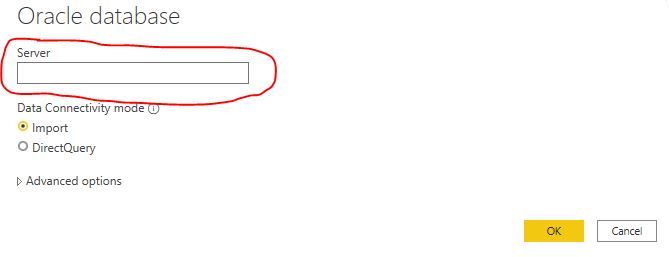
Which format do you use when entering database information into Server input box? Like ServerName/database name or other format? And whether the related database in backend is working well?

connect oracle db issue.JPG

In addition, please review the solution in the following threads and check if they can resolve your problem.

On premise Gateway and an Oracle Datasouce

Error - Oracle: ORA-12154: TNS (check the posts from bjerbe and nollc)

ORA-12154: TNS:could not resolve the connect identifier specified

Best Regards

Rena

Anonymous
Not applicable

Thanks All

The below video resolved it

https://www.youtube.com/watch?v=2VeqOMAda1o

Anonymous
Not applicable

Hi, but this solution is via an ODBC connection.

Anonymous
Not applicable

Hi @Anonymous ,

Glad to hear that your problem has been resolved. Thank you very much for sharing your solution, it will help others find the solution easily if they face the same problem with you. 

Best Regards

Rena

amitchandak
Super User
Super User

@Anonymous , please install the driver given on the page.

https://docs.microsoft.com/en-us/power-bi/connect-data/desktop-connect-oracle-database


The driver installation folder has a read only file. And please follow the steps you do not miss.

Also, make sure you add the path is added in the windows environment

path.PNG

Share with Power BI Enthusiasts: Full Power BI Video (20 Hours) YouTube
Microsoft Fabric Series 60+ Videos YouTube
Microsoft Fabric Hindi End to End YouTube
Anonymous
Not applicable

Thanks amitchandak

I spent half a day but was not able to install. ok i downloaded the 64 bit and from the downloads i extracted the files to my C drive (C:\ODAC122010Xcopy_x64)

Then in the command prompr

i typed in the commands and i get a message

install.bat is not a recognized as an internal or externalommand.


Also in the beginning of the document is see under general information

 The files of this zip file are NOT to be installed on top of an existing Oracle Universal Installer (OUI) based Oracle Home installation.

Please advice.

Thanks

Helpful resources

Announcements
Power BI DataViz World Championships

Power BI Dataviz World Championships

Vote for your favorite vizzies from the Power BI World Championship submissions!

Sticker Challenge 2026 Carousel

Join our Community Sticker Challenge 2026

If you love stickers, then you will definitely want to check out our Community Sticker Challenge!

January Power BI Update Carousel

Power BI Monthly Update - January 2026

Check out the January 2026 Power BI update to learn about new features.

FabCon Atlanta 2026 carousel

FabCon Atlanta 2026

Join us at FabCon Atlanta, March 16-20, for the ultimate Fabric, Power BI, AI and SQL community-led event. Save $200 with code FABCOMM.