cancel
Showing results for 
Search instead for 
Did you mean: 

View all the Fabric Data Days sessions on demand. View schedule

Reply
niekdp
Frequent Visitor

Can't merge columns properly

Dear,


I have a table with exchange rates per day. An example: 


Exchange rate  currency date


1.14                    usd           01/01/2018

1.40                    cad           01/01/2018

0.90                    gbp          01/01/2018
1.15                    usd           02/01/2018
1.42                    cad           02/01/2018
0.88                    gbp          02/01/2018
1.20                    usd           03/01/2018
1.44                    cad           03/01/2018
0.86                    gbp          03/01/2018


So as you can see, the exchange rate to our base currency (EUR) changes per day. 

We also have another table with transactions per day. 
So you can have multiple transactions in different currencies per day.

To merge this colums, I made a key. 
For the exchange rate column it is p. ex: 03/01/2018GBP
In the transaction colum, I also made this key 03/01/2018GBP.


What I want to do is to have the exchange rate from the correct date and currency next to the amount the was paid in the transaction column. But if I merge these columns, Power Bi only shows me the average of GBP.

So I see every time :


01/01/2018GBP 0.88
02/01/2018GBP 0.88
03/01/2018GBP 0.88
Which isn't correct.  Is there somebody who could find the solution for my problem?
(So to see the correct exchange rate per currency per day next to the amount in the transaction column)


Kind regards 
Niek

1 ACCEPTED SOLUTION
Anonymous
Not applicable

@niekdp,

How do you merge column in query editor? I use Merge column feature in Query Editor and everything works as expected. You can paste the following code to Advanced editor of a blank query.

let
    Source = Table.FromRows(Json.Document(Binary.Decompress(Binary.FromText("ZcwxDoAgDIXhu3Qm0BY0eBbCgJq4mhjvLwwmr2Hp0D/vK4XESyJH73P2K0GCsmSqbpTE/Xe0qbDfRrn2e97IApoaTUFT1HIGzWyUQYtGS6BFo62g/aV+", BinaryEncoding.Base64), Compression.Deflate)), let _t = ((type text) meta [Serialized.Text = true]) in type table [#"Exchange Rate" = _t, currency = _t, date = _t]),
    #"Changed Type" = Table.TransformColumnTypes(Source,{{"Exchange Rate", type number}, {"currency", type text}, {"date", type date}}),
    #"Inserted Merged Column" = Table.AddColumn(#"Changed Type", "Merged", each Text.Combine({[currency], Text.From([date], "en-US")}, ""), type text)
in
    #"Inserted Merged Column"

1.JPG

Regards,
Lydia

View solution in original post

3 REPLIES 3
Anonymous
Not applicable

@niekdp,

How do you merge column in query editor? I use Merge column feature in Query Editor and everything works as expected. You can paste the following code to Advanced editor of a blank query.

let
    Source = Table.FromRows(Json.Document(Binary.Decompress(Binary.FromText("ZcwxDoAgDIXhu3Qm0BY0eBbCgJq4mhjvLwwmr2Hp0D/vK4XESyJH73P2K0GCsmSqbpTE/Xe0qbDfRrn2e97IApoaTUFT1HIGzWyUQYtGS6BFo62g/aV+", BinaryEncoding.Base64), Compression.Deflate)), let _t = ((type text) meta [Serialized.Text = true]) in type table [#"Exchange Rate" = _t, currency = _t, date = _t]),
    #"Changed Type" = Table.TransformColumnTypes(Source,{{"Exchange Rate", type number}, {"currency", type text}, {"date", type date}}),
    #"Inserted Merged Column" = Table.AddColumn(#"Changed Type", "Merged", each Text.Combine({[currency], Text.From([date], "en-US")}, ""), type text)
in
    #"Inserted Merged Column"

1.JPG

Regards,
Lydia

BalaVenuGopal
Resolver I
Resolver I

Hi @niekdp,


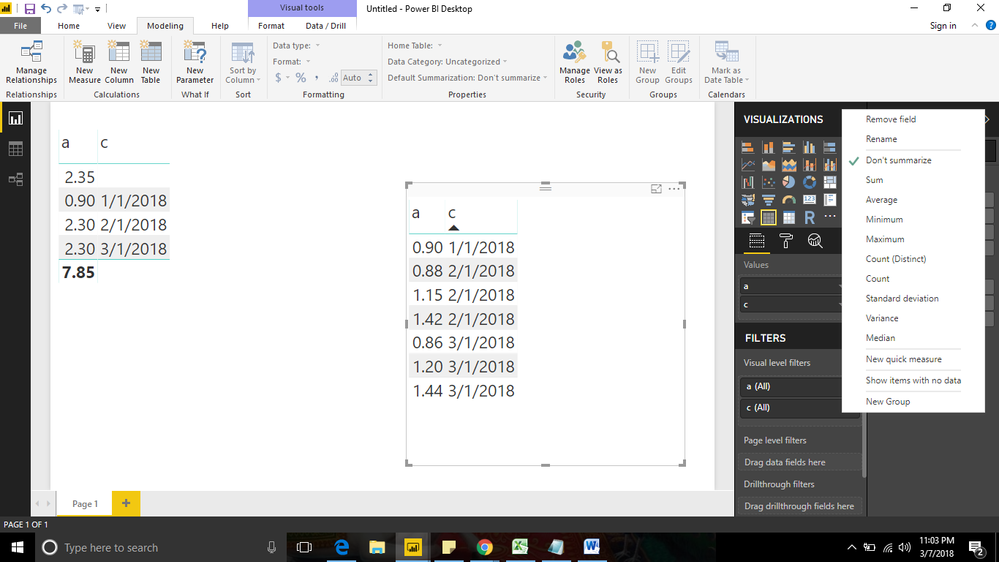
Just you go to the column a which is exchangre rate and chose dont summarize which will give you required result.


Attached image 


Plese mark as solution if this works for  you.Untitled.png

HI @BalaVenuGopal


Thank you for your response.

This is actually in the querry editor it self that I don't receive the right values..


Kind regards

NIek

Helpful resources

Announcements
November Power BI Update Carousel

Power BI Monthly Update - November 2025

Check out the November 2025 Power BI update to learn about new features.

Fabric Data Days Carousel

Fabric Data Days

Advance your Data & AI career with 50 days of live learning, contests, hands-on challenges, study groups & certifications and more!

FabCon Atlanta 2026 carousel

FabCon Atlanta 2026

Join us at FabCon Atlanta, March 16-20, for the ultimate Fabric, Power BI, AI and SQL community-led event. Save $200 with code FABCOMM.

Top Solution Authors
Top Kudoed Authors