cancel
Showing results for 
Search instead for 
Did you mean: 

Get Fabric Certified for FREE during Fabric Data Days. Don't miss your chance! Request now

Reply
SebSchoon1
Post Patron
Post Patron

Can't create a rank based on another measure

Hi fellows,


I have a rank which i have created in my Model (power query) 

Group Items by [CODE ARTICLE] Added index in each groups.


Now i'd like to rank these values according to their Value.


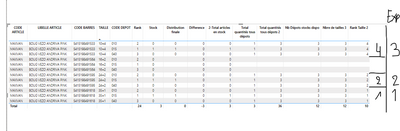
So here is my table and the expected result


SebSchoon1_0-1665044316217.png


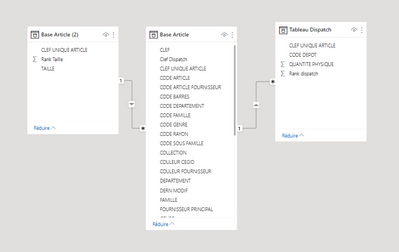
My model ( must do this due to slow perf )


SebSchoon1_1-1665044360867.png


My First Rank measure ==> 


Rank Taille = SUM('Base Article (2)'[Rank Taille])

Then 

Rank Taille 2 = 

If([Total quantités tous dépots]=BLANK(),BLANK(),
     CALCULATE(SUMX('Base Article (2)',[Rank Taille]),
            RELATEDTABLE('Base Article'),
  RELATEDTABLE('Tableau Dispatch')

 )

)

I really do not understand why it does not perform the Rankx based on each measure Value..


Thank you !! 

1 ACCEPTED SOLUTION
Anonymous
Not applicable

Hi @SebSchoon1 ,

Please update the formula of measure [Rank Taille 2] as below and check if it can return the correct rank values...

Rank Taille 2 =
IF (
    [Total quantités tous dépots] = BLANK (),
    BLANK (),
    SUMX (
        FILTER ( 'Base Article (2)', NOT ( ISBLANK ( [Total quantités tous dépots] ) ) ),
        [Rank Taille]
    )
)


If the above one can't help you get the desired result, please provide some sample data in your tables (exclude sensitive data) with Text format and your expected result with backend logic and special examples. It is better if you can share a simplified pbix file. You can refer the following link to upload the file to the community. Thank you.

How to upload PBI in Community

Best Regard

View solution in original post

3 REPLIES 3
Anonymous
Not applicable

Hi @SebSchoon1 ,

Please update the formula of measure [Rank Taille 2] as below and check if it can return the correct rank values...

Rank Taille 2 =
IF (
    [Total quantités tous dépots] = BLANK (),
    BLANK (),
    SUMX (
        FILTER ( 'Base Article (2)', NOT ( ISBLANK ( [Total quantités tous dépots] ) ) ),
        [Rank Taille]
    )
)


If the above one can't help you get the desired result, please provide some sample data in your tables (exclude sensitive data) with Text format and your expected result with backend logic and special examples. It is better if you can share a simplified pbix file. You can refer the following link to upload the file to the community. Thank you.

How to upload PBI in Community

Best Regard

Hello,


it does not work ^^ it makes 1 ,2 ,3 , 4 , I made another formula which says


If Stock is Null Then blank ()  


Then a condition which says, if  MAx Rank is above the maximum value (Total items accros al stocks), Then replace the rank with that max value ^^ Not really good but it works ^^

Anonymous
Not applicable

Hi @SebSchoon1 ,

So you can get the correct rank values? If yes, could you please mark your post as Answered? It will help the others in the community find the solution easily if they face the same problem as yours. Thank you.

Best Regards

Helpful resources

Announcements
November Power BI Update Carousel

Power BI Monthly Update - November 2025

Check out the November 2025 Power BI update to learn about new features.

Fabric Data Days Carousel

Fabric Data Days

Advance your Data & AI career with 50 days of live learning, contests, hands-on challenges, study groups & certifications and more!

FabCon Atlanta 2026 carousel

FabCon Atlanta 2026

Join us at FabCon Atlanta, March 16-20, for the ultimate Fabric, Power BI, AI and SQL community-led event. Save $200 with code FABCOMM.

Top Solution Authors
Top Kudoed Authors