Join us at FabCon Atlanta from March 16 - 20, 2026, for the ultimate Fabric, Power BI, AI and SQL community-led event. Save $200 with code FABCOMM.
Register now!The Power BI Data Visualization World Championships is back! Get ahead of the game and start preparing now! Learn more
I have a PBI report with live connection to Azure SSAS model. I'd like to add a different datasoruce, for example, Excel file, to the same report. When I click on "Make changes to this model" and click on "Add local model" option, it only shows all SSAS databases from the server I am connect to, I can't change to a differnt source like Excel. Why?
If I create the report and import the Excel data first, then i can add another data source like Azure SSAS to get it to work. However, when I start the report, I don't know if I will need data from other sources at beginning. Any ideas why i can't change to mixed mode if I start with live connection with SSAS? I've turned on all the preview features for this.
Thanks,
Wenchi Wang
@wenchi , Based on what I got. When we use "Make changes to this model" under the modeling tab. Post that we should be able to add a new excel or model. Is that not happening?
If you are on August 2022, try the same on July 2022
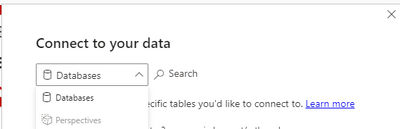
nope. This is what i saw after clicking on add local model. Is there any setting is missing on our side?
The Power BI Data Visualization World Championships is back! Get ahead of the game and start preparing now!
| User | Count |
|---|---|
| 41 | |
| 38 | |
| 36 | |
| 30 | |
| 28 |
| User | Count |
|---|---|
| 128 | |
| 88 | |
| 79 | |
| 67 | |
| 62 |