Join us at FabCon Atlanta from March 16 - 20, 2026, for the ultimate Fabric, Power BI, AI and SQL community-led event. Save $200 with code FABCOMM.
Register now!The Power BI Data Visualization World Championships is back! Get ahead of the game and start preparing now! Learn more
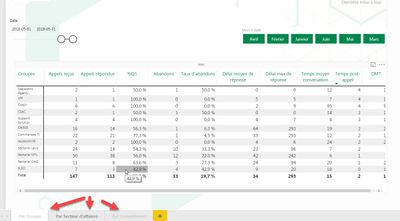
Hi, I was wondering if anyone could help me figure it out, why I can't publish the entire report into the workspace that I've created. It only shows one page.
I do have 3 pages and I upload (publish) in the Power BI services but when I looked at the report it only shows one of the 3 pages.
I need help please!
Thanks,
Solved! Go to Solution.
Hi @AssisJadue,
I just realized that your report has 2 pages on the HIDE mode.
Just click with the right button on the page name and unmark the HIDE option and publish it again.
It should work.
Hi @AssisJadue,
Do you have a published app for this workspace ? If yes, are you accessing the report by it ?
If no, have you tried to clean your cache ?
Hi..thanks for replying..
Actually I don't have an app yet for it . I did cleaned my cache, meanwhile I found in another furum this
https://community.powerbi.com/t5/Service/Power-Bi-publish-to-web-opening-page/m-p/55703#M11389
I wait for an hour after saving the report on the first page but still doesn't work.
I did empty the cache and upload the report again but still can't see the entire report.
Thanks !
Hi @AssisJadue,
I just realized that your report has 2 pages on the HIDE mode.
Just click with the right button on the page name and unmark the HIDE option and publish it again.
It should work.
Thanks @ricardocamargos,
Didn’t notice that. For some reason I might have enabled that option without noticing it.
Really appreciate it !
Gracias......
The Power BI Data Visualization World Championships is back! Get ahead of the game and start preparing now!
| User | Count |
|---|---|
| 38 | |
| 38 | |
| 37 | |
| 28 | |
| 28 |
| User | Count |
|---|---|
| 124 | |
| 89 | |
| 73 | |
| 66 | |
| 65 |