Join us at FabCon Atlanta from March 16 - 20, 2026, for the ultimate Fabric, Power BI, AI and SQL community-led event. Save $200 with code FABCOMM.
Register now!The Power BI Data Visualization World Championships is back! Get ahead of the game and start preparing now! Learn more
Hello community,
I am currently trying to visualize data from Azure Time Series Insights in Power BI.
As there is currently - to my knowledge - no connector for Time Series Insights for PowerBI yet, the RestAPI connector from CData came to my mind.
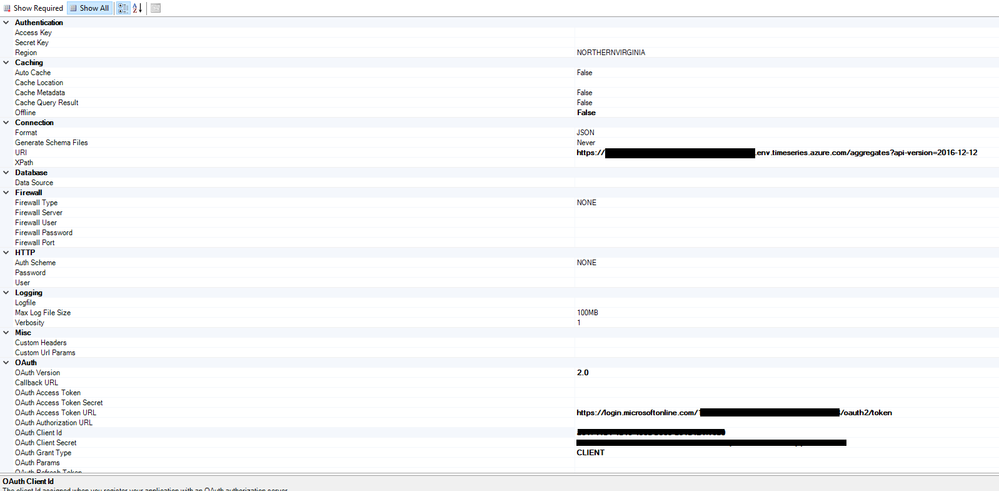
The DSN configuration of the connector looks like this:
If I now want to connect to this connector in PowerBI Desktop, I get the following error message:
Did I forget something during the configuration?
I have done an app registration in Azure to get the ClientSecret and the ClientId.
The API should be queried via DirectQuery and the ResultSet of the API call is probably a JSON.
If the connection works, do I have a way to parse the json in Direct Query mode in PowerBI?
Thank you in advance!
Best regards,
Christopher
Hi @ChristoherMuehl ,
>>If the connection works, do I have a way to parse the json in Direct Query mode in PowerBI?
We can use the Json.Document function to return the contents of a JSON document. Then we can expand the data, for more information, please refer to this blog: https://www.mssqltips.com/sqlservertip/4621/using-power-bi-with-json-data-sources-and-files/
But based on the error message, it looks like that we cannot get data from Azure Time Series directly, as a workaround, we can create another source and import data to this source, then let PowerBI access to this source.
Best Regards,
Teige
The Power BI Data Visualization World Championships is back! Get ahead of the game and start preparing now!
| User | Count |
|---|---|
| 38 | |
| 35 | |
| 33 | |
| 32 | |
| 29 |
| User | Count |
|---|---|
| 134 | |
| 96 | |
| 78 | |
| 67 | |
| 65 |