cancel
Showing results for 
Search instead for 
Did you mean: 

The Power BI Data Visualization World Championships is back! Get ahead of the game and start preparing now! Learn more

Reply
Nickstad
Frequent Visitor

Calender icon missing.

I cant seem to get a calender icon on on my date table, does anyone know why? i have the data type set as Date/time. 


Nickstad_1-1675254821362.png


1 ACCEPTED SOLUTION

Hi , @Nickstad 

For the main condition for Power BI date icon to show, you can refer to My test results:

[1]We have two tables , and we have not created a relationship between two tables:
Result : the date icon always shows  in two tables.

vyueyunzhmsft_0-1675307298784.png


[1] Two tables has relationship and we create a one-to-many relationship by the [Date].

Result: The many side table fo not show the date icon. 
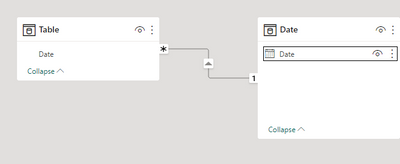
vyueyunzhmsft_1-1675307339768.png


[2]Two tables has relationship and we create a one-to-one relationship by the [Date].

Situation 1:When we drag the 'Table(2)'[Date] to the ‘Date’[Date] , the date icon in 'Table(2)'[Date] will disappear.

vyueyunzhmsft_2-1675307439817.png


Situation 1:When we drag the ‘Date’[Date] '  to the  'Table(2)'[Date]  , the date icon in ‘Date’[Date] ' will disappear.
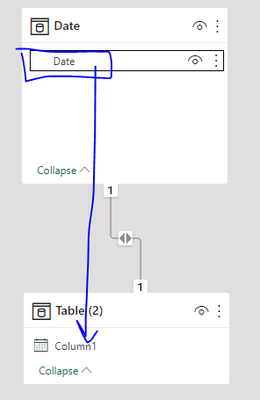
vyueyunzhmsft_3-1675307510129.png


Thank you for your time and sharing, and thank you for your support and understanding of PowerBI! 


Best Regards,

Aniya Zhang

If this post helps, then please consider Accept it as the solution to help the other members find it more quickly

View solution in original post

3 REPLIES 3
Tahreem24
Super User
Super User

@Nickstad Have you connected this Date column with other table's date column?


Don't forget to give thumbs up and accept this as a solution if it helped you!!!

Please take a quick glance at newly created dashboards : Restaurant Management Dashboard , HR Analytics Report , Hotel Management Report, Sales Analysis Report , Fortune 500 Companies Analysis , Revenue Tracking Dashboard

Hey Tahreem, thanks for your reaction. Yes i did connect them to other date fields.

Hi , @Nickstad 

For the main condition for Power BI date icon to show, you can refer to My test results:

[1]We have two tables , and we have not created a relationship between two tables:
Result : the date icon always shows  in two tables.

vyueyunzhmsft_0-1675307298784.png


[1] Two tables has relationship and we create a one-to-many relationship by the [Date].

Result: The many side table fo not show the date icon. 

vyueyunzhmsft_1-1675307339768.png


[2]Two tables has relationship and we create a one-to-one relationship by the [Date].

Situation 1:When we drag the 'Table(2)'[Date] to the ‘Date’[Date] , the date icon in 'Table(2)'[Date] will disappear.

vyueyunzhmsft_2-1675307439817.png


Situation 1:When we drag the ‘Date’[Date] '  to the  'Table(2)'[Date]  , the date icon in ‘Date’[Date] ' will disappear.

vyueyunzhmsft_3-1675307510129.png


Thank you for your time and sharing, and thank you for your support and understanding of PowerBI! 


Best Regards,

Aniya Zhang

If this post helps, then please consider Accept it as the solution to help the other members find it more quickly

Helpful resources

Announcements
Power BI DataViz World Championships

Power BI Dataviz World Championships

The Power BI Data Visualization World Championships is back! Get ahead of the game and start preparing now!

December 2025 Power BI Update Carousel

Power BI Monthly Update - December 2025

Check out the December 2025 Power BI Holiday Recap!

FabCon Atlanta 2026 carousel

FabCon Atlanta 2026

Join us at FabCon Atlanta, March 16-20, for the ultimate Fabric, Power BI, AI and SQL community-led event. Save $200 with code FABCOMM.