cancel
Showing results for 
Search instead for 
Did you mean: 

The Power BI Data Visualization World Championships is back! Get ahead of the game and start preparing now! Learn more

Reply
Anonymous
Not applicable

Calculation Group Help

Hello,


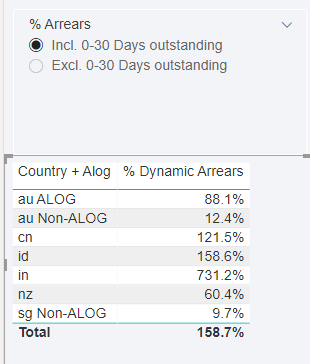
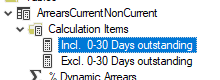
I have created a calculation group with the tabular editor as below:


fabnishi1207_1-1620885727771.png


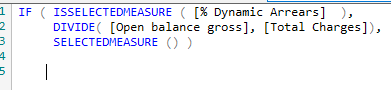
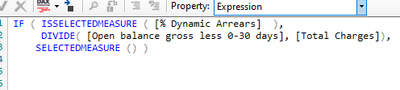
Please see below my calculation groups


fabnishi1207_2-1620885745604.png

fabnishi1207_3-1620885752233.pngfabnishi1207_4-1620885762760.png


I need two more measures but summing instead doing the % placed in another column being controlled by the same slicer.


When I select my slicer I need one more column that does the same thing as my % dynamic arrears column, however not using % and yes Sum of numbers. 

So I need One slicer to control 2 measures in one column and 2 measures in another column

The first column I already built with % and the other one will be with the sum.


is that possible?


Thanks!!


1 REPLY 1
amitchandak
Super User
Super User

@Anonymous , Not sure I got it completely. But one slicer will control one calculation group.

If you need a column in visual you need two slicers and two calculation groups (I think so) .


Share with Power BI Enthusiasts: Full Power BI Video (20 Hours) YouTube
Microsoft Fabric Series 60+ Videos YouTube
Microsoft Fabric Hindi End to End YouTube

Helpful resources

Announcements
Power BI DataViz World Championships

Power BI Dataviz World Championships

The Power BI Data Visualization World Championships is back! Get ahead of the game and start preparing now!

December 2025 Power BI Update Carousel

Power BI Monthly Update - December 2025

Check out the December 2025 Power BI Holiday Recap!

FabCon Atlanta 2026 carousel

FabCon Atlanta 2026

Join us at FabCon Atlanta, March 16-20, for the ultimate Fabric, Power BI, AI and SQL community-led event. Save $200 with code FABCOMM.

Top Solution Authors