cancel
Showing results for 
Search instead for 
Did you mean: 

Next up in the FabCon + SQLCon recap series: The roadmap for Microsoft SQL and Maximizing Developer experiences in Fabric. All sessions are available on-demand after the live show. Register now

Reply
pwissing29
Regular Visitor

Calculating the Inverse

So I have a large dataset. Its made up of 124,000 rows and 55 Columns.  One column in particular is named "Product Family"  In this column there are roughly 26 different Product Families, an example would be "Isilon", another would be "DataDomain".  Each of the 124,000 rows will have one of these 26 Product Family names in there respective row.  It is easy to pivot on all of the rows that have Isilon.  But what I need to be able to do is to create a Slicer that I can pick "Isilon" as the "Product Family"  and it shows me how many rows do not have the name "Isilon" in that row..  Same goes for "DataDomain".. I want to know how many rows do not have the name "DataDomain" in that row.  The goal is to be able to find all of my customers who are not buying a certain "Product Family".  Can someone guide me as to how to do this?  Thankyou/

1 ACCEPTED SOLUTION
Anonymous
Not applicable

Hi @pwissing29 ,


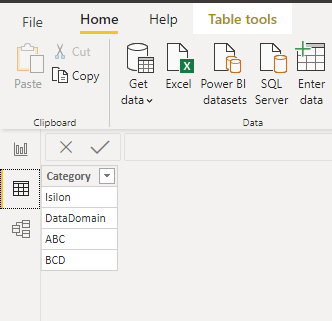
1.Create a separate category table by entering data.

1.png


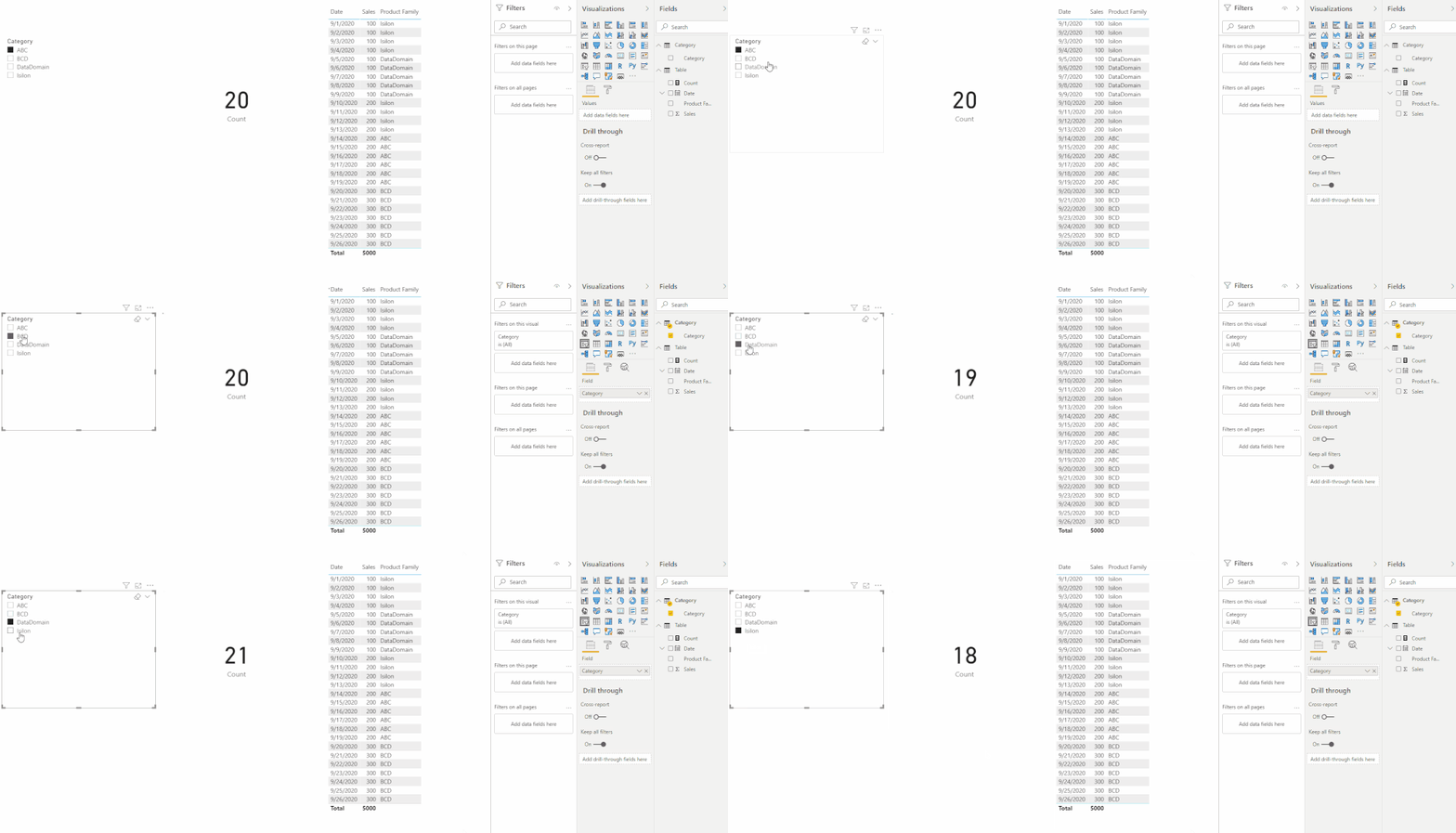
2.Create a measure to count, for example how many rows in the row have names other than "Isilon".

Count = 
SWITCH (
    SELECTEDVALUE ( 'Category'[Category] ),
    "Isilon",
        CALCULATE (
            COUNTROWS ( 'Table' ),
            FILTER ( 'Table', [Product Family] <> "Isilon" )
        ),
    "DataDomain",
        CALCULATE (
            COUNTROWS ( 'Table' ),
            FILTER ( 'Table', [Product Family] <> "DataDomain" )
        ),
    "ABC",
        CALCULATE (
            COUNTROWS ( 'Table' ),
            FILTER ( 'Table', [Product Family] <> "ABC" )
        ),
    "BCD",
        CALCULATE (
            COUNTROWS ( 'Table' ),
            FILTER ( 'Table', [Product Family] <> "BCD" )
        )
)

result924204.gif


You can check more details from here.


Best Regards,

Stephen Tao


If this post helps, then please consider Accept it as the solution to help the other members find it more quickly.

View solution in original post

4 REPLIES 4
Anonymous
Not applicable

Hi @pwissing29 ,


1.Create a separate category table by entering data.

1.png


2.Create a measure to count, for example how many rows in the row have names other than "Isilon".

Count = 
SWITCH (
    SELECTEDVALUE ( 'Category'[Category] ),
    "Isilon",
        CALCULATE (
            COUNTROWS ( 'Table' ),
            FILTER ( 'Table', [Product Family] <> "Isilon" )
        ),
    "DataDomain",
        CALCULATE (
            COUNTROWS ( 'Table' ),
            FILTER ( 'Table', [Product Family] <> "DataDomain" )
        ),
    "ABC",
        CALCULATE (
            COUNTROWS ( 'Table' ),
            FILTER ( 'Table', [Product Family] <> "ABC" )
        ),
    "BCD",
        CALCULATE (
            COUNTROWS ( 'Table' ),
            FILTER ( 'Table', [Product Family] <> "BCD" )
        )
)

result924204.gif


You can check more details from here.


Best Regards,

Stephen Tao


If this post helps, then please consider Accept it as the solution to help the other members find it more quickly.

Sooo I think i did not submit my request in teh right way. I think this is on the right path but let me give more context.  The end result is not a calculation.  The result I need is to show me all of the customers who are NOT buying "Isilon".  Say i have 20,000 customers. Out of that 20,000 lets say 5,000 are not buyng Isilon.  In other words my "Product Family" Slicer today will show me all of the customers buying Isilon because when I slice on "Isilon" i can see them all. I want somehow to create a inverse Slicer that has all of the family products in it and when i select Isilon it slices on all of the customers who dont have "Isilon".  So two slicers.  One for "Product Family" and one for "NotBuying Product Family".  Apologies for teh confusion on my ask.. But you have all been very helpful.  I am only like a month into using PBI so i am sooooo green with this. If you can tell me exactly all the steps I need to take that would be a blessing.  I want to show you some of the data but it is private.

@pwissing29 


See if this works for you:

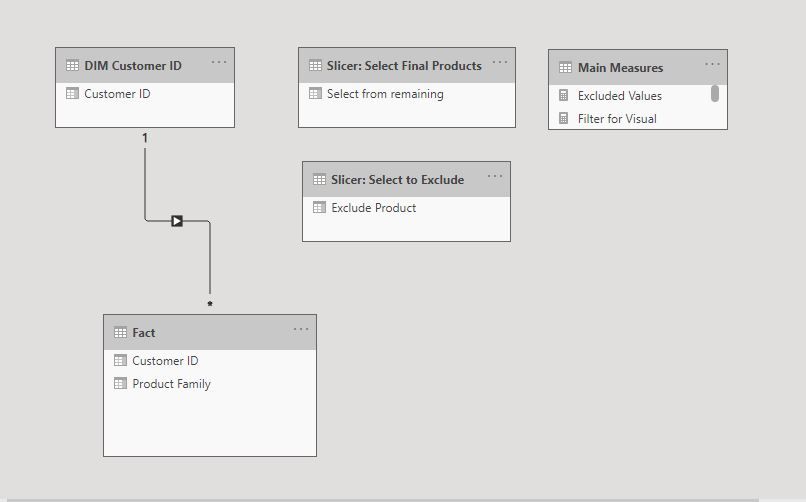
First the model:

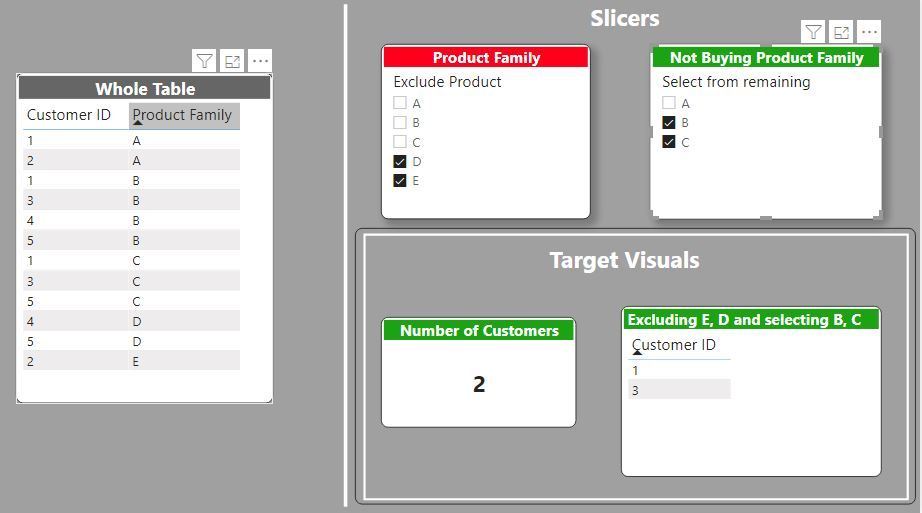
The Product Slicer table is duplicated: one for selecting the products you wish to exclude (Slicer: Select to Exclude) and the other for the final selection (Slicer: Select Final Products). Both these slicers are unrelated to the fact table.

Model.JPG


1) Create a measure to exclude the value(s) selected in the first slicer from the final products slicer: only the remaining products will be visible). Add this measure to the filter pane ("Filters for this visual") for "Slicer: Select Final Products" and set the value to 1.


Filter Slicer 2 = 
VAR Pres1 = VALUES('Slicer: Select to Exclude'[Exclude Product])
VAR Pres2 = VALUES('Slicer: Select Final Products'[Select from remaining])
RETURN
COUNTROWS(EXCEPT(Pres2, Pres1))


2) Create a measure to filter the customers in the final visual to exclude those which have purchased from the "Slicer: Select to Exclude". Add this measure to the filter pane ("Filters for this visual") for the target visuals and set the value to 1.


Filter for Visuals = 
VAR ExcludedCustomers = CALCULATETABLE(VALUES('Fact'[Customer ID]), TREATAS(VALUES('Slicer: Select to Exclude'[Exclude Product]), 'Fact'[Product Family]))
VAR Customers = CALCULATETABLE(VALUES('Fact'[Customer ID]), TREATAS(VALUES('Slicer: Select Final Products'[Select from remaining]), 'Fact'[Product Family]))
Return
COUNTROWS(EXCEPT(Customers, ExcludedCustomers))


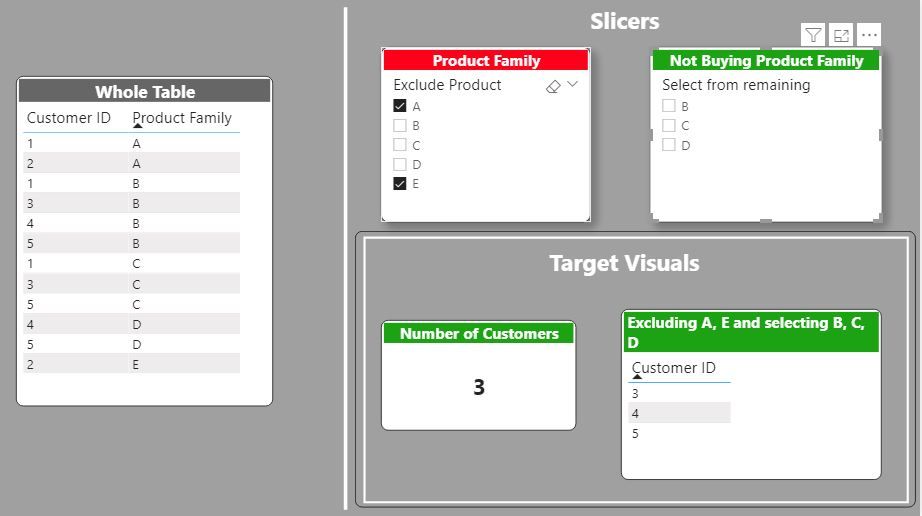
 And you get this:

No filter 2.JPG


Visual filter.JPG


I've included the sample PBIX file for your reference


Did I answer your question? Mark my post as a solution!
In doing so, you are also helping me. Thank you!

Proud to be a Super User!
Paul on Linkedin.


Anonymous
Not applicable

Helpful resources

Announcements
New to Fabric survey Carousel

New to Fabric Survey

If you have recently started exploring Fabric, we'd love to hear how it's going. Your feedback can help with product improvements.

Power BI DataViz World Championships carousel

Power BI DataViz World Championships - June 2026

A new Power BI DataViz World Championship is coming this June! Don't miss out on submitting your entry.

March Power BI Update Carousel

Power BI Community Update - March 2026

Check out the March 2026 Power BI update to learn about new features.