cancel
Showing results for 
Search instead for 
Did you mean: 

The Power BI Data Visualization World Championships is back! Get ahead of the game and start preparing now! Learn more

Reply
fernand2020
Regular Visitor

Calculating monthly RANKX as a custom column - 2 years of data

Hello,

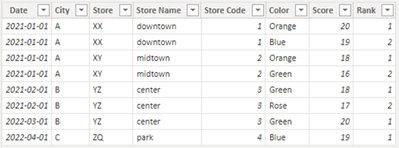
I have the following table for stores:


Date              City       Store       Store Name      Store Code       Color             Score        Rank

1/1/2021       A          XX             downtown         01                   Orange              20         1

1/1/2021       A          XX             downtown         01                   Blue                   19         2

1/1/2021       A          XY             midtown            02                   Orange              18         1

1/1/2021       A          XY             midtown            02                   Green                16         2

2/1/2021       B          YZ             center                03                   Green                18          1

2/1/2021       B          YZ             center                03                    Rose                 17         2

...


3/1/2022      B          YZ             center                 03                   Green                 20        1

4/1/2022      C          ZQ            park                    04                   Blue                   19         1


The date is always referring to the first day of the month.


How to calculate a custom column (Rank), ranking the Colors according to their score in an specific Store name, in the same month?

The desired column is given


Thanks

2 ACCEPTED SOLUTIONS
DataInsights
Super User
Super User

@fernand2020,


Try this calculated column:


Rank = 
VAR vDate = Table1[Date]
VAR vStore = Table1[Store]
VAR vTable =
    FILTER ( Table1, Table1[Date] = vDate && Table1[Store] = vStore )
VAR vResult =
    RANKX ( vTable, Table1[Score],, DESC, DENSE )
RETURN
    vResult


DataInsights_0-1660309077911.png


Did I answer your question? Mark my post as a solution!

Proud to be a Super User!


View solution in original post

Thank you @DataInsights !


The following calculated column also worked for me:


RANKX(FILTER(Table1,Table1[Store Name]=EARLIER(Table1[Store Name]) && Table1[Date]=EARLIER(Table1[Date])),Table1[Score])

View solution in original post

4 REPLIES 4
fernand2020
Regular Visitor

@DataInsights I have a last question related with the previous case, given the table and rank:


Date              City       Store       Store Name      Store Code       Color             Score        Rank

1/1/2021       A          XX             downtown         01                   Orange              20         1

1/1/2021       A          XX             downtown         01                   Blue                   19         2

1/1/2021       A          XY             midtown            02                   Orange              18         1

1/1/2021       A          XY             midtown            02                   Green                16         2

2/1/2021       B          YZ             center                03                   Green                18          1

2/1/2021       B          YZ             center                03                    Rose                 17         2

...


3/1/2022      B          YZ             center                 03                   Green                 20        1

4/1/2022      C          ZQ            park                    04                   Blue                   19         1


How to calculate a measure (new ranking) to determine that in January 2021, because Orange counted 2 times with the highest score (20 in downtown, 18 in midtown), then orange is ranked as no. 1? other color could have counted 1 time in with the higher score in 1 store (so it is ranked as 2).


Thanks,


DataInsights
Super User
Super User

@fernand2020,


Try this calculated column:


Rank = 
VAR vDate = Table1[Date]
VAR vStore = Table1[Store]
VAR vTable =
    FILTER ( Table1, Table1[Date] = vDate && Table1[Store] = vStore )
VAR vResult =
    RANKX ( vTable, Table1[Score],, DESC, DENSE )
RETURN
    vResult


DataInsights_0-1660309077911.png


Did I answer your question? Mark my post as a solution!

Proud to be a Super User!


Thanks @DataInsights, the calculated column provided works, but I need is a measure to be display as a number, having Year, Month selected in a slicer.

Thank you @DataInsights !


The following calculated column also worked for me:


RANKX(FILTER(Table1,Table1[Store Name]=EARLIER(Table1[Store Name]) && Table1[Date]=EARLIER(Table1[Date])),Table1[Score])

Helpful resources

Announcements
Power BI DataViz World Championships

Power BI Dataviz World Championships

The Power BI Data Visualization World Championships is back! Get ahead of the game and start preparing now!

December 2025 Power BI Update Carousel

Power BI Monthly Update - December 2025

Check out the December 2025 Power BI Holiday Recap!

FabCon Atlanta 2026 carousel

FabCon Atlanta 2026

Join us at FabCon Atlanta, March 16-20, for the ultimate Fabric, Power BI, AI and SQL community-led event. Save $200 with code FABCOMM.