Join us at FabCon Atlanta from March 16 - 20, 2026, for the ultimate Fabric, Power BI, AI and SQL community-led event. Save $200 with code FABCOMM.
Register now!Get Fabric Certified for FREE during Fabric Data Days. Don't miss your chance! Request now
Hi Everyone,
I'm very new to Power BI, appreciate it if you could help me find the solution. My scenario is I need to calculate the total sum of a measure for the current and previous year quarter but the problem is there are two separate slicers one for MONTH and other for YEAR. So the requirement is when a user selects any month and year in the slicer the total sum would be the sum for the quarter to which the month falls to.
Solved! Go to Solution.
Hi,
I suggest using the PARALLELPERIOD function in DAX.
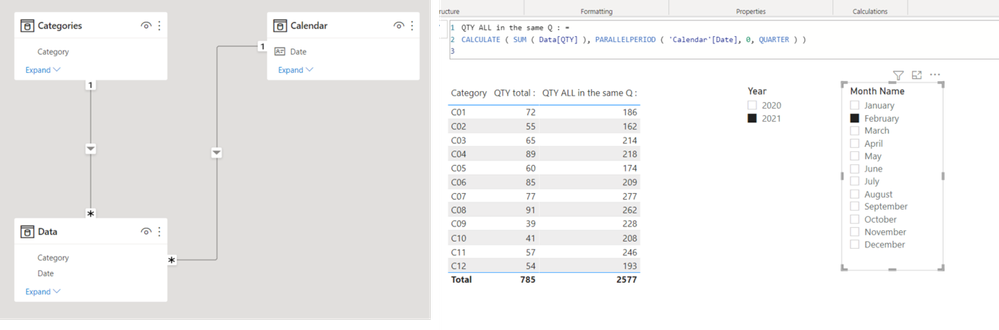
Check the below picture and the attached pbix file.
QTY ALL in the same Q : =
CALCULATE ( SUM ( Data[QTY] ), PARALLELPERIOD ( 'Calendar'[Date], 0, QUARTER ) )
Hi Jim,
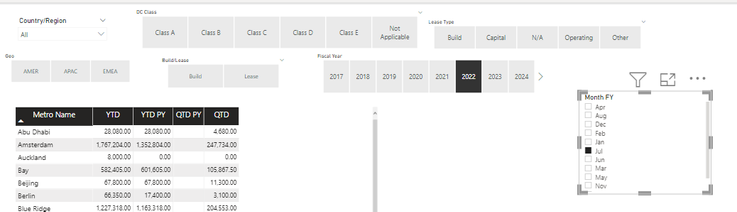
Thanks for your response it's working fine for current year quarter but for previous year quarter it is not working. please see below snip.
For example if i select year 2022 and month Jul, i should be able to see current and previous year quartern i.e. ( Jul, Aug and Sep) quarter value for 2022 and 2021.below formula is not working for QTD PY
QTD PY- CALCULATE ( SUM ( Data[QTY] ), PARALLELPERIOD ( 'Calendar'[Date], -1, QUARTER ) )
Hi,
I suggest using the PARALLELPERIOD function in DAX.
Check the below picture and the attached pbix file.
QTY ALL in the same Q : =
CALCULATE ( SUM ( Data[QTY] ), PARALLELPERIOD ( 'Calendar'[Date], 0, QUARTER ) )
Hi Jim,
Thanks for your response it's working fine for current year quarter but for previous year quarter it is not working. please see below snip.
For example if i select year 2022 and month Jul, i should be able to see current and previous year quartern i.e. ( Jul, Aug and Sep) quarter value for 2022 and 2021.below formula is not working for QTD PY
QTD PY- CALCULATE ( SUM ( Data[QTY] ), PARALLELPERIOD ( 'Calendar'[Date], -1, QUARTER ) )
Hi,
I think your measure is showing the previous quarter, not the previous year.
Check out the November 2025 Power BI update to learn about new features.
Advance your Data & AI career with 50 days of live learning, contests, hands-on challenges, study groups & certifications and more!