cancel
Showing results for 
Search instead for 
Did you mean: 

Get Fabric certified for FREE! Don't miss your chance! Learn more

Reply
JLambs20
Helper III
Helper III

Calculating Revenue and Targets in one Table

Hello!

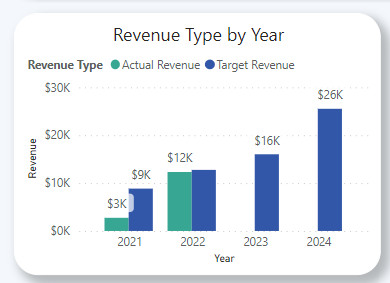
I am looking to create a bar chart with a date across the x-axis and then awarded/target values as the two bars (per year).  I need to be able to drill down into each year at least to the Quarter. 


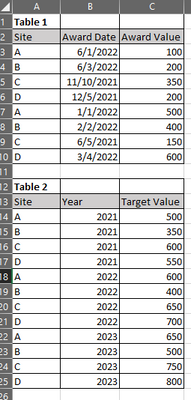
Table 1 contains site, award date, and award value while table 2 contains site, target year, and target value. Summarizing the awarded value in table 1 by year is easy enough in a measure but I'm having trouble incorporating the table 2 data.  For the target values, it would be by year, so there needs to be a sum of the target value of all sites by year (in other words, the target value for 2021 is site A + site B + site C + site D, or 2000 and the same thing for 2022, and 2023). 

The result would look something like this: 

JLambs20_0-1654535147605.png


Here's some sample data: 

JLambs20_1-1654535185789.png

Thank you!

1 ACCEPTED SOLUTION
Anonymous
Not applicable

Hi  @JLambs20 ,

Here are the steps you can follow:

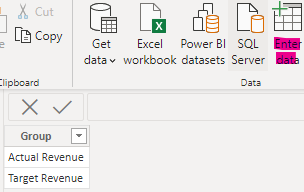
1. Create a GroupTable with Enter data.

vyangliumsft_0-1654744932567.png

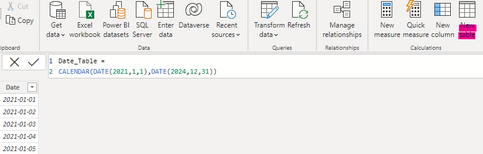
2. Create calculated Date_Table.

Date_Table =
CALENDAR(DATE(2021,1,1),DATE(2024,12,31))

vyangliumsft_1-1654744932568.png

3. Create measure.

Measure =
CALCULATE( SUM('Table1'[Award Value]),FILTER(ALL('Table1'),'Table1'[Award Date]>=MIN('Date_Table'[Date])&&'Table1'[Award Date]<=MAX('Date_Table'[Date])))
Measure1 =
CALCULATE( SUM('Table2'[Target Value]),FILTER(ALL(Table2),'Table2'[Year]>=YEAR(MIN('Date_Table'[Date]))&&'Table2'[Year]<=YEAR(MAX('Date_Table'[Date]))))
Flag=
SWITCH(
    TRUE(),
    MAX('GoupTable'[Group])="Actual Revenue",[Measure],
    MAX('GoupTable'[Group])="Target Revenue",[Measure1])

4. Result:

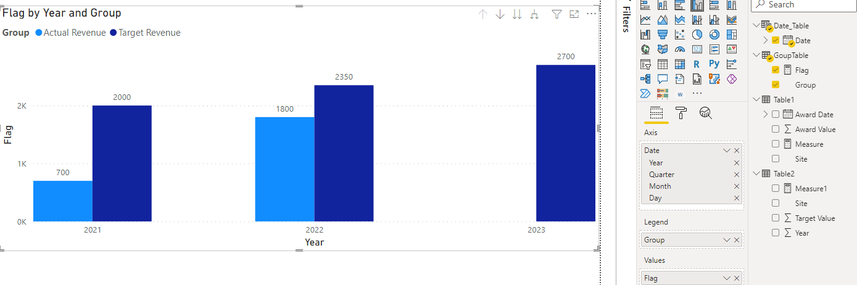
When the X axis is Year:

vyangliumsft_2-1654744932571.png

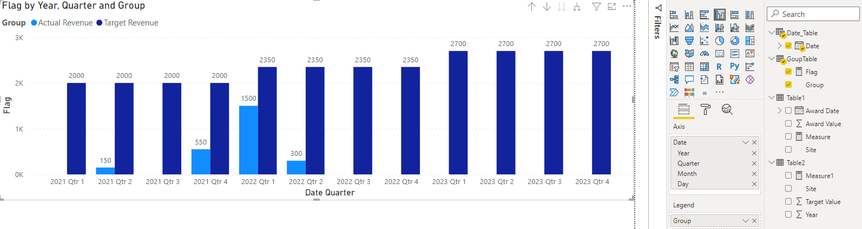
When Dill down:

vyangliumsft_3-1654744932575.png


Best Regards,

Liu Yang

If this post helps, then please consider Accept it as the solution to help the other members find it more quickly

View solution in original post

4 REPLIES 4
Anonymous
Not applicable

Hi  @JLambs20 ,

Here are the steps you can follow:

1. Create a GroupTable with Enter data.

vyangliumsft_0-1654744932567.png

2. Create calculated Date_Table.

Date_Table =
CALENDAR(DATE(2021,1,1),DATE(2024,12,31))

vyangliumsft_1-1654744932568.png

3. Create measure.

Measure =
CALCULATE( SUM('Table1'[Award Value]),FILTER(ALL('Table1'),'Table1'[Award Date]>=MIN('Date_Table'[Date])&&'Table1'[Award Date]<=MAX('Date_Table'[Date])))
Measure1 =
CALCULATE( SUM('Table2'[Target Value]),FILTER(ALL(Table2),'Table2'[Year]>=YEAR(MIN('Date_Table'[Date]))&&'Table2'[Year]<=YEAR(MAX('Date_Table'[Date]))))
Flag=
SWITCH(
    TRUE(),
    MAX('GoupTable'[Group])="Actual Revenue",[Measure],
    MAX('GoupTable'[Group])="Target Revenue",[Measure1])

4. Result:

When the X axis is Year:

vyangliumsft_2-1654744932571.png

When Dill down:

vyangliumsft_3-1654744932575.png


Best Regards,

Liu Yang

If this post helps, then please consider Accept it as the solution to help the other members find it more quickly

Ashish_Mathur
Super User
Super User

Hi,

Share the link from where i can download your PBI file.


Regards,
Ashish Mathur
http://www.ashishmathur.com
https://www.linkedin.com/in/excelenthusiasts/
JLambs20
Helper III
Helper III

This works when set up the way you mentioned, however, it doesn't allow me to drill down on the award date since we're using the distinct year as the x-axis. Once we've figured that out, I'll be good to go!

Anonymous
Not applicable

Hello, @JLambs20 !

I did it this way:

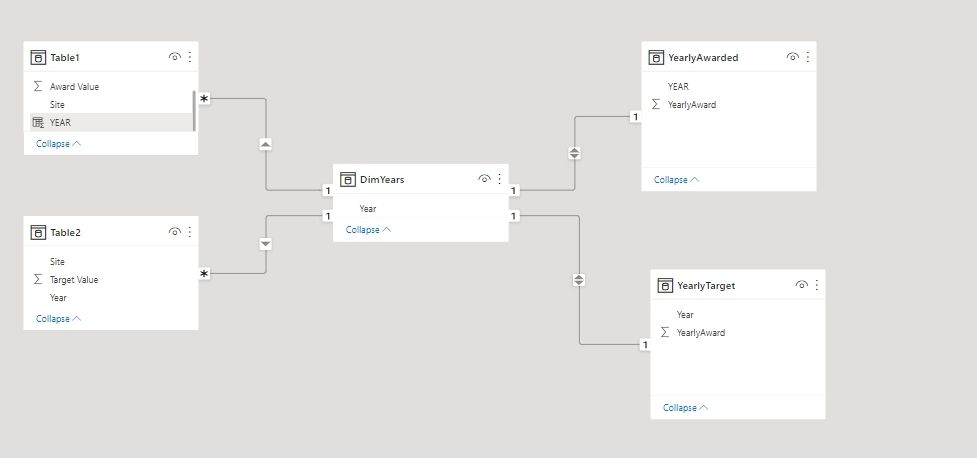
1. Create table with distinct years (DimYear)

2 Create table YearlyAwarded

YearlyAwarded = SUMMARIZE('Table1',[YEAR],"YearlyAward",SUM('Table1'[Award Value]))
3 Create table YearlyTarget:
YearlyTarget = SUMMARIZE('Table2',[Year],"YearlyTarget",SUM('Table2'[Target Value]))
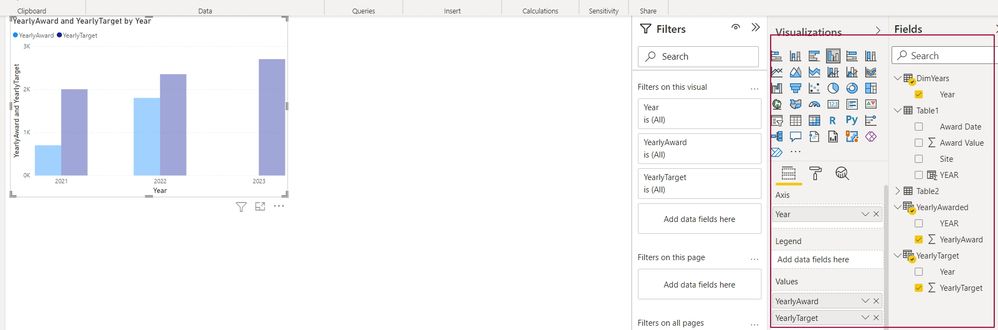
4 Connected all tables
001.jpg
002.jpg

Helpful resources

Announcements
Sticker Challenge 2026 Carousel

Join our Community Sticker Challenge 2026

If you love stickers, then you will definitely want to check out our Community Sticker Challenge!

January Power BI Update Carousel

Power BI Monthly Update - January 2026

Check out the January 2026 Power BI update to learn about new features.

FabCon Atlanta 2026 carousel

FabCon Atlanta 2026

Join us at FabCon Atlanta, March 16-20, for the ultimate Fabric, Power BI, AI and SQL community-led event. Save $200 with code FABCOMM.