cancel
Showing results for 
Search instead for 
Did you mean: 

Get Fabric Certified for FREE during Fabric Data Days. Don't miss your chance! Request now

Reply
Anonymous
Not applicable

Calculating Ratio with DAX

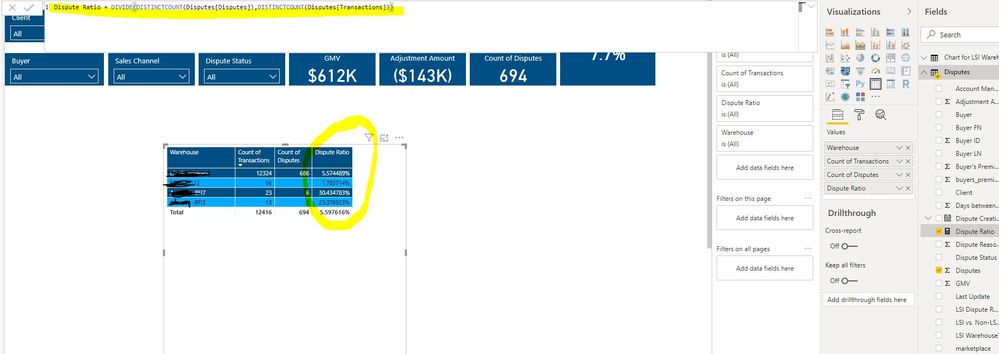
I'm trying to calculate Dispute ratio (measure) using dax but I'm missing quite a few things in my DAX formula. 

Hope the screenshot below helps:

Capture.JPG

The first row is being calculted correctly,however, others are not. I would like to show 0% in Dispute ratio for the second row. 

What am I am missing in my DAX formula?


1 ACCEPTED SOLUTION
amitchandak
Super User
Super User

Both Count Distinct and Count in the case of Transaction and Dispute will show as count on the visual value list(display name in values - right side ). Can you right-click on those and check they are count distinct only.

Share with Power BI Enthusiasts: Full Power BI Video (20 Hours) YouTube
Microsoft Fabric Series 60+ Videos YouTube
Microsoft Fabric Hindi End to End YouTube

View solution in original post

3 REPLIES 3
amitchandak
Super User
Super User

Both Count Distinct and Count in the case of Transaction and Dispute will show as count on the visual value list(display name in values - right side ). Can you right-click on those and check they are count distinct only.

Share with Power BI Enthusiasts: Full Power BI Video (20 Hours) YouTube
Microsoft Fabric Series 60+ Videos YouTube
Microsoft Fabric Hindi End to End YouTube
Anonymous
Not applicable

Thanks amitchandak.

It worked. Now, the calculations are correct except the ones where there should be 0 in "Count of Diputes" column. Example is in the second row in the screenshot I share. The "1" basically represents all blank values. The Dispute Rate for that second row must be 0% though.


Can you first calculate a column or use this in your calculation

IF(value=0, blank(),value)

This will not count 0 value.

Share with Power BI Enthusiasts: Full Power BI Video (20 Hours) YouTube
Microsoft Fabric Series 60+ Videos YouTube
Microsoft Fabric Hindi End to End YouTube

Helpful resources

Announcements
November Power BI Update Carousel

Power BI Monthly Update - November 2025

Check out the November 2025 Power BI update to learn about new features.

Fabric Data Days Carousel

Fabric Data Days

Advance your Data & AI career with 50 days of live learning, contests, hands-on challenges, study groups & certifications and more!

FabCon Atlanta 2026 carousel

FabCon Atlanta 2026

Join us at FabCon Atlanta, March 16-20, for the ultimate Fabric, Power BI, AI and SQL community-led event. Save $200 with code FABCOMM.

Top Solution Authors
Top Kudoed Authors