cancel
Showing results for 
Search instead for 
Did you mean: 

The Power BI Data Visualization World Championships is back! Get ahead of the game and start preparing now! Learn more

Reply
JoeKat07
Frequent Visitor

Calculating Inventory with Prepacked items

Hello,

My company sells its items in both prepackaged units and by individual pounds. 


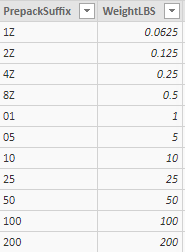
table.PNG


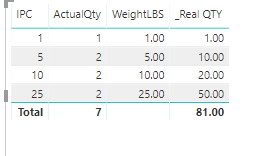
I am trying to do a calculation to find the real inventory in our warehouse (Prepack suffix of 50 is stored in our Inventory table as an each so 1) and its throwing me for a loop. I used the below method to get the right sum for the individual items broken out in a table, however the total comes out to be the sum of each UoM * quantity. The join goes Prepack table <- Item table -> Inventory table.


My calculation is as follows:  _Real QTY = if(ISBLANK(sum(DimPrepackUOM[WeightLBS])), sum(DimInventory[ActualQty]), sum(DimInventory[ActualQty]) * SUM(DimPrepackUOM[WeightLBS]))


table.PNG


Thanks

1 ACCEPTED SOLUTION
v-lid-msft
Community Support
Community Support

Hi @JoeKat07 ,


We can try to use the following measuer to meet your requirement.


_Real QTY = 
IF (
    ISINSCOPE ( DimInventory[IPC] ),
    IF (
        ISBLANK ( SUM ( DimPrepackUOM[WeightLBS] ) ),
        SUM ( DimInventory[ActualQty] ),
        SUM ( DimInventory[ActualQty] ) * SUM ( DimPrepackUOM[WeightLBS] )
    ),
    SUMX (
        SUMMARIZECOLUMNS (
            'DimInventory'[IPC],
            "qty", IF (
                ISBLANK ( SUM ( DimPrepackUOM[WeightLBS] ) ),
                SUM ( DimInventory[ActualQty] ),
                SUM ( DimInventory[ActualQty] ) * SUM ( DimPrepackUOM[WeightLBS] )
            )
        ),
        [qty]
    )
)

9.PNG


BTW, pbix as attached.


Best regards,

Community Support Team _ Dong Li
If this post helps, then please consider Accept it as the solution to help the other members find it more quickly.

Community Support Team _ Dong Li
If this post helps, then please consider Accept it as the solution to help the other members find it more quickly.

View solution in original post

2 REPLIES 2
v-lid-msft
Community Support
Community Support

Hi @JoeKat07 ,


How about the result after you follow the suggestions mentioned in my original post?


Best regards,

Community Support Team _ Dong Li
If this post helps, then please consider Accept it as the solution to help the other members find it more quickly.

Community Support Team _ Dong Li
If this post helps, then please consider Accept it as the solution to help the other members find it more quickly.
v-lid-msft
Community Support
Community Support

Hi @JoeKat07 ,


We can try to use the following measuer to meet your requirement.


_Real QTY = 
IF (
    ISINSCOPE ( DimInventory[IPC] ),
    IF (
        ISBLANK ( SUM ( DimPrepackUOM[WeightLBS] ) ),
        SUM ( DimInventory[ActualQty] ),
        SUM ( DimInventory[ActualQty] ) * SUM ( DimPrepackUOM[WeightLBS] )
    ),
    SUMX (
        SUMMARIZECOLUMNS (
            'DimInventory'[IPC],
            "qty", IF (
                ISBLANK ( SUM ( DimPrepackUOM[WeightLBS] ) ),
                SUM ( DimInventory[ActualQty] ),
                SUM ( DimInventory[ActualQty] ) * SUM ( DimPrepackUOM[WeightLBS] )
            )
        ),
        [qty]
    )
)

9.PNG


BTW, pbix as attached.


Best regards,

Community Support Team _ Dong Li
If this post helps, then please consider Accept it as the solution to help the other members find it more quickly.

Community Support Team _ Dong Li
If this post helps, then please consider Accept it as the solution to help the other members find it more quickly.

Helpful resources

Announcements
Power BI DataViz World Championships

Power BI Dataviz World Championships

The Power BI Data Visualization World Championships is back! Get ahead of the game and start preparing now!

December 2025 Power BI Update Carousel

Power BI Monthly Update - December 2025

Check out the December 2025 Power BI Holiday Recap!

FabCon Atlanta 2026 carousel

FabCon Atlanta 2026

Join us at FabCon Atlanta, March 16-20, for the ultimate Fabric, Power BI, AI and SQL community-led event. Save $200 with code FABCOMM.

Top Solution Authors