cancel
Showing results for 
Search instead for 
Did you mean: 

Learn from the best! Meet the four finalists headed to the FINALS of the Power BI Dataviz World Championships! Register now

Reply
Zainhashmi
Regular Visitor

Calculating Custom Measure for Matrix

Hi..


i need help with my measure below..


image.png


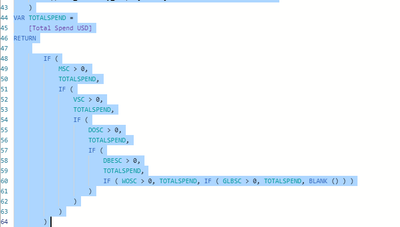
i am creating a measure for custom calculation.. the criteria is if the created measure has the value greater than '"0" than it should return the spending otherwise blank.. the formula working on row by row is perfectly fine

Zainhashmi_3-1611599768429.png

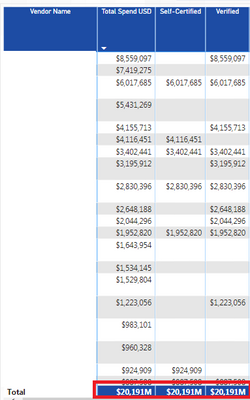
but for the totals.. it is showing the same amount of spend which is incorrect.. in this case where i am making the mistake.. would be very glad for your expert opinon.. 

Thanks


1 ACCEPTED SOLUTION
v-lionel-msft
Community Support
Community Support

Hi @Zainhashmi ,


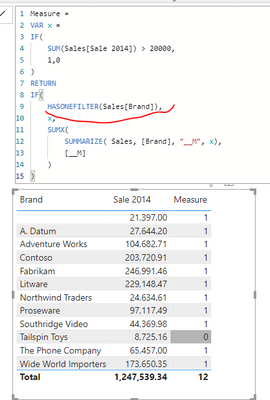
Please refer to my formula.

v-lionel-msft_0-1611897430877.png


Best regards,
Lionel Chen

If this post helps, then please consider Accept it as the solution to help the other members find it more quickly.

View solution in original post

4 REPLIES 4
v-lionel-msft
Community Support
Community Support

Hi @Zainhashmi ,


Please refer to my formula.

v-lionel-msft_0-1611897430877.png


Best regards,
Lionel Chen

If this post helps, then please consider Accept it as the solution to help the other members find it more quickly.

DataZoe
Microsoft Employee
Microsoft Employee

@Zainhashmi You could try and add on line 47 (after the RETURN) a SUMX like so:

SUMX(VALUES('Table'[Vendor Name]),


then add another ) at the very end. That way it will figure it out per vendor (you can also do it for each row of the table if you drill down), then sum them up.

Respectfully,
Zoe Douglas (DataZoe)


Follow me on LinkedIn at https://www.linkedin.com/in/zoedouglas-data
See my reports and blog at https://www.datazoepowerbi.com/

so when i am trying to aggregate it... it doesn't show the formula as seen below:

Zainhashmi_0-1611670824166.png

@Zainhashmi Can you try doing it as a new measure? Verified Total = sumx(values(table[vendor name]),[Verified])

Respectfully,
Zoe Douglas (DataZoe)


Follow me on LinkedIn at https://www.linkedin.com/in/zoedouglas-data
See my reports and blog at https://www.datazoepowerbi.com/

Helpful resources

Announcements
Join our Fabric User Panel

Join our Fabric User Panel

Share feedback directly with Fabric product managers, participate in targeted research studies and influence the Fabric roadmap.

March Power BI Update Carousel

Power BI Community Update - March 2026

Check out the March 2026 Power BI update to learn about new features.