Join us at FabCon Atlanta from March 16 - 20, 2026, for the ultimate Fabric, Power BI, AI and SQL community-led event. Save $200 with code FABCOMM.
Register now!Get Fabric Certified for FREE during Fabric Data Days. Don't miss your chance! Request now
Hi,
I am needing help wrapping my head around the best way to apply a percentage based off of the total volume per item of a shipment.
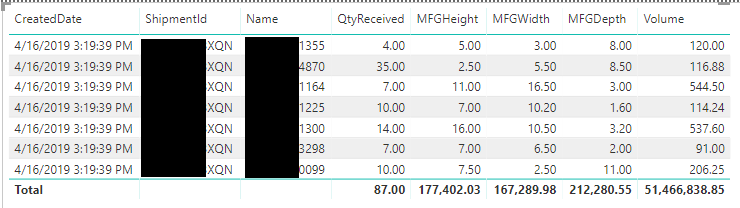
Here is the data I am working with. On this shipment we have 6 different products being shipped and a total of 87 units. The total cost of that Shipment was $167. I would like an output like the one attached at the bottom.
Thank you.
Solved! Go to Solution.
Hello @NBOnecall
A couple measures to get you to your goal.
Total Volume uses SUMX to calc qty * volume
Total Volume = SUMX ( shipments, shipments[Qty] * shipments[Volume] )
Quantity is just a straight sum
SumQty = Sum(shipments[Qty])
Total cost is done with a cross filter so the shipment id can flow back up the relationship to the cost table.
SumCost =
CALCULATE (
SUM ( Cost[Cost] ),
CROSSFILTER ( Cost[ShipmentID], shipments[ShipmentID], BOTH )
)Then the mesure to allocate the cost per shipment across the lines using our [Total Volume] measure
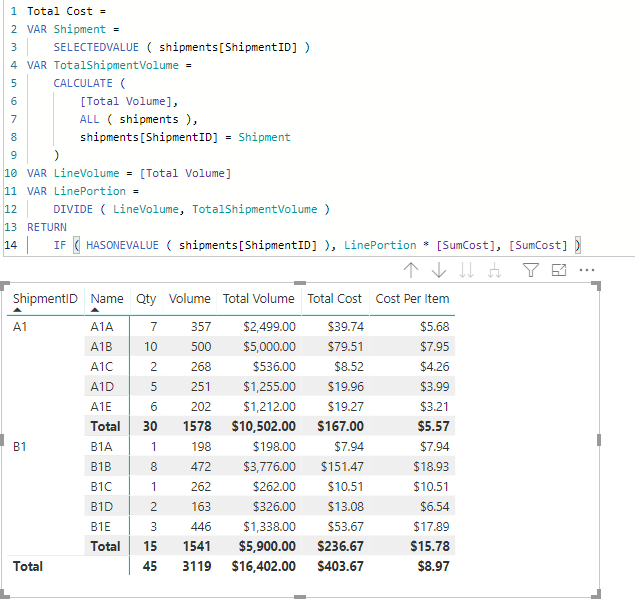
Total Cost =
VAR Shipment =
SELECTEDVALUE ( shipments[ShipmentID] )
VAR TotalShipmentVolume =
CALCULATE (
[Total Volume],
ALL ( shipments ),
shipments[ShipmentID] = Shipment
)
VAR LineVolume = [Total Volume]
VAR LinePortion =
DIVIDE ( LineVolume, TotalShipmentVolume )
RETURN
IF ( HASONEVALUE ( shipments[ShipmentID] ), LinePortion * [SumCost], [SumCost] )It includes the IF ( HASONEVALE () ) portion so that subtotals on the measure will work correctly.
Finally the per unit cost measure.
Cost Per Item = DIVIDE( [Total Cost] , [SumQty] )
Hello @NBOnecall
A couple measures to get you to your goal.
Total Volume uses SUMX to calc qty * volume
Total Volume = SUMX ( shipments, shipments[Qty] * shipments[Volume] )
Quantity is just a straight sum
SumQty = Sum(shipments[Qty])
Total cost is done with a cross filter so the shipment id can flow back up the relationship to the cost table.
SumCost =
CALCULATE (
SUM ( Cost[Cost] ),
CROSSFILTER ( Cost[ShipmentID], shipments[ShipmentID], BOTH )
)Then the mesure to allocate the cost per shipment across the lines using our [Total Volume] measure
Total Cost =
VAR Shipment =
SELECTEDVALUE ( shipments[ShipmentID] )
VAR TotalShipmentVolume =
CALCULATE (
[Total Volume],
ALL ( shipments ),
shipments[ShipmentID] = Shipment
)
VAR LineVolume = [Total Volume]
VAR LinePortion =
DIVIDE ( LineVolume, TotalShipmentVolume )
RETURN
IF ( HASONEVALUE ( shipments[ShipmentID] ), LinePortion * [SumCost], [SumCost] )It includes the IF ( HASONEVALE () ) portion so that subtotals on the measure will work correctly.
Finally the per unit cost measure.
Cost Per Item = DIVIDE( [Total Cost] , [SumQty] )
Thank you for replying. I well definelty try your way, but as I was waiting for a reply I went through and worked it a different way that I think gets the same results, but generally tried to based it off of sumif formula of Excel.
For shipment Cost I added a column to my shipment report -
Hello @NBOnecall
For me the "better" way is the one that works that I understand. Sometimes the layers of formulas can get confusing and I want to be able to predict the behavior of the measures.
If both of the methods perform equally well (calculate quickly in visuals) then I would use the one you came up with on your own.
Cheers!
Check out the November 2025 Power BI update to learn about new features.
Advance your Data & AI career with 50 days of live learning, contests, hands-on challenges, study groups & certifications and more!