Join us at FabCon Atlanta from March 16 - 20, 2026, for the ultimate Fabric, Power BI, AI and SQL community-led event. Save $200 with code FABCOMM.
Register now!Get Fabric Certified for FREE during Fabric Data Days. Don't miss your chance! Request now
Hi, everybody.
I worked with OBIEE for a few years, and I'm starting with Power BI.
I'm currently struggling with its formula sintax on front-end, and I kindly need some help with one quite simple calculation, please:
For one particular Dashboard page, I only have one page filter, which is "Week" ("Week 01", "Week 02", "Week 03", etc.)
I have a metric "Order Value", and I actually need is to calculate the Average Sum of the Order Value for the current week and the 3 previous ones.
I mean, if I choose "Week 31" on the page filter, the measure shoud calculate the Average Sum from Weeks 31, 30, 29 and 28.
Just as a reference, in OBIEE I would define a presentation variable for the Week Filter, and I'd create a Measure that would consider the selected week through the variable on the formula and summarize the Order Value for current week + (current week-1) + (current week -2), etc, and then apply AVERAGE on it, but that doesn't seem like a workaround applicable for Power BI.
Thank you very much in advance.
I really appreciate your help.
Looking forward for your reply
Solved! Go to Solution.
Hello, Daniel.
I wasn't aware of the functions "ALL" and "SELECTEDVALUE".
It worked out just fine.
Thank you very much!
You're a life saver.
Best regards.
Hi @Anonymous,
Based on my test, you could refer to below steps:
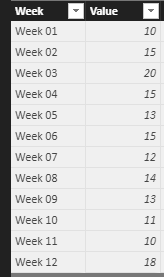
Sample data:
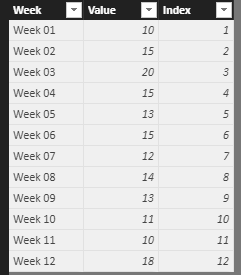
Create an Index column:
Index = RANKX('Table1',FIRSTNONBLANK('Table1'[Week],'Table1'[Week]),,ASC,Dense)
Create a measure:
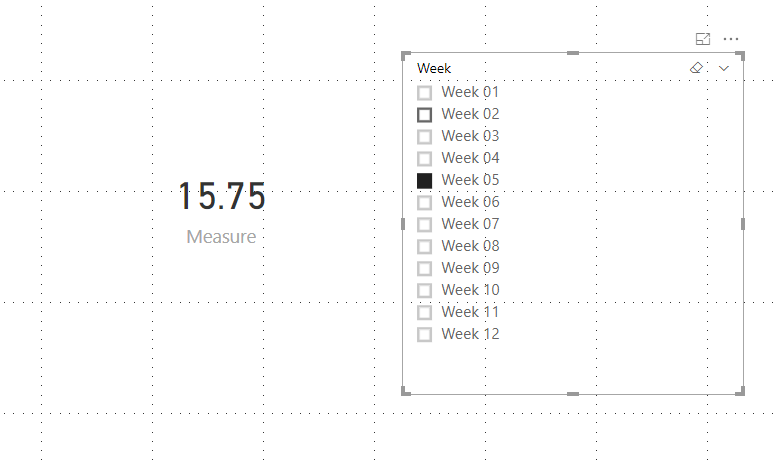
Measure = CALCULATE(AVERAGE(Table1[Value]),FILTER(ALL('Table1'),'Table1'[Index]>=SELECTEDVALUE(Table1[Index])-3&&'Table1'[Index]<=SELECTEDVALUE(Table1[Index])))
Result:
You could also download the pbix file to have a view.
Regards,
Daniel He
Hello, Daniel.
I wasn't aware of the functions "ALL" and "SELECTEDVALUE".
It worked out just fine.
Thank you very much!
You're a life saver.
Best regards.
Check out the November 2025 Power BI update to learn about new features.
Advance your Data & AI career with 50 days of live learning, contests, hands-on challenges, study groups & certifications and more!