cancel
Showing results for 
Search instead for 
Did you mean: 

Get Fabric Certified for FREE during Fabric Data Days. Don't miss your chance! Request now

Reply
Kolumam
Post Prodigy
Post Prodigy

Calculating Annual Contract based on Start Date and End Date

I have a table that has a start date of the contract starting from March 2017 and ending at April 2018. I want to calculate the yearly contract price. See the table below.

Contract NameStart Date of ContractEnd Date of ContractPrice
X1/3/201731/3/2018387
X1/4/201831/3/2019387
X1/4/201931/12/2020250


I want to calculate what was the annual price for each year and for all the contracts. How do I do this?

@amitchandak @parry2k @mahoneypat @harshnathani 

6 REPLIES 6
harshnathani
Community Champion
Community Champion

HI @Kolumam ,


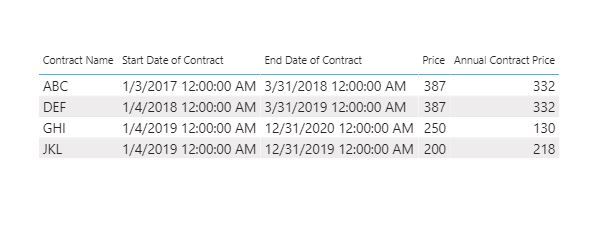
Let me know if you are lookin for this. If not, pls provide the expected o/p.


You can try this measure.


Annual Contract Price =
VAR diff_stdat_endate =
    DATEDIFF (
        MAX ( 'Table'[Start Date of Contract] ),
        MAX ( 'Table'[End Date of Contract] ),
        MONTH
    )
RETURN
    DIVIDE (
        12,
        diff_stdat_endate
    )
        * MAX ( 'Table'[Price] )


1.jpg


Regards,

Harsh Nathani


Appreciate with a Kudos!! (Click the Thumbs Up Button)

Did I answer your question? Mark my post as a solution!


Hi @harshnathani 


Thanks but I need to plot the values using a Year column. How do I do this for each contract?


@Kolumam , can share expected output.

Current Contract  = CALCULATE(Maxx(FILTER(Contract,Employee[Start Date]<=max('Date'[Date]) && (ISBLANK(Contract[End Date]) || Contract[End Date]>max('Date'[Date]))),(Contract[Price])),CROSSFILTER(Contract[Start Date],'Date'[Date],None))


If you create a date table and join it with the start date above will give max price for the year. Year should be there in Date table

Share with Power BI Enthusiasts: Full Power BI Video (20 Hours) YouTube
Microsoft Fabric Series 60+ Videos YouTube
Microsoft Fabric Hindi End to End YouTube

Hi @amitchandak @harshnathani 


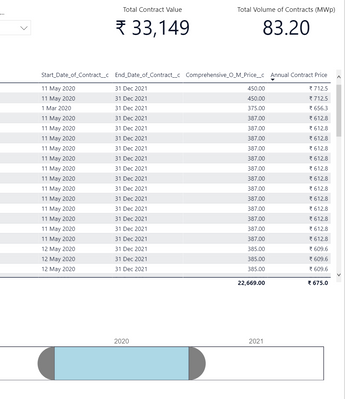
As per the formula given by @harshnathani , I tried it but the issue is the date. When I filter the year to 2020, it should ideally show the "Annual Contract Price" as (450*7/12) which is 262.5. How do I add a proper date axis and filter it with year?

Kolumam_0-1594022765734.png


amitchandak
Super User
Super User

@Kolumam , Just see if this blog can help

You will get a monthly amount

https://community.powerbi.com/t5/Community-Blog/HR-Analytics-Active-Employee-Hire-and-Termination-tr...


Or this file can help

https://www.dropbox.com/s/bqbei7b8qbq5xez/leavebetweendates.pbix?dl=0

Share with Power BI Enthusiasts: Full Power BI Video (20 Hours) YouTube
Microsoft Fabric Series 60+ Videos YouTube
Microsoft Fabric Hindi End to End YouTube

Hi @amitchandak 


The solution looks very complex.

I am looking for a yearly contract price calculation for each contract.

Helpful resources

Announcements
November Power BI Update Carousel

Power BI Monthly Update - November 2025

Check out the November 2025 Power BI update to learn about new features.

Fabric Data Days Carousel

Fabric Data Days

Advance your Data & AI career with 50 days of live learning, contests, hands-on challenges, study groups & certifications and more!

FabCon Atlanta 2026 carousel

FabCon Atlanta 2026

Join us at FabCon Atlanta, March 16-20, for the ultimate Fabric, Power BI, AI and SQL community-led event. Save $200 with code FABCOMM.

Top Solution Authors
Top Kudoed Authors