cancel
Showing results for 
Search instead for 
Did you mean: 

Learn from the best! Meet the four finalists headed to the FINALS of the Power BI Dataviz World Championships! Register now

Reply
Anonymous
Not applicable

Calculated % measure

Hello, 


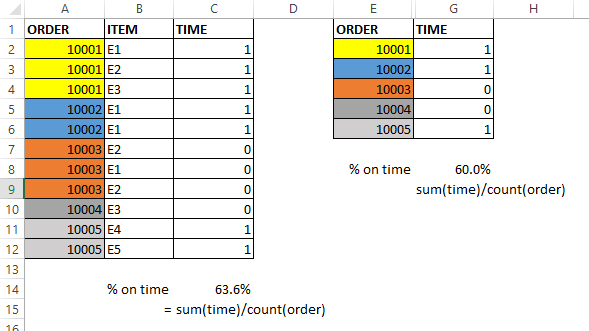
I have problems creating a measure, i want to show on a line chart the percentage of "orders on time" (1).

My power bi table looks like the first one with orders and itmes, and when I make this measure the result is 63%, but it really should be 60% , because it depens on the number of orders, not the number of itmes in the order.


My measure is sum(time)/count(order) = 7/11, and should be 3/5


How can I make the measure, without loosing the item column?

Capturafe.PNGPlease I need Help

1 ACCEPTED SOLUTION
v-cherch-msft
Microsoft Employee
Microsoft Employee

Hi @Anonymous


You may create measure as below:

Measure =
COUNTROWS ( SUMMARIZE ( FILTER ( Table1, Table1[Time] = 1 ), Table1[Order] ) )
    / DISTINCTCOUNT ( Table1[Order] )

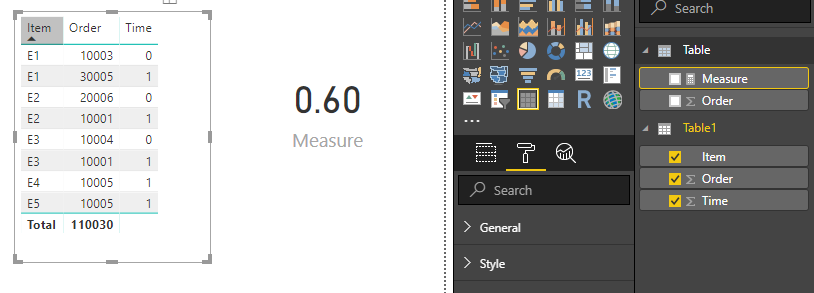
aa.png


Regards,

Cherie

Community Support Team _ Cherie Chen
If this post helps, then please consider Accept it as the solution to help the other members find it more quickly.

View solution in original post

2 REPLIES 2
v-cherch-msft
Microsoft Employee
Microsoft Employee

Hi @Anonymous


You may create measure as below:

Measure =
COUNTROWS ( SUMMARIZE ( FILTER ( Table1, Table1[Time] = 1 ), Table1[Order] ) )
    / DISTINCTCOUNT ( Table1[Order] )

aa.png


Regards,

Cherie

Community Support Team _ Cherie Chen
If this post helps, then please consider Accept it as the solution to help the other members find it more quickly.
Zubair_Muhammad
Community Champion
Community Champion

@Anonymous


Try this one


Measure =
VAR orderswithTime1 =
    COUNTROWS (
        FILTER ( VALUES ( Table1[Order] ), CALCULATE ( SUM ( Table1[Time] ) ) > 0 )
    )
VAR TotalOrders =
    COUNTROWS ( VALUES ( Table1[Order] ) )
RETURN
    DIVIDE ( orderswithTime1, TotalOrders )

Helpful resources

Announcements
Join our Fabric User Panel

Join our Fabric User Panel

Share feedback directly with Fabric product managers, participate in targeted research studies and influence the Fabric roadmap.

March Power BI Update Carousel

Power BI Community Update - March 2026

Check out the March 2026 Power BI update to learn about new features.