cancel
Showing results for 
Search instead for 
Did you mean: 

The Power BI Data Visualization World Championships is back! Get ahead of the game and start preparing now! Learn more

Reply
ecroke
Frequent Visitor

Calculated fields in text boxes

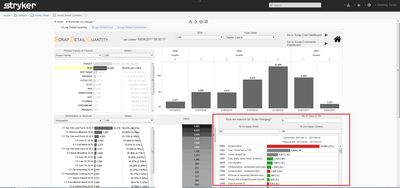
This is the document in which I have to transfer into Power Bi. The aspect I am having problems with is outlined in a red box. You must be able to enter data into the “No. of Days in Bin”, “% Increase” and “% Decrease” Boxes.

“Days in Bin” refers to the amount of days you would like to look back on eg. 9 days in “No. of Days in Bin” means it will look back on the previous 9 days and so on. When data is entered into “% Increase (Red)” anything greater than or equal to this figure turns red. This is the same with “% Decrease” except less than or equal to.

Is there anyway of doing this or doing something similar?

Thanks in Advanced


SCRAP.png


1 ACCEPTED SOLUTION
v-huizhn-msft
Microsoft Employee
Microsoft Employee

Hi @ecroke,

Do you have resource data? You need to load the data from web? If it is, please Get Data->From Web->Type URL, and load the table needed, more details, please review this article

In Power BI desktop, we can not create visual like the box(you can type value into box). You can create a slicer including one field, and you can select a value in slicer, and filter the report.

>>eg. 9 days in “No. of Days in Bin” means it will look back on the previous 9 days and so on.

You can create a new table including No. of Days in Bin, and create a slicer including it.

If you date is continuous, you can create a measure using DATEADD function like the formula. You can refer to this blog.

Nine Day back =CALCULATE(sum(Table[sale]), DATEADD(Table2[date],-9,Day)))

 
For color formating, you can use conditional formating in Table or Matrix visuals.

Best Regards,
Angelia

View solution in original post

1 REPLY 1
v-huizhn-msft
Microsoft Employee
Microsoft Employee

Hi @ecroke,

Do you have resource data? You need to load the data from web? If it is, please Get Data->From Web->Type URL, and load the table needed, more details, please review this article

In Power BI desktop, we can not create visual like the box(you can type value into box). You can create a slicer including one field, and you can select a value in slicer, and filter the report.

>>eg. 9 days in “No. of Days in Bin” means it will look back on the previous 9 days and so on.

You can create a new table including No. of Days in Bin, and create a slicer including it.

If you date is continuous, you can create a measure using DATEADD function like the formula. You can refer to this blog.

Nine Day back =CALCULATE(sum(Table[sale]), DATEADD(Table2[date],-9,Day)))

 
For color formating, you can use conditional formating in Table or Matrix visuals.

Best Regards,
Angelia
Helpful resources

Announcements
Power BI DataViz World Championships

Power BI Dataviz World Championships

The Power BI Data Visualization World Championships is back! Get ahead of the game and start preparing now!

December 2025 Power BI Update Carousel

Power BI Monthly Update - December 2025

Check out the December 2025 Power BI Holiday Recap!

FabCon Atlanta 2026 carousel

FabCon Atlanta 2026

Join us at FabCon Atlanta, March 16-20, for the ultimate Fabric, Power BI, AI and SQL community-led event. Save $200 with code FABCOMM.