
Join us at FabCon Atlanta from March 16 - 20, 2026, for the ultimate Fabric, Power BI, AI and SQL community-led event. Save $200 with code FABCOMM.
Register now!The Power BI Data Visualization World Championships is back! Get ahead of the game and start preparing now! Learn more
I would like to have a calculated column of the monthly sum of sales like this:
| DateTime | Sales | MonthlySales |
| 1/1/2018 | 10 | 100 |
| 1/5/2018 | 90 | 100 |
| 2/16/2018 | 25 | 50 |
| 2/18/2018 | 25 | 50 |
I've tried to achieve this by using the following formula:
MonthlySalesTotal = SUMX( VALUES(DimDate[MonthYear]), SUM(FactSales[LineTotal]) )
This just gives me the entire sales total on each line like so:
| DateTime | Sales | MonthlySales |
| 1/1/2018 | 10 | 150 |
| 1/5/2018 | 90 | 150 |
| 2/16/2018 | 25 | 150 |
| 2/18/2018 | 25 | 150 |
It looks like it's failing to group by MonthYear correctly and just providing all the MonthYear values instead of the single on related to that row. I have confirmed the join between my calendar table and sales table since formulas such as TOTALYTD work just fine. What formula can I use to produce a monthly sales total for each line in my table?
Solved! Go to Solution.
You won't be able to use it as a report filter unfortunately. You could create a column by duplicating the table in power query and aggregate the table to calculate the monthly values and merge join the table to give you a value.
You would need to join on the month start date which you could calculate in M.
Text.From(Date.Year([DateTime])) & "-" & Text.End("0" &Text.From(Date.Month([DateTime])),2) & "-01"
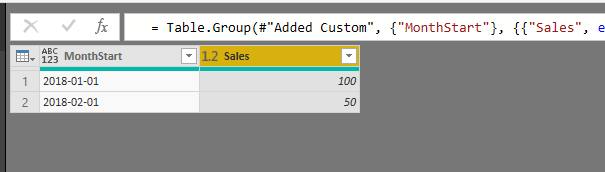
Copy that table and then group the new table;
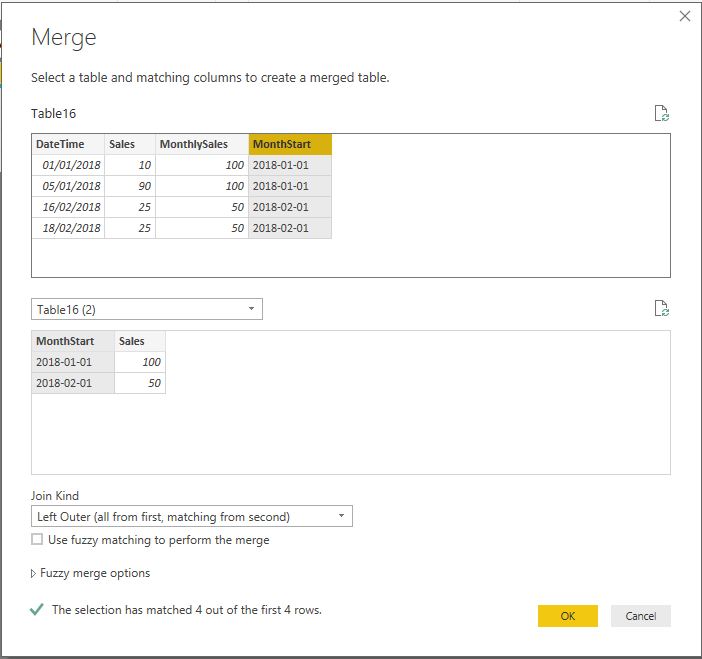
Then merge join on the original table
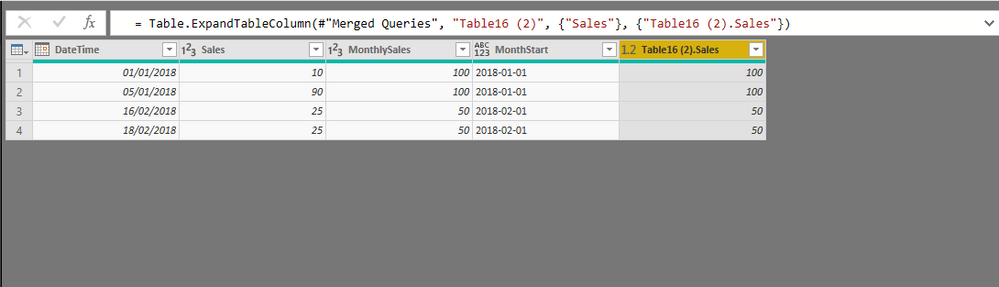
Then you will have the monthly values in a column. Be careful to not double count the values it's purely for filtering purposes only!
Measure = CALCULATE(sum(Table16[Sales]),filter(ALLSELECTED(Table16),Table16[DateTime].[MonthNo] = maxx(Table16,Table16[DateTime].[MonthNo]) && Table16[DateTime].[Year] = maxx( Table16,Table16[DateTime].[Year])))
You could try above.
That got me much closer! My formula below works as a measure but I can't use it as a report level filter. I tried using the same code for a caculated column and it just shows all blanks. Is there a way to write it as cacluated column so I can use it across all visuals in the report without manually dragging the measure into each individual visual filter?
(Or alternatively is there a way to use this measure as a report level filter)
MonthSalesTotal =
CALCULATE(sum(FactSales[LineTotal]),
filter(ALLSELECTED(DimDate),
DimDate[MonthYear]= maxx(DimDate,DimDate[MonthYear]))
)
You won't be able to use it as a report filter unfortunately. You could create a column by duplicating the table in power query and aggregate the table to calculate the monthly values and merge join the table to give you a value.
You would need to join on the month start date which you could calculate in M.
Text.From(Date.Year([DateTime])) & "-" & Text.End("0" &Text.From(Date.Month([DateTime])),2) & "-01"
Copy that table and then group the new table;
Then merge join on the original table
Then you will have the monthly values in a column. Be careful to not double count the values it's purely for filtering purposes only!
Thanks for the detailed answer.... but that's a really long walk for just a monthly sum column. I think at this point I will give up trying to do this in DAX and just modify the underlying SQL View. Thanks for the help!
The Power BI Data Visualization World Championships is back! Get ahead of the game and start preparing now!
Check out the November 2025 Power BI update to learn about new features.
| User | Count |
|---|---|
| 59 | |
| 46 | |
| 42 | |
| 23 | |
| 18 |
| User | Count |
|---|---|
| 190 | |
| 122 | |
| 96 | |
| 66 | |
| 47 |