cancel
Showing results for 
Search instead for 
Did you mean: 

The Power BI Data Visualization World Championships is back! Get ahead of the game and start preparing now! Learn more

Reply
Anonymous
Not applicable

Calculated Column inside Matrix where measures are rows

 Hi, I have a list of many Measures by Year, in the Matrix, I had the Values "show on rows" so that the measures are in rows, and the Years are Columns.  Now I want to take YOY comparisons of the Years, is this possible? So I want to take YOY comparisons by Number and % increases by year, on the measures that I have in rows.  I having been trying many ways for hours but nothing is working. I was wondering if it's even possible?

2 REPLIES 2
v-lili6-msft
Community Support
Community Support

hi, @Anonymous

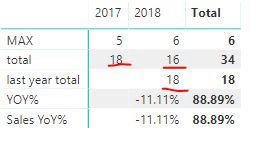
You can use SAMEPERIODLASTYEAR Function to add a last year total measure like below:

last year total = CALCULATE(SUM(Table1[Sales]),SAMEPERIODLASTYEAR('Date'[Date]))

And YOY % increase measure

YOY% = DIVIDE([total]-[last year total],[last year total])

Also you can use New quick measure to quickly add a measure

5.JPG

then drag these measure into Value

Result:

6.JPG


Best Regards,

Lin


Community Support Team _ Lin
If this post helps, then please consider Accept it as the solution to help the other members find it more quickly.
Anonymous
Not applicable

Hi Lin,


Yes, I got that to work just fine when I have measures totaling each year (2015-2018) and YOY changes in dollars and %'s for P&L & Sales items (coming off one column of values in the data coming from Excel).  But now I am doing another chart where I am taking KPI measures/functions off that same P&L data, then showing those functions as rows (2015-2018) (through the values feature "show on rows") and now I want calculated columns for YOY changes going across, on those measures.  I think my issue is that if I have 20 KPI Measures/DAX Formulas, and then I put them into rows, it seems I have to create measures for each year on those measures for each YOY Changes (2016-2018),  What I did in the meantime was create a ton of measures, then make multiple Matrixes for each YOY Change and then sort of hide the row headings and line all the tables up.  I know I could use cards instead, but that would slow down the dashboard.  I know this sounds confusing.... I will try what you wrote below, I just don't think it's going to work, but I will let you know!


Helpful resources

Announcements
Power BI DataViz World Championships

Power BI Dataviz World Championships

The Power BI Data Visualization World Championships is back! Get ahead of the game and start preparing now!

December 2025 Power BI Update Carousel

Power BI Monthly Update - December 2025

Check out the December 2025 Power BI Holiday Recap!

FabCon Atlanta 2026 carousel

FabCon Atlanta 2026

Join us at FabCon Atlanta, March 16-20, for the ultimate Fabric, Power BI, AI and SQL community-led event. Save $200 with code FABCOMM.

Top Solution Authors