FabCon is coming to Atlanta
Join us at FabCon Atlanta from March 16 - 20, 2026, for the ultimate Fabric, Power BI, AI and SQL community-led event. Save $200 with code FABCOMM.
Register now!- Power BI forums
- Get Help with Power BI
- Desktop
- Service
- Report Server
- Power Query
- Mobile Apps
- Developer
- DAX Commands and Tips
- Custom Visuals Development Discussion
- Health and Life Sciences
- Power BI Spanish forums
- Translated Spanish Desktop
- Training and Consulting
- Instructor Led Training
- Dashboard in a Day for Women, by Women
- Galleries
- Data Stories Gallery
- Themes Gallery
- Contests Gallery
- QuickViz Gallery
- Quick Measures Gallery
- Visual Calculations Gallery
- Notebook Gallery
- Translytical Task Flow Gallery
- TMDL Gallery
- R Script Showcase
- Webinars and Video Gallery
- Ideas
- Custom Visuals Ideas (read-only)
- Issues
- Issues
- Events
- Upcoming Events
The Power BI Data Visualization World Championships is back! Get ahead of the game and start preparing now! Learn more
- Power BI forums
- Forums
- Get Help with Power BI
- Desktop
- Calculated Column With Multiple LookupValue Filter...
- Subscribe to RSS Feed
- Mark Topic as New
- Mark Topic as Read
- Float this Topic for Current User
- Bookmark
- Subscribe
- Printer Friendly Page

- Mark as New
- Bookmark
- Subscribe
- Mute
- Subscribe to RSS Feed
- Permalink
- Report Inappropriate Content
Calculated Column With Multiple LookupValue Filters
I have two types of calculated columns I need to create that are essentially lookup values with multiple criteria. I will need 3 of one and 3 of the other type.
The first type looks up a value in a related table based on its ID number and the date. This table has the data set up as follows:
| ID | Date | Off? | Hours Ran | Accuracy |
| 1 | 10/1/2019 | 0 | 12 | 92% |
| 1 | 11/1/2019 | 1 | 0 | 58% |
| 1 | 12/1/2019 | 1 | 0 | 52% |
| 2 | 10/1/2019 | 0 | 1 | 100% |
| 2 | 11/1/2019 | 0 | 3 | 98% |
| 2 | 12/1/2019 | 0 | 7 | 85% |
| 3 | 10/1/2019 | 1 | 0 | 34% |
| 3 | 11/1/2019 | 0 | 3 | 75% |
| 3 | 12/1/2019 | 0 | 1 | 100% |
I'm trying to reference this table via calculated columns in a related table that also has Date and ID. Trying to return essentially the value in one of the other three columns based on Date and ID criteria. I know I'm close based on the CALCULATE(FILTER()) combination, but essentially I'm trying to do this in the other table:
Device Off =IF(
CALCULATE(
COUNTROWS(Table[Id]),
FILTER(Table,
Table[Id] = OtherTable[Id]
Table[Date] = OtherTable[Date],
Table[Off] = 1)) > 0, "Off", "On")
Accuracy = IF(
CALCULATE(
COUNTROWS(Table[Id]),
FILTER(Table,
Table[Id] = OtherTable[Id],
Table[Date] = OtherTable[Date],
Table[Accuracy] < .9)) > 0, "Low Accuracy", "")
Low Hours = IF(
CALCULATE(
COUNTROWS(Table[Id]),
FILTER(Table,
Table[Id] = OtherTable[Id],
Table[Date] = OtherTable[Date],
Table[Hours Ran] < 2)) > 0, "Low", "Normal")
The second calculated column is based on a string capture based on ID and Date. If the alert matches the month of the date, I want it to return the alert. Alert table:
| ID | Date | Alert | Major Alert | Critical Alert |
| 1 | 10/20/2019 | Alert | ||
| 2 | 11/2/2019 | Alert | Critical | |
| 2 | 12/14/2019 | Major | ||
| 3 | 11/25/2019 | Alert | Critical | |
| 3 | 12/13/2019 | Alert |
Each one of these alerts is returned the same way:
Alert = IF(
CALCULATE(
COUNTROWS(AlertTable[Id]),
FILTER(AlertTable,
AlertTable[Id] = OtherTable[Id],
MONTH(AlertTable[Date]) = (MONTH(OtherTable[Date]),
AlertTable[Alert] = "Alert")) > 0, "Alerts", "")
Major Alerts= IF(
CALCULATE(
COUNTROWS(AlertTable[Id]),
FILTER(AlertTable,
AlertTable[Id] = OtherTable[Id],
MONTH(AlertTable[Date]) = (MONTH(OtherTable[Date])
AlertTable[Alert] = "Major")) > 0, "Alerts - Major", "")
Critical Alerts= IF(
CALCULATE(
COUNTROWS(AlertTable[Id]),
FILTER(AlertTable,
AlertTable[Id] = OtherTable[Id]
MONTH(AlertTable[Date]) = (MONTH(OtherTable[Date])
AlertTable[Alert] = "Critical")) > 0, "Alerts - Critical", "")
The desired result would be something like this:
| ID | Date | Device Off | Low Hours | Accuracy | Alerts | Major Alerts | Critical Alerts |
1 | 10/1/2019 | On | Normal | Alerts | |||
| 1 | 11/1/2019 | Off | Low | Low Accuracy | |||
| 1 | 12/1/2019 | Off | Low | Low Accuracy | |||
| 2 | 10/1/2019 | On | Low | ||||
| 2 | 11/1/2019 | On | Normal | Alerts | Alerts - Critical | ||
| 2 | 12/1/2019 | On | Normal | Low Accuracy | Alerts - Major | ||
| 3 | 10/1/2019 | Off | Low | Low Accuracy | |||
| 3 | 11/1/2019 | On | Normal | Low Accuracy | |||
| 3 | 12/1/2019 | On | Low | Alerts |
I tried the CALCULATE(FILTER()) combinations for each one but I'm not getting that return on my OtherTable. Is there something I'm missing with the filter? Should something other than COUNTROWS() be used since I only need a single value for comparison? Feel like I'm almost there but just need that last bit to make it work out.
Solved! Go to Solution.


- Mark as New
- Bookmark
- Subscribe
- Mute
- Subscribe to RSS Feed
- Permalink
- Report Inappropriate Content
Hi @Anonymous ,
Please check if this is what you want:
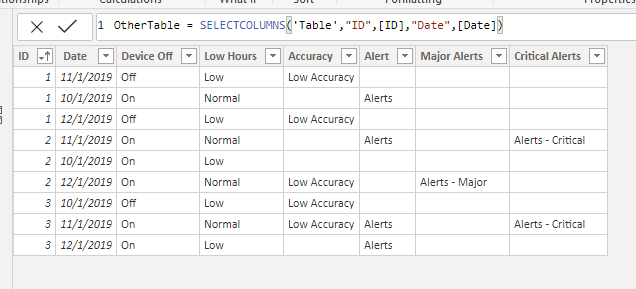
1. Create OtherTable.
OtherTable = SELECTCOLUMNS ( 'Table', "ID", [ID], "Date", [Date] )
2. Create Calculated columns.
Device Off =
IF (
    CALCULATE (
        COUNTROWS ( 'Table' ),
        FILTER (
            'Table',
            'Table'[ID] = OtherTable[ID]
                && 'Table'[Date] = OtherTable[Date]
                && 'Table'[Off] = 1
        )
    ) > 0,
    "Off",
    "On"
)
Low Hours =
IF (
CALCULATE (
COUNTROWS ( 'Table' ),
FILTER (
'Table',
'Table'[ID] = OtherTable[ID]
&& 'Table'[Date] = OtherTable[Date]
&& 'Table'[Hours Ran] < 2
)
) > 0,
"Low",
"Normal"
)
Accuracy =
IF (
    CALCULATE (
        COUNTROWS ( 'Table' ),
        FILTER (
            'Table',
            'Table'[ID] = OtherTable[ID]
                && 'Table'[Date] = OtherTable[Date]
                && 'Table'[Accuracy] < .9
        )
    ) > 0,
    "Low Accuracy",
    ""
)
Alert =
IF (
CALCULATE (
COUNTROWS ( AlertTable ),
FILTER (
AlertTable,
AlertTable[ID] = OtherTable[ID]
&& MONTH ( AlertTable[Date] ) = MONTH ( OtherTable[Date] )
&& AlertTable[Alert] = "Alert"
)
) > 0,
"Alerts",
""
)
Major Alerts =
IF (
    CALCULATE (
        COUNTROWS ( AlertTable ),
        FILTER (
            AlertTable,
            AlertTable[ID] = OtherTable[ID]
                && MONTH ( AlertTable[Date] ) = MONTH ( OtherTable[Date] )
                && AlertTable[Major Alert] = "Major"
        )
    ) > 0,
    "Alerts - Major",
    ""
)
Critical Alerts =
IF (
CALCULATE (
COUNTROWS ( AlertTable ),
FILTER (
AlertTable,
AlertTable[ID] = OtherTable[ID]
&& MONTH ( AlertTable[Date] ) = MONTH ( OtherTable[Date] )
&& AlertTable[Critical Alert] = "Critical"
)
) > 0,
"Alerts - Critical",
""
)
Best Regards,
Icey
If this post helps, then please consider Accept it as the solution to help the other members find it more quickly.
- Mark as New
- Bookmark
- Subscribe
- Mute
- Subscribe to RSS Feed
- Permalink
- Report Inappropriate Content
Hi @Anonymous ,
Please check if this is what you want:
1. Create OtherTable.
OtherTable = SELECTCOLUMNS ( 'Table', "ID", [ID], "Date", [Date] )
2. Create Calculated columns.
Device Off =
IF (
    CALCULATE (
        COUNTROWS ( 'Table' ),
        FILTER (
            'Table',
            'Table'[ID] = OtherTable[ID]
                && 'Table'[Date] = OtherTable[Date]
                && 'Table'[Off] = 1
        )
    ) > 0,
    "Off",
    "On"
)
Low Hours =
IF (
CALCULATE (
COUNTROWS ( 'Table' ),
FILTER (
'Table',
'Table'[ID] = OtherTable[ID]
&& 'Table'[Date] = OtherTable[Date]
&& 'Table'[Hours Ran] < 2
)
) > 0,
"Low",
"Normal"
)
Accuracy =
IF (
    CALCULATE (
        COUNTROWS ( 'Table' ),
        FILTER (
            'Table',
            'Table'[ID] = OtherTable[ID]
                && 'Table'[Date] = OtherTable[Date]
                && 'Table'[Accuracy] < .9
        )
    ) > 0,
    "Low Accuracy",
    ""
)
Alert =
IF (
CALCULATE (
COUNTROWS ( AlertTable ),
FILTER (
AlertTable,
AlertTable[ID] = OtherTable[ID]
&& MONTH ( AlertTable[Date] ) = MONTH ( OtherTable[Date] )
&& AlertTable[Alert] = "Alert"
)
) > 0,
"Alerts",
""
)
Major Alerts =
IF (
    CALCULATE (
        COUNTROWS ( AlertTable ),
        FILTER (
            AlertTable,
            AlertTable[ID] = OtherTable[ID]
                && MONTH ( AlertTable[Date] ) = MONTH ( OtherTable[Date] )
                && AlertTable[Major Alert] = "Major"
        )
    ) > 0,
    "Alerts - Major",
    ""
)
Critical Alerts =
IF (
CALCULATE (
COUNTROWS ( AlertTable ),
FILTER (
AlertTable,
AlertTable[ID] = OtherTable[ID]
&& MONTH ( AlertTable[Date] ) = MONTH ( OtherTable[Date] )
&& AlertTable[Critical Alert] = "Critical"
)
) > 0,
"Alerts - Critical",
""
)
Best Regards,
Icey
If this post helps, then please consider Accept it as the solution to help the other members find it more quickly.
- Mark as New
- Bookmark
- Subscribe
- Mute
- Subscribe to RSS Feed
- Permalink
- Report Inappropriate Content
Thanks, Icey! One thing I also realized that was giving me trouble was the ID fields in each table weren't named the same, so when I referred to them in my formulas, it kept giving me either all or nothing there. It's amazing what a typo can do. Appreciate it!
- Mark as New
- Bookmark
- Subscribe
- Mute
- Subscribe to RSS Feed
- Permalink
- Report Inappropriate Content
Hi @Anonymous ,
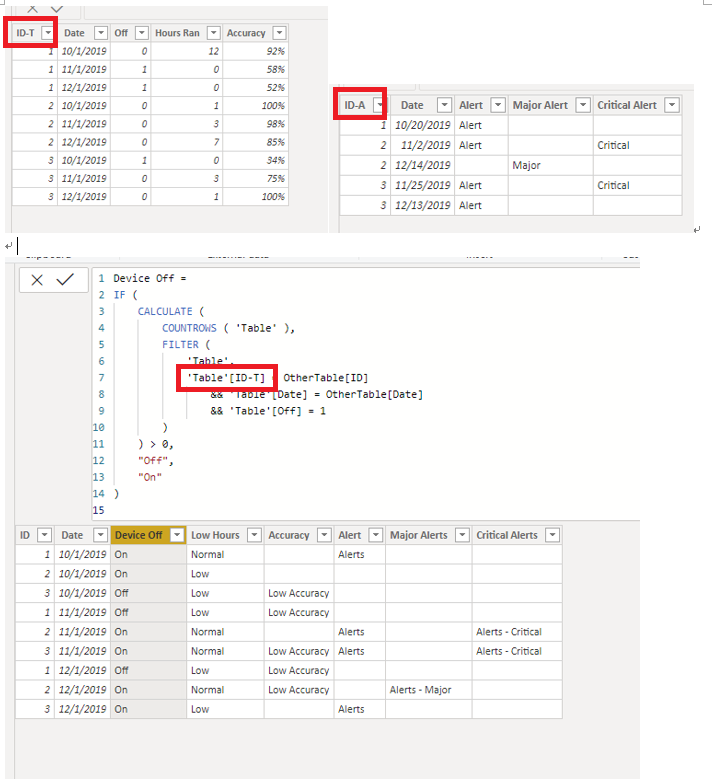
I don't quite understand it. Please give me some screenshots to help me know your issue.
My understanding is like this, but it's no different.
Best Regards,
Icey


- Mark as New
- Bookmark
- Subscribe
- Mute
- Subscribe to RSS Feed
- Permalink
- Report Inappropriate Content
For the first one, you might look at using an "X" aggregation like MAXX, SUMX, etc. over a FILTER of RELATEDTABLE.
for the second one, you should likely look at LOOKUPVALUE.
Follow on LinkedIn
@ me in replies or I'll lose your thread!!!
Instead of a Kudo, please vote for this idea
Become an expert!: Enterprise DNA
External Tools: MSHGQM
YouTube Channel!: Microsoft Hates Greg
Latest book!: DAX For Humans
DAX is easy, CALCULATE makes DAX hard...
Helpful resources

Power BI Dataviz World Championships
The Power BI Data Visualization World Championships is back! Get ahead of the game and start preparing now!

Power BI Monthly Update - December 2025
Check out the December 2025 Power BI Holiday Recap!

FabCon Atlanta 2026
Join us at FabCon Atlanta, March 16-20, for the ultimate Fabric, Power BI, AI and SQL community-led event. Save $200 with code FABCOMM.

| User | Count |
|---|---|
| 38 | |
| 36 | |
| 33 | |
| 33 | |
| 29 |


| User | Count |
|---|---|
| 134 | |
| 96 | |
| 78 | |
| 67 | |
| 65 |


