Don't miss your chance to take the Fabric Data Engineer (DP-600) exam for FREE! Find out how by watching the DP-600 session on-demand now through April 28th.
Learn moreJoin the FabCon + SQLCon recap series. Up next: Power BI, Real-Time Intelligence, IQ and AI, and Data Factory take center stage. All sessions are available on-demand after the live show. Register now
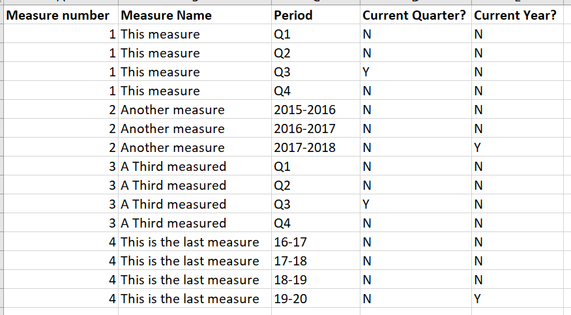
I have a dataset that is a mix of quarterly data and annual data. It's similar to the simple example below:
The 'Current Quarter?' column is a calculated column that I've added that identifies whether the quarter listed in the 'Quarter' column is the period we're currently reporting on. It automatically updates when the next reporting period rolls around. You can see in the example that measures 1 and 3 both have a Y in the 'Current Quarter?' column because the period we're currently reporting on is quarter 3.
However, I can't work out how to add the 'Current Year?' column. It needs to identify the latest/most recent entry for a measure and add in a Y, as per the example above. In the example, measures 2 and 4 both have a Y in the most recent entry. An added wrinkle is that the annual data won't necessarily have 4 entries (in the example, measure 2 only has 3).
Any ideas?
Hi @Mat42 ,
Does "measure" have corresponding date?
If so, try the DAX below:
Best Regards,
Liang
If this post helps, then please consider Accept it as the solution to help the other members find it more quickly.
Thanks for your responses.
The problem is that what I've shared is basically all there is. The measures don't have an assigned date, just Q1 Q2 etc or the 2015/2016, 2018-2019 designations. The rest of the table is just service specific data (levels, amounts etc) that match the measure. The example table is the only data not input on a quarterly basis.
Is it possible, maybe, to use the Max function to create the column to add a Y to the last entry per annual measure? The quarter labels (Q1 etc) are easy to work with, but the year entries will vary. Sometimes the latest data will be 2019/2020, sometimes it might be 2016/2017. It really just needs to add a Y in for the latest year (for those measures that don't have Q1 etc.
Thanks for everyone's help.
Turns out I was trying to do something that we don't actually need to do. Which would have been helpful to know a month ago.
Anyway, thanks for the help.
is this your raw data, on which you are working?
Try Like
if(period = (year(today()) &"-"& year(date(year(today()) ,year(today()) -12,day(today()) ))),"Y","N")
Check out the April 2026 Power BI update to learn about new features.
If you have recently started exploring Fabric, we'd love to hear how it's going. Your feedback can help with product improvements.
A new Power BI DataViz World Championship is coming this June! Don't miss out on submitting your entry.
| User | Count |
|---|---|
| 48 | |
| 40 | |
| 38 | |
| 20 | |
| 17 |
| User | Count |
|---|---|
| 68 | |
| 65 | |
| 30 | |
| 26 | |
| 25 |