FabCon is coming to Atlanta
Join us at FabCon Atlanta from March 16 - 20, 2026, for the ultimate Fabric, Power BI, AI and SQL community-led event. Save $200 with code FABCOMM.
Register now!- Power BI forums
- Get Help with Power BI
- Desktop
- Service
- Report Server
- Power Query
- Mobile Apps
- Developer
- DAX Commands and Tips
- Custom Visuals Development Discussion
- Health and Life Sciences
- Power BI Spanish forums
- Translated Spanish Desktop
- Training and Consulting
- Instructor Led Training
- Dashboard in a Day for Women, by Women
- Galleries
- Data Stories Gallery
- Themes Gallery
- Contests Gallery
- Quick Measures Gallery
- Notebook Gallery
- Translytical Task Flow Gallery
- TMDL Gallery
- R Script Showcase
- Webinars and Video Gallery
- Ideas
- Custom Visuals Ideas (read-only)
- Issues
- Issues
- Events
- Upcoming Events
Join the Fabric FabCon Global Hackathon—running virtually through Nov 3. Open to all skill levels. $10,000 in prizes! Register now.
- Power BI forums
- Forums
- Get Help with Power BI
- Desktop
- Calculate unique viewership duration
- Subscribe to RSS Feed
- Mark Topic as New
- Mark Topic as Read
- Float this Topic for Current User
- Bookmark
- Subscribe
- Printer Friendly Page

- Mark as New
- Bookmark
- Subscribe
- Mute
- Subscribe to RSS Feed
- Permalink
- Report Inappropriate Content
Calculate unique viewership duration
hi,
I have that captures viership of media/video content like netflix shown in table below. Row 1 captures viewership of customer "123456" watching video "Short Movie 2" that is 240 secs in duration on 20th Aug 2020, he/she started waching the video on the 40sec and stopped watching 40 secs later at index 80 secs.
| Unique ID | Customer ID | Date | Start Index (secs) | Stop Index (secs) | Video Duration (secs) | Video Name |
| 1 | 123456 | 20-Aug-20 | 40 | 80 | 240 | Short Movie 2 |
| 2 | 123456 | 18-Aug-20 | 70 | 90 | 240 | Short Movie 2 |
My objective is - at the end of each month, for each customer and each video, calculate the sum of unique viewership duration. i.e. as you can see in row 1 and 2 there is duration overlap between index 70 and 80 secs.
I have the data table above queried on power query, what do I do next to generate a monthly report on powerbi for this.
Appreciate everyone's help.


- Mark as New
- Bookmark
- Subscribe
- Mute
- Subscribe to RSS Feed
- Permalink
- Report Inappropriate Content
Hi @Anonymous
Create a date table
Date1 = ADDCOLUMNS(CALENDARAUTO(),"year-month",FORMAT([Date],"yyyy-mm"))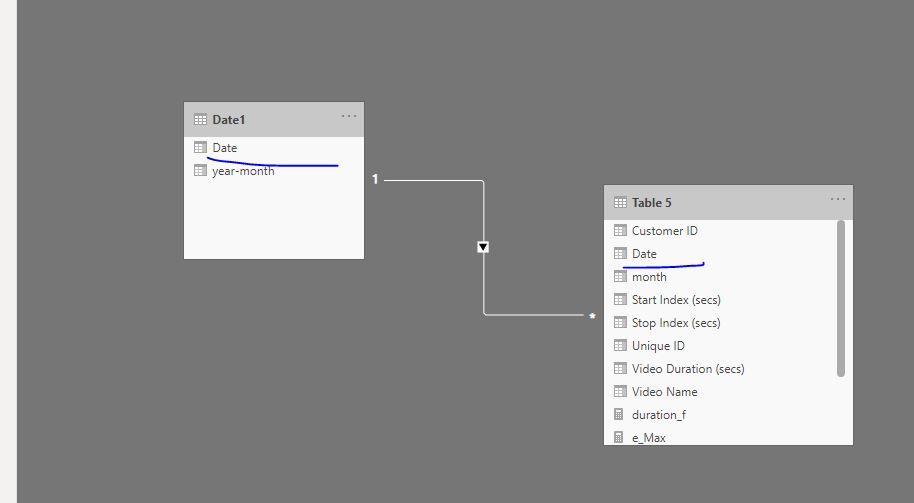
Add column in Table5,
month = FORMAT([Date],"yyyy-mm")Measures
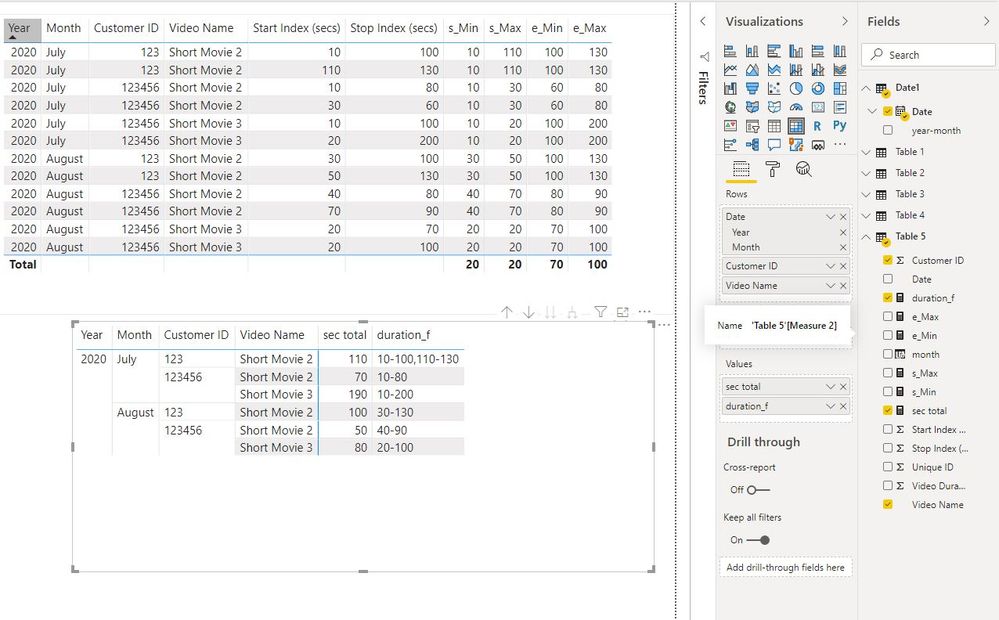
s_Min =
CALCULATE (
    MIN ( 'Table 5'[Start Index (secs)] ),
    FILTER (
        ALLSELECTED ( 'Table 5' ),
        'Table 5'[Customer ID] = MAX ( 'Table 5'[Customer ID] )
            && 'Table 5'[Video Name] = MAX ( 'Table 5'[Video Name] )
            && 'Table 5'[month] = MAX ( 'Table 5'[month] )
    )
)


s_Max =
CALCULATE (
    MAX ( 'Table 5'[Start Index (secs)] ),
    FILTER (
        ALLSELECTED ( 'Table 5' ),
        'Table 5'[Customer ID] = MAX ( 'Table 5'[Customer ID] )
            && 'Table 5'[Video Name] = MAX ( 'Table 5'[Video Name] )
            && 'Table 5'[month] = MAX ( 'Table 5'[month] )
    )
)


e_Min =
CALCULATE (
    MIN ( 'Table 5'[Stop Index (secs)] ),
    FILTER (
        ALLSELECTED ( 'Table 5' ),
        'Table 5'[Customer ID] = MAX ( 'Table 5'[Customer ID] )
            && 'Table 5'[Video Name] = MAX ( 'Table 5'[Video Name] )
            && 'Table 5'[month] = MAX ( 'Table 5'[month] )
    )
)


e_Max =
CALCULATE (
    MAX ( 'Table 5'[Stop Index (secs)] ),
    FILTER (
        ALLSELECTED ( 'Table 5' ),
        'Table 5'[Customer ID] = MAX ( 'Table 5'[Customer ID] )
            && 'Table 5'[Video Name] = MAX ( 'Table 5'[Video Name] )
            && 'Table 5'[month] = MAX ( 'Table 5'[month] )
    )
)

sec total = IF([s_Max]<=[e_Min],[e_Max]-[s_Min],[e_Min]-[s_Min]+[e_Max]-[s_Max])

duration_f =
IF (
    [sec total] <> BLANK (),
    IF (
        [s_Max] <= [e_Min],
        [s_Min] & "-" & [e_Max],
        [s_Min] & "-" & [e_Min] & "," & [s_Max] & "-" & [e_Max]
    )
)
Best Regards
Maggie
Community Support Team _ Maggie Li
If this post helps, then please consider Accept it as the solution to help the other members find it more quickly.
- Mark as New
- Bookmark
- Subscribe
- Mute
- Subscribe to RSS Feed
- Permalink
- Report Inappropriate Content
Hi @v-juanli-msft Maggie
I believe this is the closest to the final solution. Absolutely Brilliant. However, I believe, the formula fails for the following scenario
| Customer ID | Date | Movie | StartIndex | StopIndex |
| 123456 | aug 20 | short movie3 | 20 | 40 |
| 123456 | aug 20 | short movie3 | 30 | 50 |
| 123456 | aug 20 | short movie3 | 60 | 80 |
| 123456 | aug 20 | short movie3 | 90 | 100 |
in this case [sec_total] = 30. But actual unique duration for the month of august = 60. It misses out row 3 & 4.
Any thoughts on this?


- Mark as New
- Bookmark
- Subscribe
- Mute
- Subscribe to RSS Feed
- Permalink
- Report Inappropriate Content
I thought about it some more and here is what I would do:
For each customer and video collect all the viewed seconds ( via GENERATESERIES ) into a table variable and then do a DISTINCTCOUNT on the second values. That has the same effect as EXCEPT but across all video fragments.
- Mark as New
- Bookmark
- Subscribe
- Mute
- Subscribe to RSS Feed
- Permalink
- Report Inappropriate Content
@lbendlini am very keen to try your proposed solutions, however I am having trouble understanding how to execute it
- Mark as New
- Bookmark
- Subscribe
- Mute
- Subscribe to RSS Feed
- Permalink
- Report Inappropriate Content
Provide some more sample data.
- Mark as New
- Bookmark
- Subscribe
- Mute
- Subscribe to RSS Feed
- Permalink
- Report Inappropriate Content
- Mark as New
- Bookmark
- Subscribe
- Mute
- Subscribe to RSS Feed
- Permalink
- Report Inappropriate Content
For your overlap periods you can either deploy an EXCEPT function, so that the duration would be
(A EXCEPT B ) + B
but that would require you do decide on a granularity ( i guess you already settled on seconds) and then generate series on the fly.
The alternative would be to realize that Power BI is not the right tool for your requirement.
- Mark as New
- Bookmark
- Subscribe
- Mute
- Subscribe to RSS Feed
- Permalink
- Report Inappropriate Content
@lbendlinwhat would be A and B in the formula you mentioned? And, what tool would you suggest instead of PowerBI


- Mark as New
- Bookmark
- Subscribe
- Mute
- Subscribe to RSS Feed
- Permalink
- Report Inappropriate Content
You should be able to use a simple SUMX measure to get your result like this (replace "Data" with your actual table name)
Total Duration Viewed = SUMX(Data, Data[Stop Index (secs)] - Data[Start Index (secs)])
You can use the above in a table visual with Customer and/or Video Name (or just as a card visual).
If this works for you, please mark it as the solution. Kudos are appreciated too. Please let me know if not.
Regards,
Pat
Did I answer your question? Mark my post as a solution! Kudos are also appreciated!
To learn more about Power BI, follow me on Twitter or subscribe on YouTube.
@mahoneypa HoosierBI on YouTube
- Mark as New
- Bookmark
- Subscribe
- Mute
- Subscribe to RSS Feed
- Permalink
- Report Inappropriate Content
- Mark as New
- Bookmark
- Subscribe
- Mute
- Subscribe to RSS Feed
- Permalink
- Report Inappropriate Content
I thought you wanted to make sure overlapping views were included not excluded. Here is a different measure that will calculate the overall duration watched for each customer and video combination. Note this works with your example data, but if you have a customer that watched the first 10 sec and last 10 sec of a video, it would calculate the whole video duration. A more complex expression would be needed to avoid that. I didn't have time to do that now, but may later. Perhaps the below approach will be enough, or get you started.
NewMeasure =
SUMX (
SUMMARIZE ( Table, Table[Customer ID], Table[Video Name] ),
CALCULATE ( MAX ( Table[Stop Index] ) - MIN ( Table[Start Index] ) )
)
If this works for you, please mark it as the solution. Kudos are appreciated too. Please let me know if not.
Regards,
Pat
Did I answer your question? Mark my post as a solution! Kudos are also appreciated!
To learn more about Power BI, follow me on Twitter or subscribe on YouTube.
@mahoneypa HoosierBI on YouTube
- Mark as New
- Bookmark
- Subscribe
- Mute
- Subscribe to RSS Feed
- Permalink
- Report Inappropriate Content
Did you try the SUMX measure? It calculates the difference on each row and then sums up the results, so should avoid overlapping values.
If this works for you, please mark it as the solution. Kudos are appreciated too. Please let me know if not.
Regards,
Pat
Did I answer your question? Mark my post as a solution! Kudos are also appreciated!
To learn more about Power BI, follow me on Twitter or subscribe on YouTube.
@mahoneypa HoosierBI on YouTube
- Mark as New
- Bookmark
- Subscribe
- Mute
- Subscribe to RSS Feed
- Permalink
- Report Inappropriate Content
Helpful resources

Power BI Monthly Update - September 2025
Check out the September 2025 Power BI update to learn about new features.

FabCon Atlanta 2026
Join us at FabCon Atlanta, March 16-20, for the ultimate Fabric, Power BI, AI and SQL community-led event. Save $200 with code FABCOMM.


