Forum Discussion

Calculate totals between rows
Hello everyone,
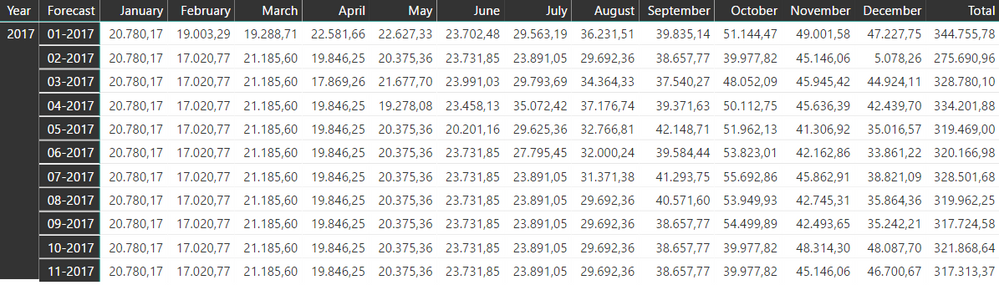
I need some urgent help with this one. I need to show the changes of the Total values, between the single forecast dates.
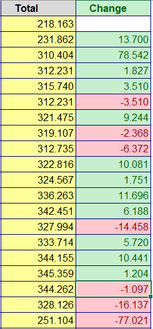
As in the Excel example the forecast date 01-2017 has the total value of 218.163, the change to the next forecast date (02-2017) is 13.700, and so on.
Is it possible to do it in Power Bi like in the excel example? If yes, do anyone have any idea?
Thank you guys in advance for your help :)
Hi Billy0503,
To calculate the changes, you can firstly calculate the values of last month, then it should be easy to get the changes. The formula below is for your reference. :smileyhappy:
Changes =
VAR currentYear =
    MAX ( 'Table'[Year] )
VAR currentMonth =
    MAX ( 'Table'[Year] )
RETURN
    SUM ( 'Table'[Values] )
        - CALCULATE (
            SUM ( 'Table'[Values] ),
            FILTER (
                ALL ( 'Table' ),
                'Table'[Year] = currentYear
                    && 'Table'[Month]
                    = currentMonth - 1
            )
        )
Regards
2 Replies
 v-ljerr-msft
Microsoft Employee
Hi Billy0503,
To calculate the changes, you can firstly calculate the values of last month, then it should be easy to get the changes. The formula below is for your reference. :smileyhappy:
Changes =
VAR currentYear =
    MAX ( 'Table'[Year] )
VAR currentMonth =
    MAX ( 'Table'[Year] )
RETURN
    SUM ( 'Table'[Values] )
        - CALCULATE (
            SUM ( 'Table'[Values] ),
            FILTER (
                ALL ( 'Table' ),
                'Table'[Year] = currentYear
                    && 'Table'[Month]
                    = currentMonth - 1
            )
        )
Regards
 Billy0503Frequent Visitor
You are a genius :) Thanks a lot for your help v-ljerr-msft