cancel
Showing results for 
Search instead for 
Did you mean: 

The Power BI Data Visualization World Championships is back! Get ahead of the game and start preparing now! Learn more

Reply
Anonymous
Not applicable

Calculate time difference

Hi Guys,


I have a data set where is information about email delivering and opening and I want to see how long does it take to user to open the email.

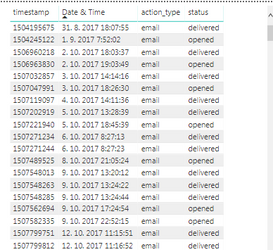
Problem is, that I do not have separate columns for deliver and open, so I cant just subtract one value from another  but something like this (where I have a column "status" where are more values like delivered, opened, etc and every row has its timestamp + date & time):

email.PNG

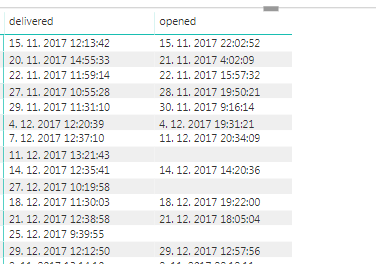
I can create a matrix where I can see for every email information when was delivered and when (if) was opened and I need a third column where will be the time how much it took the user to open an email (so open minus delivered)

email2.PNG


Is it possible?


Thank you

Lukas

5 REPLIES 5
EVEAdmin
Post Patron
Post Patron

Please check this thread, where you will find a solution to your query.

Anonymous
Not applicable

Hi EVEAdmin,


thank you for reply but I am not sure if I follows. On the link you provided is not the solution to my problem or am I missing something?


I dont need to convert timestamp to standard date time (or I needed it and I used the solution from this thread you sent 🙂 )


I need a new measure where will be the difference (EG from my table the first row should be 9:49:10 etc)


Thanks

Lukas

If you convert the timestap to standard date time, then you calculate the difference between the 2 dates

Anonymous
Not applicable

Yes, but this works when I have 2 separates columns right?

One columne is "email opened" and another is "email delivered" and I create third column where I use formula "email opened" minus "email delivered", right?


problem is that my data looks like the image below

Those 3 rows belong to 1 email, first represent when the email was sent, second when was delivered and third when was opened.

I tried to use some if functions but no result, I got errors or completely wrong numbers

email data.PNG


Thanks

Lukas

Using the formula suggested in that thread, you will add a new calculated column to your model. This new calculated column will allow you to calculate the difference between the 2 dates.


Helpful resources

Announcements
Power BI DataViz World Championships

Power BI Dataviz World Championships

The Power BI Data Visualization World Championships is back! Get ahead of the game and start preparing now!

December 2025 Power BI Update Carousel

Power BI Monthly Update - December 2025

Check out the December 2025 Power BI Holiday Recap!

FabCon Atlanta 2026 carousel

FabCon Atlanta 2026

Join us at FabCon Atlanta, March 16-20, for the ultimate Fabric, Power BI, AI and SQL community-led event. Save $200 with code FABCOMM.