Join us at FabCon Atlanta from March 16 - 20, 2026, for the ultimate Fabric, Power BI, AI and SQL community-led event. Save $200 with code FABCOMM.
Register now!Get Fabric Certified for FREE during Fabric Data Days. Don't miss your chance! Request now
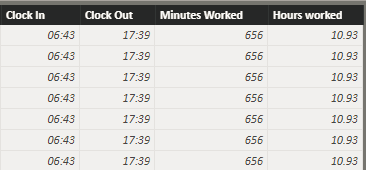
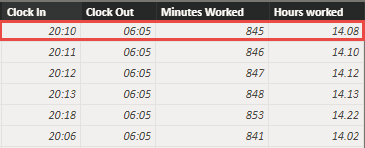
I'm trying to calculate how many Minutes there are between an employee's clock in and out time (in that order) to get total minutes worked. My formula: Minutes Worked = ABS(DATEDIFF('TA Data'[Clock In],'TA Data'[Clock Out],MINUTE)). It returns the correct minutes worked when Clock in time is in the AM and clock out is in the PM (see figure 1 below). However, there is no date information attached to these times so when clock in is in the PM and clock out is in the Am minutes worked ends up being calculated wrong (see figure 2 below). What formula do I need to use to calculate time from clock in until clock out, in that order?
Figure 1: shows correct working minutes
Figure 2: shows incorrect working minutes. The highlighted example should show 595 actual working minutes (minutes between clock in and clock out time). Without date information it is counting minutes from clock out (AM) until clock in (PM) and showing 845 minutes.
Solved! Go to Solution.
Hi @Anonymous
You may try to create below columns:
Hour =
IF (
'TA Data'[Clock in] < 'TA Data'[Clock Out],
ABS ( DATEDIFF ( 'TA Data'[Clock in], 'TA Data'[Clock Out], HOUR ) ),
24 - HOUR ( 'TA Data'[Clock in] )
+ HOUR ( 'TA Data'[Clock Out] )
)Minute =
VAR a =
HOUR ( 'TA Data'[Clock Out] ) * 60
+ MINUTE ( 'TA Data'[Clock Out] )
VAR b =
( 24 - HOUR ( 'TA Data'[Clock in] ) )
* 60
- MINUTE ( 'TA Data'[Clock in] )
RETURN
IF (
'TA Data'[Clock in] < 'TA Data'[Clock Out],
ABS ( DATEDIFF ( 'TA Data'[Clock in], 'TA Data'[Clock Out], MINUTE ) ),
a + b
) Regards,
Cherie
Hi @Anonymous
You may try to create below columns:
Hour =
IF (
'TA Data'[Clock in] < 'TA Data'[Clock Out],
ABS ( DATEDIFF ( 'TA Data'[Clock in], 'TA Data'[Clock Out], HOUR ) ),
24 - HOUR ( 'TA Data'[Clock in] )
+ HOUR ( 'TA Data'[Clock Out] )
)Minute =
VAR a =
HOUR ( 'TA Data'[Clock Out] ) * 60
+ MINUTE ( 'TA Data'[Clock Out] )
VAR b =
( 24 - HOUR ( 'TA Data'[Clock in] ) )
* 60
- MINUTE ( 'TA Data'[Clock in] )
RETURN
IF (
'TA Data'[Clock in] < 'TA Data'[Clock Out],
ABS ( DATEDIFF ( 'TA Data'[Clock in], 'TA Data'[Clock Out], MINUTE ) ),
a + b
) Regards,
Cherie
Check out the November 2025 Power BI update to learn about new features.
Advance your Data & AI career with 50 days of live learning, contests, hands-on challenges, study groups & certifications and more!