cancel
Showing results for 
Search instead for 
Did you mean: 

Get Fabric Certified for FREE during Fabric Data Days. Don't miss your chance! Request now

Reply
jader3rd
Microsoft Employee
Microsoft Employee

Calculate the average of a sums of a subset of values per day

I have a dataset where the series column has 8 possible value SeriesA_1, SeriesA_2, SeriesA_3, SeriesA_4, SeriesB_1, SeriesB_2, SeriesB_3, SeriesB_4. Any one of them may or may not show up in every day.

What I want is the average of the sum per day of a subset of the series.

I can get the sum of a subset by using:

SUMX(FILTER(Query1, Query1[Series] IN {"SeriesA_1", "SeriesA_2", "SeriesA_3", "SeriesA_4"}), Query1[Value])

But now I need a way to appy a filter, such that it will only be doing the summing on a per day basis, and then take the average of those values.

I can't just wrap an Average around it, because Average expects a column name, and there is no column name.

AverageX is expecting a table and an expression. I was hoping that if I made a table of dates, it would then take the average of each expression per date:

AVERAGEX(FILTER(Query1, DISTINCT(Query1[Date])), SUMX(FILTER(Query1, Query1[Series] IN {"SeriesA_1", "SeriesA_2", "SeriesA_3", "SeriesA_4"}), Query1[Value]))

But that didn't work. The error is A table of multiple values was supplied where a single value was expected.

1 ACCEPTED SOLUTION
v-juanli-msft
Community Support
Community Support

Hi @jader3rd

To avoid this error "A table of multiple values ...", modify with following mearure

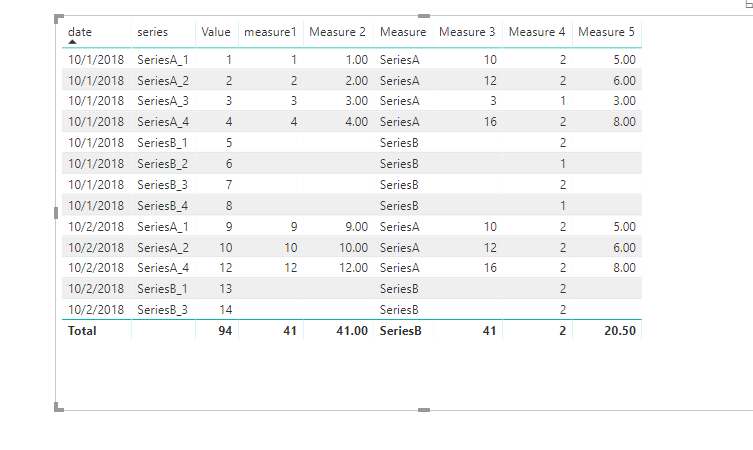
Measure 2 = AVERAGEX(DISTINCT(Query1[Date]),SUMX(FILTER(Query1, Query1[Series] 

IN {"SeriesA_1", "SeriesA_2", "SeriesA_3", "SeriesA_4"}), Query1[Value]))


Based on my understanding, your requirement is to calculate

average of the sum per day of a subset of the series

for example

Series                DATE      value      average

SeriesA_1          day1       2            (2+4)/2

SeriesA_1          day2       4            (2+4)/2

SeriesA_2          day1       4            (4+4+4)/3

SeriesA_2          day2       4            (4+4+4)/3

SeriesA_2          day3       4            (4+4+4)/3

Right?


If so, please follow my advice

Measure = LEFT(MAX([series]),7)

Measure 3 = SUMX(FILTER(ALLEXCEPT(Query1,Query1[series]),[Measure]="SeriesA"),[Value])

Measure 4 = CALCULATE(DISTINCTCOUNT(Query1[date]),ALLEXCEPT(Query1,Query1[series]))

Measure 5 = [Measure 3]/[Measure 4]

13.png


Best Regards

Maggie


View solution in original post

3 REPLIES 3
v-juanli-msft
Community Support
Community Support

Hi @jader3rd

To avoid this error "A table of multiple values ...", modify with following mearure

Measure 2 = AVERAGEX(DISTINCT(Query1[Date]),SUMX(FILTER(Query1, Query1[Series] 

IN {"SeriesA_1", "SeriesA_2", "SeriesA_3", "SeriesA_4"}), Query1[Value]))


Based on my understanding, your requirement is to calculate

average of the sum per day of a subset of the series

for example

Series                DATE      value      average

SeriesA_1          day1       2            (2+4)/2

SeriesA_1          day2       4            (2+4)/2

SeriesA_2          day1       4            (4+4+4)/3

SeriesA_2          day2       4            (4+4+4)/3

SeriesA_2          day3       4            (4+4+4)/3

Right?


If so, please follow my advice

Measure = LEFT(MAX([series]),7)

Measure 3 = SUMX(FILTER(ALLEXCEPT(Query1,Query1[series]),[Measure]="SeriesA"),[Value])

Measure 4 = CALCULATE(DISTINCTCOUNT(Query1[date]),ALLEXCEPT(Query1,Query1[series]))

Measure 5 = [Measure 3]/[Measure 4]

13.png


Best Regards

Maggie


Why is it DistinctCount instead of Distinct?

Hi @jader3rd

The DISTINCTCOUNT function counts the number of distinct values in a column.

DISTINCT(<column>)  Returns a one-column table that contains the distinct values from the specified column.


Best Regards

Maggie


Helpful resources

Announcements
November Power BI Update Carousel

Power BI Monthly Update - November 2025

Check out the November 2025 Power BI update to learn about new features.

Fabric Data Days Carousel

Fabric Data Days

Advance your Data & AI career with 50 days of live learning, contests, hands-on challenges, study groups & certifications and more!

FabCon Atlanta 2026 carousel

FabCon Atlanta 2026

Join us at FabCon Atlanta, March 16-20, for the ultimate Fabric, Power BI, AI and SQL community-led event. Save $200 with code FABCOMM.

Top Solution Authors
Top Kudoed Authors