cancel
Showing results for 
Search instead for 
Did you mean: 

Get Fabric Certified for FREE during Fabric Data Days. Don't miss your chance! Request now

Reply
Anonymous
Not applicable

Calculate the average based on week period

Hello, 


I am kind of new to power Bi, data visualizacion and report construction. I am trying to build a demand graph based on a weekly demand. 


image.png

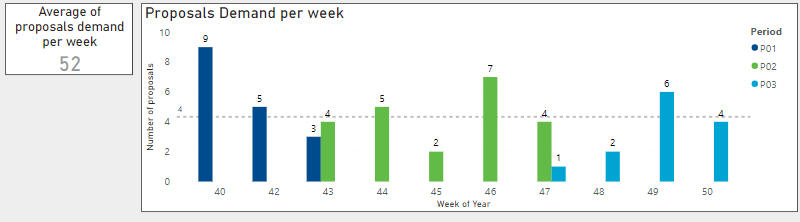
The Graph shows the demand volume based on the different weeks. The week value is set through another table of periods which is associated with a date value from the demand table. As you may see, I have already an average line on the visualization with a very small, hard to see '4' number over there.


I want to show  the average per week on the data card that is set at the left. Any ideas on how I could be able to achieve this? I don't know how to calculate this average per week. 

1 ACCEPTED SOLUTION
v-kelly-msft
Community Support
Community Support

Hi @Anonymous ,


What you need is to create 2 measures :

1.Create a measure to get value of “Proposals demand”:


Proposal demand =

VAR week =
MAX ( 'Date'[Week of year] )
VAR p =
MAX ( 'Date'[Period] )
VAR k =
ADDCOLUMNS (
Demand,
"ind", CALCULATE (
MAX ( 'Date'[Period] ),
FILTER (
'Date',
'Date'[Week of year] = Demand[Week of year]
&& 'Date'[Index] = Demand[Index]
)
)
)
RETURN
CALCULATE (
SUM ( Demand[Proposals Demand per week] ),
FILTER ( k, Demand[Week of year] = MAX ( 'Date'[Week of year] ) && [ind] = p )
)


2. show the “average ” in a card:

Average of proposals demand per week= AVERAGE('Demand'[Proposals Demand per week])
 

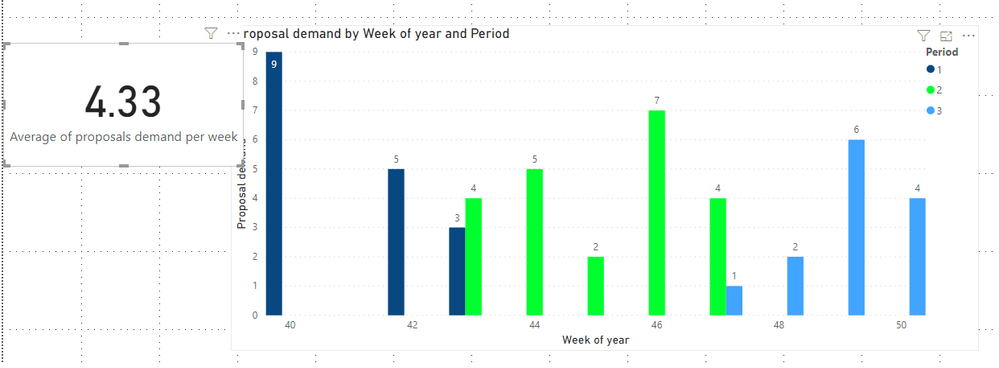
3.Then you will see as below:

555.png

For the related .pbix file,pls turn to URL: https://microsoftapc-my.sharepoint.com/:u:/g/personal/v-kellya_microsoft_com/EZrxK33QIJJFh1P_nskya94B47Z-f_BqWT7qb4I-emY2zQ?e=nr41Dw

Hope this would help.


Best Regards,

Kelly


View solution in original post

1 REPLY 1
v-kelly-msft
Community Support
Community Support

Hi @Anonymous ,


What you need is to create 2 measures :

1.Create a measure to get value of “Proposals demand”:


Proposal demand =

VAR week =
MAX ( 'Date'[Week of year] )
VAR p =
MAX ( 'Date'[Period] )
VAR k =
ADDCOLUMNS (
Demand,
"ind", CALCULATE (
MAX ( 'Date'[Period] ),
FILTER (
'Date',
'Date'[Week of year] = Demand[Week of year]
&& 'Date'[Index] = Demand[Index]
)
)
)
RETURN
CALCULATE (
SUM ( Demand[Proposals Demand per week] ),
FILTER ( k, Demand[Week of year] = MAX ( 'Date'[Week of year] ) && [ind] = p )
)


2. show the “average ” in a card:

Average of proposals demand per week= AVERAGE('Demand'[Proposals Demand per week])
 

3.Then you will see as below:

555.png

For the related .pbix file,pls turn to URL: https://microsoftapc-my.sharepoint.com/:u:/g/personal/v-kellya_microsoft_com/EZrxK33QIJJFh1P_nskya94B47Z-f_BqWT7qb4I-emY2zQ?e=nr41Dw

Hope this would help.


Best Regards,

Kelly


Helpful resources

Announcements
November Power BI Update Carousel

Power BI Monthly Update - November 2025

Check out the November 2025 Power BI update to learn about new features.

Fabric Data Days Carousel

Fabric Data Days

Advance your Data & AI career with 50 days of live learning, contests, hands-on challenges, study groups & certifications and more!

FabCon Atlanta 2026 carousel

FabCon Atlanta 2026

Join us at FabCon Atlanta, March 16-20, for the ultimate Fabric, Power BI, AI and SQL community-led event. Save $200 with code FABCOMM.

Top Solution Authors
Top Kudoed Authors