cancel
Showing results for 
Search instead for 
Did you mean: 

Learn from the best! Meet the four finalists headed to the FINALS of the Power BI Dataviz World Championships! Register now

Reply
YasminYas
Helper I
Helper I

Calculate past 7days Rolling average of 2 columns

Hi All,
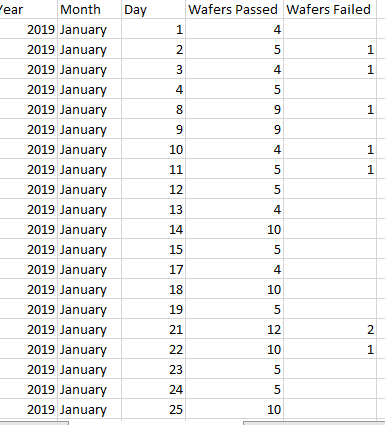
I have data like this. I want to calculate past 7 days rolling average and the folrmula should be 

[sum(Pass wafers in past 7D)] / [sum(Pass + Fail wafers in past 7D)]
I have 3 filters in my power bi as Year , Month and Day. Please help me with Dax
My approach was :
1.Calculated pass pass percentage 

Pass Percentage = divide(CALCULATE(count(YIELD[WAFERPASS])),CALCULATE(count(YIELD[QC_DATE_OUT]),ALLSELECTED(YIELD[WAFERPASS])))
2.Calculated 7D pass pass percentage using Quick measures
Pass Percentage 7D rolling average =
if(ISBLANK([QC_Pass Percentage]),BLANK(),
IF(
ISFILTERED('YIELD'[QC_DATE_OUT]),
ERROR("Time intelligence quick measures can only be grouped or filtered by the Power BI-provided date hierarchy or primary date column."),
VAR __LAST_DATE = LASTDATE('YIELD'[QC_DATE_OUT].[Date])
RETURN
AVERAGEX(
DATESBETWEEN(
'YIELD'[QC_DATE_OUT].[Date],
DATEADD(__LAST_DATE, -7, DAY),
__LAST_DATE
),
CALCULATE([QC_Pass Percentage])
)
))
 
Still didn't get the correct figures
 

Thanks In advance


Waf.PNG

1 ACCEPTED SOLUTION

Hi All,

This Dax used for me to calculated 7D_Rolling average:
 7D_Rolling average=

VAR LAST_DATE = LASTDATE('YIELD'[QC_DATE_OUT].[Date])

Var Sum_waferpasses_7 = calculate(sum(YIELD[WAFERPASS]),DATESBETWEEN('YIELD'[QC_DATE_OUT].[Date],DATEADD(LAST_DATE, -6, DAY),LAST_DATE))

    Var Sum_allthewafers_7 = calculate(sum(YIELD[TotalWafers]),DATESBETWEEN('YIELD'[QC_DATE_OUT].[Date],DATEADD(LAST_DATE, -6, DAY),LAST_DATE))

    return divide(Sum_waferpasses_7 ,Sum_allthewafers_7))

Thanks


View solution in original post

3 REPLIES 3
v-cherch-msft
Microsoft Employee
Microsoft Employee

Hi @YasminYas


I would suggest you create a rolling sum first.Then divide it with 7.Please refer to this article.

https://www.sqlbi.com/articles/rolling-12-months-average-in-dax/

If you need further help, please share a simplified data sample and expected output.You can upload the .pbix to OneDrive and post the link here. Do mask sensitive data before uploading.


Regards,

Cherie

Community Support Team _ Cherie Chen
If this post helps, then please consider Accept it as the solution to help the other members find it more quickly.
Greg_Deckler
Community Champion
Community Champion

There is a Rolling Average quick measure I believe. Also, See if my Time Intelligence the Hard Way provides a different way of accomplishing what you are going for.

https://community.powerbi.com/t5/Quick-Measures-Gallery/Time-Intelligence-quot-The-Hard-Way-quot-TIT...


Follow on LinkedIn
@ me in replies or I'll lose your thread!!!
Instead of a Kudo, please vote for this idea
Become an expert!: Enterprise DNA
External Tools: MSHGQM
YouTube Channel!: Microsoft Hates Greg
Latest book!:
DAX For Humans

DAX is easy, CALCULATE makes DAX hard...

Hi All,

This Dax used for me to calculated 7D_Rolling average:
 7D_Rolling average=

VAR LAST_DATE = LASTDATE('YIELD'[QC_DATE_OUT].[Date])

Var Sum_waferpasses_7 = calculate(sum(YIELD[WAFERPASS]),DATESBETWEEN('YIELD'[QC_DATE_OUT].[Date],DATEADD(LAST_DATE, -6, DAY),LAST_DATE))

    Var Sum_allthewafers_7 = calculate(sum(YIELD[TotalWafers]),DATESBETWEEN('YIELD'[QC_DATE_OUT].[Date],DATEADD(LAST_DATE, -6, DAY),LAST_DATE))

    return divide(Sum_waferpasses_7 ,Sum_allthewafers_7))

Thanks


Helpful resources

Announcements
Join our Fabric User Panel

Join our Fabric User Panel

Share feedback directly with Fabric product managers, participate in targeted research studies and influence the Fabric roadmap.

February Power BI Update Carousel

Power BI Monthly Update - February 2026

Check out the February 2026 Power BI update to learn about new features.