Join us at FabCon Atlanta from March 16 - 20, 2026, for the ultimate Fabric, Power BI, AI and SQL community-led event. Save $200 with code FABCOMM.
Register now!The Power BI Data Visualization World Championships is back! Get ahead of the game and start preparing now! Learn more
Hi, I am wondering if anyone here can help!
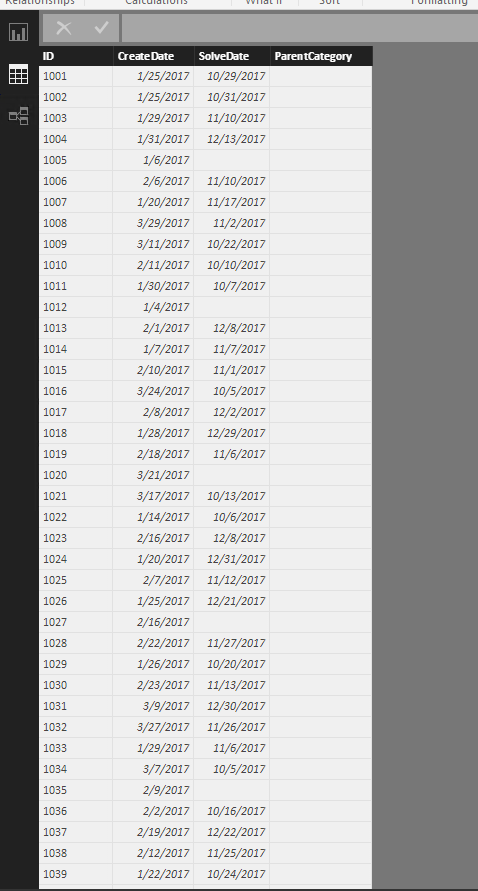
I am building a self service reporting tool for the IT Helpdesk. We have an incidents table that has Incident ID, Create Date, Solve Date, Parent Cateory columns.
I need to somehow work out how many incidents were open at the end of each month. A ticket is considered open if the [Solve Date] is null, OR the [Solve Date] > end of the month.
So for an example, if a ticket was created on April 2nd, 2017 and closed on April 20th, 2017 - this would not be included. If a ticket was created on April 2nd 2017, and closed on May 5th 2017, this would be included for April as it went over the end of the month mark.
If a ticket was opened April 2nd 2017, and closed 8th Jul 2017 it would be included for April, May and June.
I hope this makes sense? I have looked at similar examples but can't seem to find what I need on here!
Many thanks for any help
Solved! Go to Solution.
You could create a table below by using DAX to get the result you want.
Date =
ADDCOLUMNS (
FILTER (
CALENDAR ( DATE ( 2017, 1, 1 ), DATE ( 2018, 1, 31 ) ),
DAY ( [Date] ) = 1
),
"YearMonth", FORMAT ( [Date], "YYYY-MMM" ),
"OpenTicket", CALCULATE ( COUNT ( Incidents[ID] ) )
- CALCULATE (
COUNT ( Incidents[ID] ),
FILTER ( Incidents, Incidents[SolveDate] < [Date] )
)
+ CALCULATE (
COUNT ( Incidents[ID] ),
FILTER ( Incidents, ISBLANK ( Incidents[SolveDate] ) )
)
)
Regards,
Charlie Liao
You could create a table below by using DAX to get the result you want.
Date =
ADDCOLUMNS (
FILTER (
CALENDAR ( DATE ( 2017, 1, 1 ), DATE ( 2018, 1, 31 ) ),
DAY ( [Date] ) = 1
),
"YearMonth", FORMAT ( [Date], "YYYY-MMM" ),
"OpenTicket", CALCULATE ( COUNT ( Incidents[ID] ) )
- CALCULATE (
COUNT ( Incidents[ID] ),
FILTER ( Incidents, Incidents[SolveDate] < [Date] )
)
+ CALCULATE (
COUNT ( Incidents[ID] ),
FILTER ( Incidents, ISBLANK ( Incidents[SolveDate] ) )
)
)
Regards,
Charlie Liao
Hi,
I have the same requirement,but I am working on tabular model with date dimension and fact table that has Open and Close dates.The date table and fact table is joined with Open date(active),CloseDate(inactive).
Now,how can i acheive the same results without creating additional table.Can't we do this in a measure?
Hi, I am wondering if anyone here can help!
I am building a self service reporting tool for the IT Helpdesk. We have an incidents table that has Incident ID, Create Date, Solve Date, Parent Cateory columns.
I need to somehow work out how many incidents were open at the end of each month. A ticket is considered open if the [Solve Date] is null, OR the [Solve Date] > end of the month.
So for an example, if a ticket was created on April 2nd, 2017 and closed on April 20th, 2017 - this would not be included. If a ticket was created on April 2nd 2017, and closed on May 5th 2017, this would be included for April as it went over the end of the month mark.
If a ticket was opened April 2nd 2017, and closed 8th Jul 2017 it would be included for April, May and June.
I hope this makes sense? I have looked at similar examples but can't seem to find what I need on here!
Many thanks for any help
The Power BI Data Visualization World Championships is back! Get ahead of the game and start preparing now!
| User | Count |
|---|---|
| 41 | |
| 38 | |
| 36 | |
| 30 | |
| 28 |
| User | Count |
|---|---|
| 128 | |
| 88 | |
| 79 | |
| 67 | |
| 62 |