FabCon is coming to Atlanta
Join us at FabCon Atlanta from March 16 - 20, 2026, for the ultimate Fabric, Power BI, AI and SQL community-led event. Save $200 with code FABCOMM.
Register now!- Power BI forums
- Get Help with Power BI
- Desktop
- Service
- Report Server
- Power Query
- Mobile Apps
- Developer
- DAX Commands and Tips
- Custom Visuals Development Discussion
- Health and Life Sciences
- Power BI Spanish forums
- Translated Spanish Desktop
- Training and Consulting
- Instructor Led Training
- Dashboard in a Day for Women, by Women
- Galleries
- Data Stories Gallery
- Themes Gallery
- Contests Gallery
- QuickViz Gallery
- Quick Measures Gallery
- Visual Calculations Gallery
- Notebook Gallery
- Translytical Task Flow Gallery
- TMDL Gallery
- R Script Showcase
- Webinars and Video Gallery
- Ideas
- Custom Visuals Ideas (read-only)
- Issues
- Issues
- Events
- Upcoming Events
The Power BI Data Visualization World Championships is back! Get ahead of the game and start preparing now! Learn more
- Power BI forums
- Forums
- Get Help with Power BI
- Desktop
- Calculate % of Revenue
- Subscribe to RSS Feed
- Mark Topic as New
- Mark Topic as Read
- Float this Topic for Current User
- Bookmark
- Subscribe
- Printer Friendly Page


- Mark as New
- Bookmark
- Subscribe
- Mute
- Subscribe to RSS Feed
- Permalink
- Report Inappropriate Content
Calculate % of Revenue
Hello,
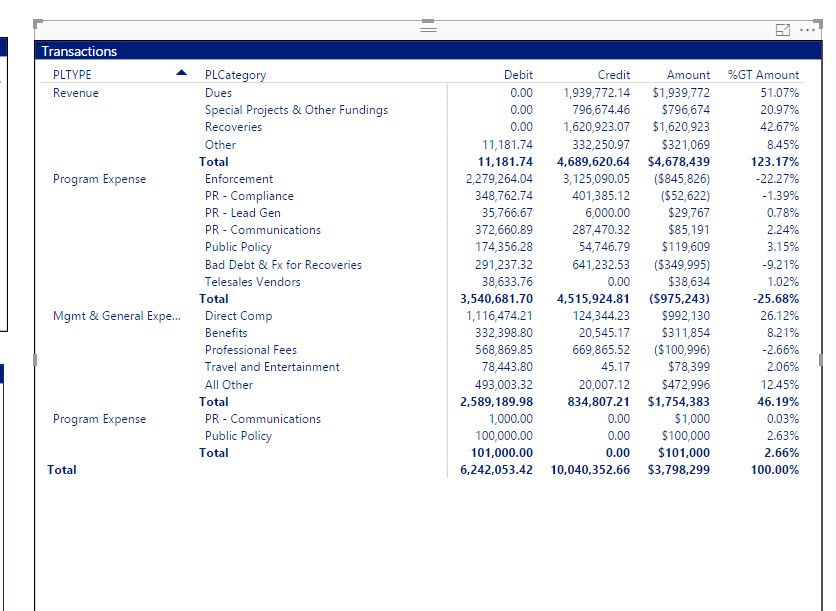
I have a need to calculate % of revenue . I tried using the Default % of Grand total , but since there are negative numbers it calculates revenue past 100%
Revenue should alsways = 100% and the percentage should be based on Revenue.
How Can I calculate the Percentage of Revenue ?


- Mark as New
- Bookmark
- Subscribe
- Mute
- Subscribe to RSS Feed
- Permalink
- Report Inappropriate Content
Hi @lcasey,
Could you try using SUMX function(DAX) to calculate the Amount, then use the Default % of Grand total to see if it works? The formula below is for your reference.
Amount =
SUMX (
    '00-GLSummary',
    IF ( '00-GLSummary'[Revenue] > 0, [Credit] - [Debit], [Debit] - [Credit] )
)
Regards
- Mark as New
- Bookmark
- Subscribe
- Mute
- Subscribe to RSS Feed
- Permalink
- Report Inappropriate Content
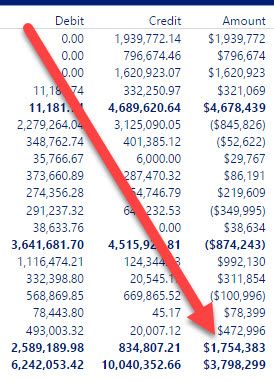
I Tried , but the numbers are now wrong. The Bottom Line number should
Using SUMX Incorrect Bottom Line

Correct Bottom Line:

- Mark as New
- Bookmark
- Subscribe
- Mute
- Subscribe to RSS Feed
- Permalink
- Report Inappropriate Content
How about this?
% of Revenue =
DIVIDE (
    SUM ( Table[Amount] ),
    CALCULATE (
        SUM ( Table[Amount] ),
        Table[PLTYPE] = "Revenue",
        ALLSELECTED ( Table[PLCategory] )
    ),
    0
)
Or you can try ALL(Table) instead of ALLSELECTED ( Table[PLCategory] )
Good Luck!
- Mark as New
- Bookmark
- Subscribe
- Mute
- Subscribe to RSS Feed
- Permalink
- Report Inappropriate Content
There is also no Sum of Amount there are only debits and credits.
My Amount must be a measure to make revenue show as a positive number:
Amount = IF(SUM('00-GLSummary'[Revenue]) > 0,[Credit] - [Debit],[Debit] - [Credit])
Revenue = IF(RELATED('00-COASlicer'[PLTYPE]) = "Revenue" ,1,0)
- Mark as New
- Bookmark
- Subscribe
- Mute
- Subscribe to RSS Feed
- Permalink
- Report Inappropriate Content
How about this? Just substitute the real table name where PLCategory is (I could not see it)
% of Revenue =
DIVIDE (
    [Amount],
    CALCULATE (
        [Amount],
        '00-COASlicer'[PLTYPE] = "Revenue",
        ALLSELECTED ( 'Table'[PLCategory] )
    ),
    0
)
- Mark as New
- Bookmark
- Subscribe
- Mute
- Subscribe to RSS Feed
- Permalink
- Report Inappropriate Content
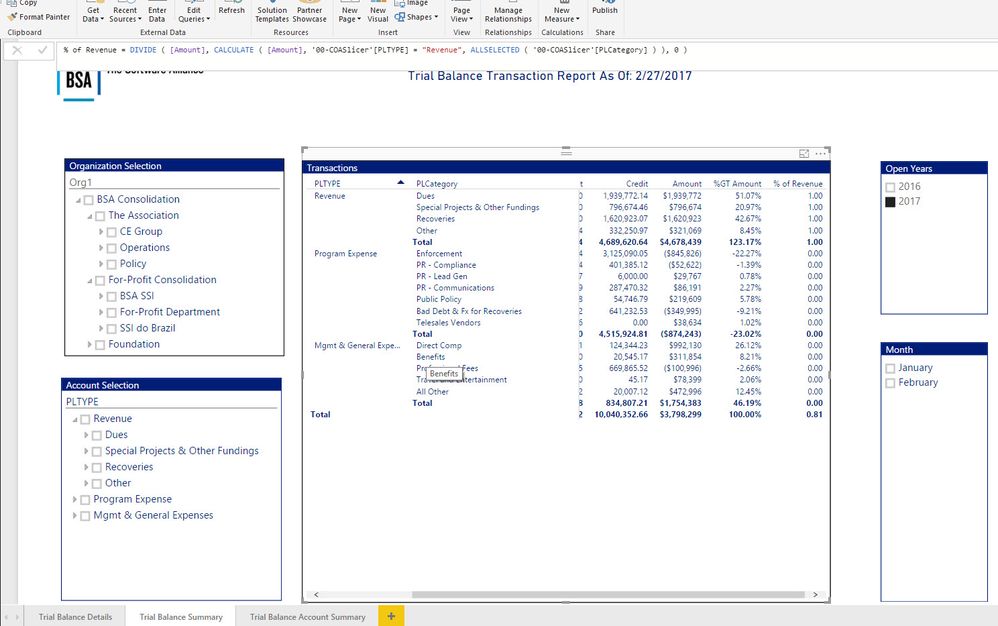
I have tried that and there is no errors now, but no calculation either.
See Picture:
- Mark as New
- Bookmark
- Subscribe
- Mute
- Subscribe to RSS Feed
- Permalink
- Report Inappropriate Content
Also,
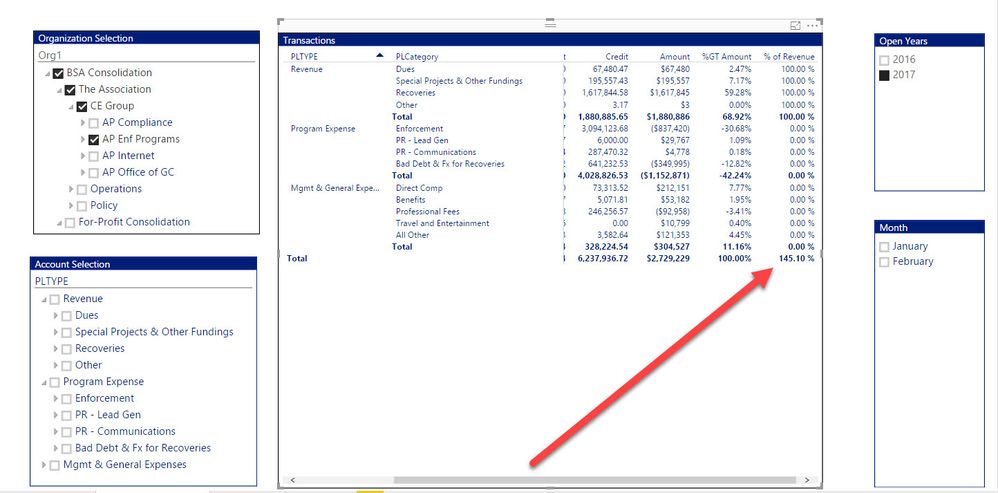
If I model the % of Revenue as a % then Expenses when filtered show the wrong amount....
- Mark as New
- Bookmark
- Subscribe
- Mute
- Subscribe to RSS Feed
- Permalink
- Report Inappropriate Content
Hello Sean,
It doesnt seem to work. I am getting an Incorrect Syntax error.
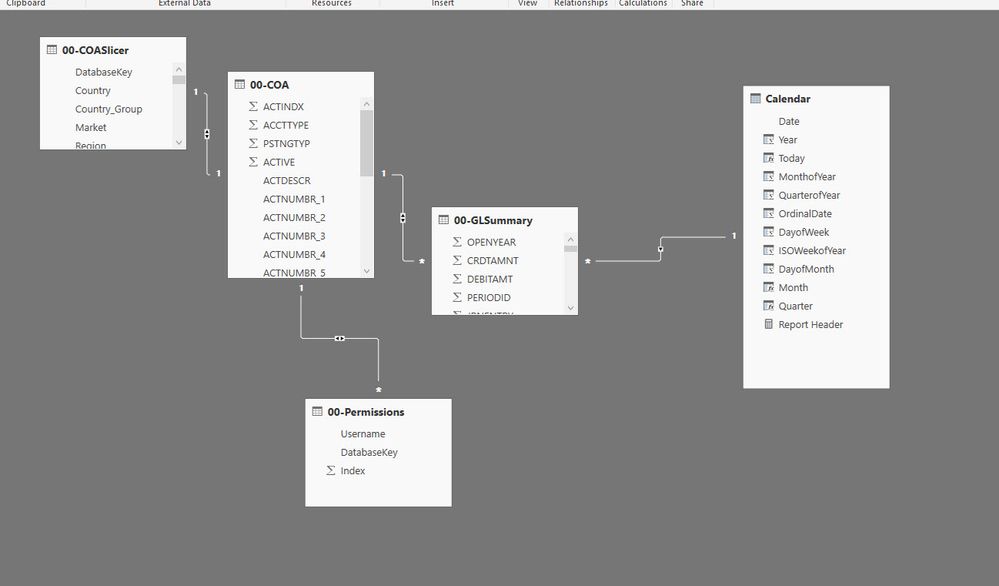
Maybee its the relationship?

Helpful resources

Power BI Dataviz World Championships
The Power BI Data Visualization World Championships is back! Get ahead of the game and start preparing now!

Power BI Monthly Update - December 2025
Check out the December 2025 Power BI Holiday Recap!

FabCon Atlanta 2026
Join us at FabCon Atlanta, March 16-20, for the ultimate Fabric, Power BI, AI and SQL community-led event. Save $200 with code FABCOMM.

| User | Count |
|---|---|
| 41 | |
| 38 | |
| 36 | |
| 31 | |
| 28 |


| User | Count |
|---|---|
| 129 | |
| 88 | |
| 79 | |
| 68 | |
| 63 |


