Join us at FabCon Atlanta from March 16 - 20, 2026, for the ultimate Fabric, Power BI, AI and SQL community-led event. Save $200 with code FABCOMM.
Register now!Get Fabric Certified for FREE during Fabric Data Days. Don't miss your chance! Request now
Hello,
I need help in how to calculate the total number of distinct customers in the last 90 days. below is a sample for the file.
PowerBI Community - OneDrive (sharepoint.com)
thank you
Actually it did not work due to "too many arguments" error.
can you please try again using the sample data below:
| CustomerID | Transaction Date |
| 9174815 | 3/1/2022 |
| 9174816 | 3/1/2022 |
| 9174815 | 3/1/2022 |
| 9174818 | 3/1/2022 |
| 9174815 | 3/1/2022 |
| 9174820 | 3/1/2022 |
| 9174821 | 3/1/2022 |
| 9174816 | 4/1/2022 |
| 9174815 | 4/1/2022 |
| 9174818 | 4/1/2022 |
| 9174825 | 4/1/2022 |
| 9174827 | 4/1/2022 |
| 9174828 | 4/1/2022 |
| 9174829 | 4/1/2022 |
| 9174831 | 4/1/2022 |
| 9174834 | 4/1/2022 |
| 9174835 | 4/1/2022 |
| 9174836 | 4/1/2022 |
| 9174837 | 4/1/2022 |
| 9174838 | 4/1/2022 |
| 9174839 | 4/1/2022 |
| 9174840 | 4/1/2022 |
| 9174844 | 4/1/2022 |
| 9174845 | 4/1/2022 |
| 9174846 | 4/1/2022 |
| 9174847 | 4/1/2022 |
| 9174848 | 4/1/2022 |
| 9174849 | 4/1/2022 |
| 9174851 | 4/1/2022 |
| 9174852 | 4/1/2022 |
| 9174854 | 4/1/2022 |
| 9174855 | 4/1/2022 |
| 9174856 | 4/1/2022 |
| 9174857 | 4/1/2022 |
| 9174859 | 4/1/2022 |
| 9174825 | 4/2/2022 |
| 9174827 | 4/2/2022 |
| 9174828 | 4/2/2022 |
| 9174829 | 4/2/2022 |
| 9174831 | 4/2/2022 |
| 9174834 | 4/2/2022 |
| 9174867 | 4/2/2022 |
| 9174868 | 4/2/2022 |
| 9174869 | 4/2/2022 |
| 9174870 | 4/2/2022 |
| 9174871 | 4/2/2022 |
| 9174872 | 4/2/2022 |
| 9174875 | 4/2/2022 |
| 9174876 | 4/2/2022 |
| 9174877 | 4/2/2022 |
All is ok, thank you all for the support.
Hi @QaisAltwal ,
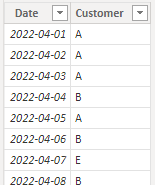
I don't have permission to access your data, I created some myself
Here are the steps you can follow:
1. Create measure.
Measure =
CALCULATE(DISTINCTCOUNT('Table'[Customer])
,
FILTER(ALL('Table'),
'Table'[Date]>=
DATE(YEAR(TODAY()),MONTH(TODAY()),DAY(TODAY())-90)&&'Table'[Date]<=TODAY()))
2. Result:
Best Regards,
Liu Yang
If this post helps, then please consider Accept it as the solution to help the other members find it more quickly
I haven't looked at the file you attached, but you should be able to something like this!
CALCULATE (
[DISTINCT CUSTOMERS],
DATESINPERIOD (
'Date'[Date],
MAX ( 'Date'[Date] ),
-90,
DAY
)
)
Check out the November 2025 Power BI update to learn about new features.
Advance your Data & AI career with 50 days of live learning, contests, hands-on challenges, study groups & certifications and more!