cancel
Showing results for 
Search instead for 
Did you mean: 

The Power BI Data Visualization World Championships is back! Get ahead of the game and start preparing now! Learn more

Reply
Anonymous
Not applicable

Calculate no. of working days that have passed in the year so far

Hi, 


I have a calendar table where I'm using a calculated column to calculate the no. of working days in each month this year. 


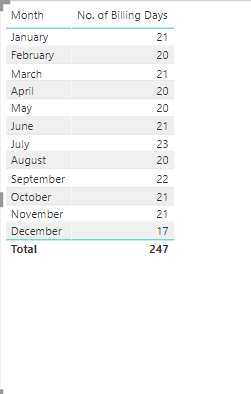
Based on this column and the current date, I want to calculate the no. of working days that have passed year to date. Please see screenshot below for no. of working days by month. Essentially, I want this formula to return 21 for January, 20 for Feb and 19 for March (since based on today's date we have 2 more working days left in March) and the total to be 60. I have tried a few different formulas but can't seem to get the desired result, mainly the total is almost always incorrect. 


Thank you for any suggestions!


Working Days Year.PNG


1 ACCEPTED SOLUTION
amitchandak
Super User
Super User

YTD Sales = CALCULATE(SUM('Date'[Working Day]),DATESYTD(('Date'[Date]),"12/31"))


But for that, you need have a filter of the date on the page

or try like

YTD Sales = CALCULATE(SUM('Date'[Working Day]),DATESYTD(('Date'[Date]),"12/31"),'Date'[Date]<=today())

Share with Power BI Enthusiasts: Full Power BI Video (20 Hours) YouTube
Microsoft Fabric Series 60+ Videos YouTube
Microsoft Fabric Hindi End to End YouTube

View solution in original post

4 REPLIES 4
v-kelly-msft
Community Support
Community Support

Hi @Anonymous , 

Take year 2020 for example:

1.Create a calendar table using below dax expression:


 table = CALENDAR(DATE(2020,1,1),DATE(2020,12,31)) 


2.Then create 3 calculated columns:

 Month = FORMAT('table'[Date],"MMMM") 


weekday = WEEKDAY('table'[Date],2)


Working day = IF('table'[weekday]<>6&&'table'[weekday]<>7,1,0)


3.Fianlly create a measure as below:

Measure = IF(MONTH(MAX('table'[Date]))=MONTH(TODAY()),CALCULATE(SUM('table'[Working day]),'table'[Date]<=TODAY()),SUM('table'[Working day]))


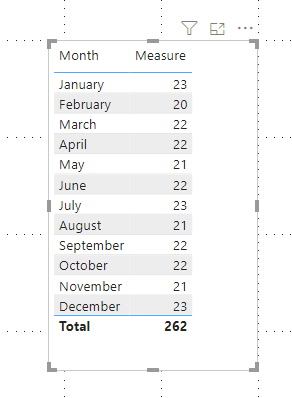
And you will see:

Annotation 2020-03-31 112312.png


For the related .pbix file,pls click here.


Best Regards,
Kelly
Did I answer your question? Mark my post as a solution!


Anonymous
Not applicable

Hi all,


Thanks for all your suggestions. @amitchandak , your solution works and its what I needed. 


Greg_Deckler
Community Champion
Community Champion

First, Please see this post regarding How to Get Your Question Answered Quickly: https://community.powerbi.com/t5/Community-Blog/How-to-Get-Your-Question-Answered-Quickly/ba-p/38490


If you have a Calendar, then you should be able to create a column like:

Working Day = IF(WEEKDAY([Date],2)<6,1,0)


You should then just be able to SUM the Working Day column to get the number of working days and the totals should be correct.


If you are using some kind of measure, you may have a measure totals issue. See my post about it here: https://community.powerbi.com/t5/DAX-Commands-and-Tips/Dealing-with-Measure-Totals/td-p/63376

Also, this Quick Measure, Measure Totals, The Final Word should get you what you need:
https://community.powerbi.com/t5/Quick-Measures-Gallery/Measure-Totals-The-Final-Word/m-p/547907


Follow on LinkedIn
@ me in replies or I'll lose your thread!!!
Instead of a Kudo, please vote for this idea
Become an expert!: Enterprise DNA
External Tools: MSHGQM
YouTube Channel!: Microsoft Hates Greg
Latest book!:
DAX For Humans

DAX is easy, CALCULATE makes DAX hard...
amitchandak
Super User
Super User

YTD Sales = CALCULATE(SUM('Date'[Working Day]),DATESYTD(('Date'[Date]),"12/31"))


But for that, you need have a filter of the date on the page

or try like

YTD Sales = CALCULATE(SUM('Date'[Working Day]),DATESYTD(('Date'[Date]),"12/31"),'Date'[Date]<=today())

Share with Power BI Enthusiasts: Full Power BI Video (20 Hours) YouTube
Microsoft Fabric Series 60+ Videos YouTube
Microsoft Fabric Hindi End to End YouTube

Helpful resources

Announcements
Power BI DataViz World Championships

Power BI Dataviz World Championships

The Power BI Data Visualization World Championships is back! Get ahead of the game and start preparing now!

December 2025 Power BI Update Carousel

Power BI Monthly Update - December 2025

Check out the December 2025 Power BI Holiday Recap!

FabCon Atlanta 2026 carousel

FabCon Atlanta 2026

Join us at FabCon Atlanta, March 16-20, for the ultimate Fabric, Power BI, AI and SQL community-led event. Save $200 with code FABCOMM.