FabCon is coming to Atlanta
Join us at FabCon Atlanta from March 16 - 20, 2026, for the ultimate Fabric, Power BI, AI and SQL community-led event. Save $200 with code FABCOMM.
Register now!- Power BI forums
- Get Help with Power BI
- Desktop
- Service
- Report Server
- Power Query
- Mobile Apps
- Developer
- DAX Commands and Tips
- Custom Visuals Development Discussion
- Health and Life Sciences
- Power BI Spanish forums
- Translated Spanish Desktop
- Training and Consulting
- Instructor Led Training
- Dashboard in a Day for Women, by Women
- Galleries
- Data Stories Gallery
- Themes Gallery
- Contests Gallery
- QuickViz Gallery
- Quick Measures Gallery
- Visual Calculations Gallery
- Notebook Gallery
- Translytical Task Flow Gallery
- TMDL Gallery
- R Script Showcase
- Webinars and Video Gallery
- Ideas
- Custom Visuals Ideas (read-only)
- Issues
- Issues
- Events
- Upcoming Events
The Power BI Data Visualization World Championships is back! Get ahead of the game and start preparing now! Learn more
- Power BI forums
- Forums
- Get Help with Power BI
- Desktop
- Calculate how many sold - create a calculated meas...
- Subscribe to RSS Feed
- Mark Topic as New
- Mark Topic as Read
- Float this Topic for Current User
- Bookmark
- Subscribe
- Printer Friendly Page


- Mark as New
- Bookmark
- Subscribe
- Mute
- Subscribe to RSS Feed
- Permalink
- Report Inappropriate Content
Calculate how many sold - create a calculated measure
Is there a measure for percentage? For example, I am trying to create a dax measure for the total sales we had this month for furniture.
Since March 1, 2020 our store opened, we sold - 761 furnitures
In the month of july, we sold 161 furnitures
I can easily see that using the visuals in power bi but I want to create a measure to calculate the "161" furnitures sold this month, and want to be able to do the same next month. Is there a way to do that?
My table name is Bulk_store and these are the columns on my table:
1. Furniture
2. Technology
3. Manufacturing goods
4. Jewelry
5. Price
Youe help is much appreciated!
6. Sale Date
7. Region
8. City

- Mark as New
- Bookmark
- Subscribe
- Mute
- Subscribe to RSS Feed
- Permalink
- Report Inappropriate Content
I believe I manged to get what you want,
Please refere to below snip. I also included the related measure. I have a date tabel that connects to fact tabel using one to manay relationships with date.
for more information please contact info@nykensanalytics.com.au
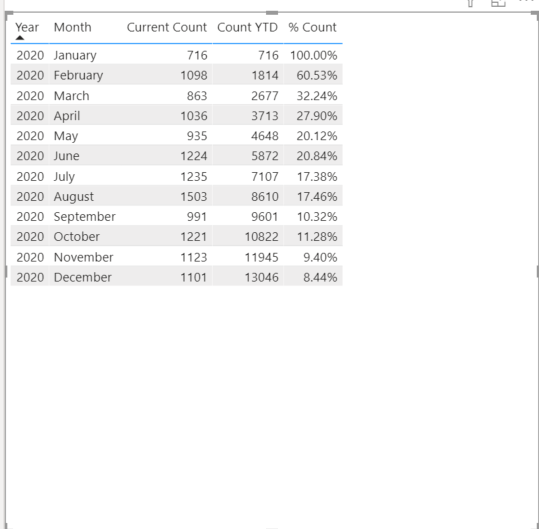
==CURRETNT COUNT==


- Mark as New
- Bookmark
- Subscribe
- Mute
- Subscribe to RSS Feed
- Permalink
- Report Inappropriate Content
hi @OPS-MLTSD
For your case, I think you could just use this simple measure
Measure = TOTALMTD(COUNTA(Bulk_store[Furniture]),Bulk_store[Sale Date])
If not your case, please share your sample pbix file and expected output.
Please see this post regarding How to Get Your Question Answered Quickly:
https://community.powerbi.com/t5/Community-Blog/How-to-Get-Your-Question-Answered-Quickly/ba-p/38490
Regards,
Lin
If this post helps, then please consider Accept it as the solution to help the other members find it more quickly.
- Mark as New
- Bookmark
- Subscribe
- Mute
- Subscribe to RSS Feed
- Permalink
- Report Inappropriate Content
This measure gives me all the sales of furnitures since March 2020, I am looking for a measure that only gives me the sales of furniture in JULY 2020
thank you
- Mark as New
- Bookmark
- Subscribe
- Mute
- Subscribe to RSS Feed
- Permalink
- Report Inappropriate Content
@OPS-MLTSD , The result depend on what you put on the report page if you put mont in the report page @v-lili6-msft answer should give you the totals for July.
- Mark as New
- Bookmark
- Subscribe
- Mute
- Subscribe to RSS Feed
- Permalink
- Report Inappropriate Content
hi @OPS-MLTSD
Please share your sample pbix file for us have a test, that will be a great help.
Regards,
Lin
If this post helps, then please consider Accept it as the solution to help the other members find it more quickly.

- Mark as New
- Bookmark
- Subscribe
- Mute
- Subscribe to RSS Feed
- Permalink
- Report Inappropriate Content
Hi @OPS-MLTSD
you can alternatively use your calculation in a measure click on the measure in the filelds section of teh report and change the data type.

- Mark as New
- Bookmark
- Subscribe
- Mute
- Subscribe to RSS Feed
- Permalink
- Report Inappropriate Content
If somebody could please help me figure this out that would be much appreciated - I just need to know how to calculate this month's sale only using DAX code.
thank you


- Mark as New
- Bookmark
- Subscribe
- Mute
- Subscribe to RSS Feed
- Permalink
- Report Inappropriate Content
@OPS-MLTSD , you can use time intelligence with date table
MTD Sales = CALCULATE(SUM(Sales[Sales Amount]),DATESMTD('Date'[Date]))
last MTD Sales = CALCULATE(SUM(Sales[Sales Amount]),DATESMTD(dateadd('Date'[Date],-1,MONTH)))
last month Sales = CALCULATE(SUM(Sales[Sales Amount]),previousmonth('Date'[Date]))
last MTD (complete) Sales =  CALCULATE(SUM(Sales[Sales Amount]),DATESMTD(ENDOFMONTH(dateadd('Date'[Date],-1,MONTH))))
Power BI — MTD
https://medium.com/@amitchandak.1978/power-bi-mtd-questions-time-intelligence-3-5-64b0b4a4090e
To get the best of the time intelligence function. Make sure you have a date calendar and it has been marked as the date in model view. Also, join it with the date column of your fact/s. Refer :
https://radacad.com/creating-calendar-table-in-power-bi-using-dax-functions
https://www.archerpoint.com/blog/Posts/creating-date-table-power-bi
https://www.sqlbi.com/articles/creating-a-simple-date-table-in-dax/
See if my webinar on Time Intelligence can help: https://community.powerbi.com/t5/Webinars-and-Video-Gallery/PowerBI-Time-Intelligence-Calendar-WTD-Y...
Appreciate your Kudos.


- Mark as New
- Bookmark
- Subscribe
- Mute
- Subscribe to RSS Feed
- Permalink
- Report Inappropriate Content
Dear @OPS-MLTSD
Please can you tell me compared to what do you need percentage to be calculated
I am sure I can help you with DAX 👍
Please reply soon
Please do tag me so that i can know
I will more than happy to help
regards
Sujit
- Mark as New
- Bookmark
- Subscribe
- Mute
- Subscribe to RSS Feed
- Permalink
- Report Inappropriate Content
@Sujit_Thakur Thank you for your prompt reply!
I need to calculate the percentage of furnitures sold in July compared to the all the furnitures sold since March 1, 2020 - so it wold be 161/761 *100 - but I need to do a measure first to calculate the "161" furnitures sold this month
And I want to be able to do this for the subsequent months as well as we move from August to Sept and so forth
Helpful resources

Power BI Monthly Update - November 2025
Check out the November 2025 Power BI update to learn about new features.

Fabric Data Days
Advance your Data & AI career with 50 days of live learning, contests, hands-on challenges, study groups & certifications and more!

FabCon Atlanta 2026
Join us at FabCon Atlanta, March 16-20, for the ultimate Fabric, Power BI, AI and SQL community-led event. Save $200 with code FABCOMM.


