cancel
Showing results for 
Search instead for 
Did you mean: 

The Power BI Data Visualization World Championships is back! Get ahead of the game and start preparing now! Learn more

Reply
IEPMost
Helper III
Helper III

Calculate dynamically the heat consumption 2019 - 2020 of a public buildung (due to coronavirus)

Hi guys,


I have to calculate and visualize the heat consumption of a school for september and october in 2019 compared to 2020 due to the corona virus. Therefore I have a date table and two tables with a certain value for every date in kWh. Also I got two slicers, where you can choose between the months or calendar weeks which should be compared.


How can I calculate dynamically the difference between two values, so that I get the consumption for a certain week or a certain calendar week automatically?


For example my table for 2019 looks like this:

DateConsumption (kWh)
09.09.2019234655
10.09.2019234900
11.09.2019235220
12.09.2019235260
13.09.2019235410
16.09.2019235700
17.09.2019235990
18.09.2019236200
19.09.2019236440
20.09.2019236700

... and a similar table for 2020!


Now when I want the consumption for 16.09. - 20.09. I have to subtract 236700 from 235700 and all this I want to combine with a slicer. So when I choose another week, the calculation should dynamically display the difference. Is that possible?


Thank you very much, any help is much appreciated! (If you need more information about this, please reach out!!)

Cheers.


1 ACCEPTED SOLUTION

Hi @IEPMost ,


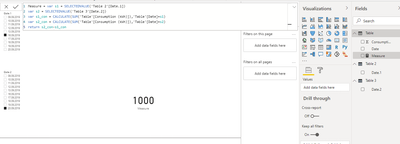
Perhaps the easiest way to do this is to create two new calendars as slicers.

Table 2 = DISTINCT('Table'[Date])
Table 3 = DISTINCT('Table'[Date])

Measure = var s1 = SELECTEDVALUE('Table 2'[Date.1])
var s2 = SELECTEDVALUE('Table 3'[Date.2])
var s1_con = CALCULATE(SUM('Table'[Consumption (kWh)]),'Table'[Date]=s1)
var s2_con = CALCULATE(SUM('Table'[Consumption (kWh)]),'Table'[Date]=s2)
return s2_con-s1_con

V-lianl-msft_0-1604902811900.png


Best Regards,
Liang
If this post helps, then please consider Accept it as the solution to help the other members find it more quickly.

View solution in original post

4 REPLIES 4
IEPMost
Helper III
Helper III

My main issue is the dynamic calculation of the values of two dates. I want to put it in a different way here:


The heat consumption of our clients are ongoing numbers, so on one day there is 300 kWh consumption and on the next day 400 kWh; so between those days there is a consumption of 100 kWh. So I always need the difference between the values of two days and optimally this calculation is dynamic, so no matter what kind of time range you choose, the measure calculates the values of the start and end date of this range. And in the next step you compare the results of 2019 and 2020.


I would be very thankful for any help, if you need further information please reach out to me.


Cheers:)

Hi @IEPMost ,


Perhaps the easiest way to do this is to create two new calendars as slicers.

Table 2 = DISTINCT('Table'[Date])
Table 3 = DISTINCT('Table'[Date])

Measure = var s1 = SELECTEDVALUE('Table 2'[Date.1])
var s2 = SELECTEDVALUE('Table 3'[Date.2])
var s1_con = CALCULATE(SUM('Table'[Consumption (kWh)]),'Table'[Date]=s1)
var s2_con = CALCULATE(SUM('Table'[Consumption (kWh)]),'Table'[Date]=s2)
return s2_con-s1_con

V-lianl-msft_0-1604902811900.png


Best Regards,
Liang
If this post helps, then please consider Accept it as the solution to help the other members find it more quickly.

amitchandak
Super User
Super User

@IEPMost , for Week wise comparison you can create weeks in your date table and do it

Week of choice -https://community.powerbi.com/t5/Community-Blog/Any-Weekday-Week-Decoding-Date-and-Calendar-2-5-Powe...

How to compare weeks 

Power BI — Week on Week and WTD
https://medium.com/@amitchandak.1978/power-bi-wtd-questions-time-intelligence-4-5-98c30fab69d3
https://community.powerbi.com/t5/Community-Blog/Week-Is-Not-So-Weak-WTD-Last-WTD-and-This-Week-vs-La...


If you need compare two week or ranges you need a code like this

https://community.powerbi.com/t5/Community-Blog/Comparing-Data-Across-Date-Ranges/ba-p/823601


Change range to weeks

Share with Power BI Enthusiasts: Full Power BI Video (20 Hours) YouTube
Microsoft Fabric Series 60+ Videos YouTube
Microsoft Fabric Hindi End to End YouTube

HI @amitchandak ,


thank you for providing those links, very helpful. But how can I calculate dynamically the difference of two values for two dates. For example I choose the time range from 1st January 2019 to 7th January 2019 -> the values for the date between those dates don´t matter. So there is a value for the 7th (for example 100 kWh) and another for the 1st (10 kWh) -> now I need 100 - 10 = 90!  So my heat consumption for this week would be 90 kWh. So I need a measure, which should calculate this way for a random time range. Comparing the same week in two different years would be the second step.


I hope you know what I mean and thank you again!!


Helpful resources

Announcements
Power BI DataViz World Championships

Power BI Dataviz World Championships

The Power BI Data Visualization World Championships is back! Get ahead of the game and start preparing now!

November Power BI Update Carousel

Power BI Monthly Update - November 2025

Check out the November 2025 Power BI update to learn about new features.

FabCon Atlanta 2026 carousel

FabCon Atlanta 2026

Join us at FabCon Atlanta, March 16-20, for the ultimate Fabric, Power BI, AI and SQL community-led event. Save $200 with code FABCOMM.