Join us at FabCon Atlanta from March 16 - 20, 2026, for the ultimate Fabric, Power BI, AI and SQL community-led event. Save $200 with code FABCOMM.
Register now!The Power BI Data Visualization World Championships is back! Get ahead of the game and start preparing now! Learn more
Hello People,
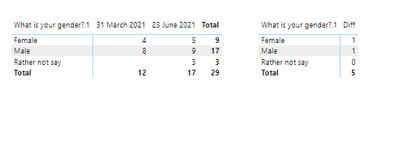
I am facing an issue while calculating differences in the matrix. For example,
In the below image as you can see where there is a blank, the difference is coming 0 whereas it should come 3. I have used the following formula for calculating difference:
Diff = CALCULATE (
DISTINCTCOUNT('Question and Answer'[Respondent ID]),
FILTER (
'Question and Answer' ,
'Question and Answer'[Start Date] = max('Question and Answer'[Start Date])
))
- CALCULATE (
DISTINCTCOUNT('Question and Answer'[Respondent ID]),
FILTER (
'Question and Answer' ,
'Question and Answer'[Start Date] = min('Question and Answer'[Start Date])
))
Any help would be appreciated. Thanks!
Hi,
I am not sure how your data model looks like,
but I assume that
Rather Not Say -> only has June 23rd 2021.
If the above assumption is true, then min date and max date are the same. -> So, the calculation is 3 - 3 = 0
If the above assumption is not true, please share your sample pbix file, then I can try to look into it to come up with accurate measure.
thanks.
Thanks for your response, the assumption is true Rather not say has only 23rd June. In this case is there any alternate option?
Hi,
thank you for your feedback.
In my opinion, you can try to create a condition inside your measure, something like mentioning about the below.
if there is only one date visibile per category, then max value is the visible value, and min value is zero.
if there are more than two dates visible per category, then simple max -min.
Please try to implement the above logic.
Or, please share your sample pbix file, then I can try to write accurate measure for your data model.
Thanks.
I will try to implement the above logic.
Also, attaching the .pbix file.
https://1drv.ms/u/s!Atnt-zbKkySJghuDqJfFfbbgG_sW?e=TrDcFl
Thanks!
Hello Community
Any luck on finding the solution?
The Power BI Data Visualization World Championships is back! Get ahead of the game and start preparing now!
| User | Count |
|---|---|
| 40 | |
| 36 | |
| 33 | |
| 29 | |
| 26 |
| User | Count |
|---|---|
| 134 | |
| 104 | |
| 63 | |
| 60 | |
| 55 |