cancel
Showing results for 
Search instead for 
Did you mean: 

The Power BI Data Visualization World Championships is back! Get ahead of the game and start preparing now! Learn more

Reply
Anonymous
Not applicable

Calculate difference against the value of a previous period selected by user

I need to display  the latest value and the value reported at a date selected by user and calculate their difference.

The following is my data set.  Three ID report values at different dates. exampledata.PNG

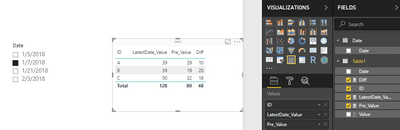
what I want is the following table:

IDValuePrev ValueDiff
A392910
B391920
C503218


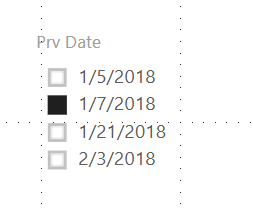
Here the Value is data reported on the latest date (2/3/2018), and Prev Value is the value reported on 1/7/2018, which is the date chosen by the user by selecting the following slicer. I tried differnet funcation such LOOKUPVALUE and CACLUATE, but none of them is workong. Can some one give me some ideas about how to implement it?

Prev Date Slicer.PNG

1 ACCEPTED SOLUTION
v-huizhn-msft
Microsoft Employee
Microsoft Employee

Hi @Anonymous,

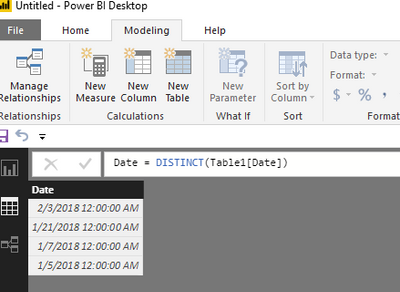
Please create new date table only include date by clicking "New Table" under Modeling on Home page. There is no relationship between date and your fact table.

1.PNG

Create a slicer including Date[Date], create three measure, you will get expected result.

LatestDate_Value =
CALCULATE (
    SUM ( Table1[Value] ),
    FILTER ( Table1, Table1[Date] = MAXX ( ALL ( 'Date'[Date] ), 'Date'[Date] ) )
)


Pre_Value =
IF (
    ISFILTERED ( 'Date'[Date] ),
    CALCULATE (
        SUM ( Table1[Value] ),
        FILTER ( Table1, Table1[Date] = SELECTEDVALUE ( 'Date'[Date] ) )
    ),
    [LatestDate_Value]
)

Diff = [LatestDate_Value]-[Pre_Value] 


Please see expected result as follows, you can download attachment file for more details.

1.PNG

Best Regards,
Angelia

View solution in original post

3 REPLIES 3
v-huizhn-msft
Microsoft Employee
Microsoft Employee

Hi @Anonymous,

Please create new date table only include date by clicking "New Table" under Modeling on Home page. There is no relationship between date and your fact table.

1.PNG

Create a slicer including Date[Date], create three measure, you will get expected result.

LatestDate_Value =
CALCULATE (
    SUM ( Table1[Value] ),
    FILTER ( Table1, Table1[Date] = MAXX ( ALL ( 'Date'[Date] ), 'Date'[Date] ) )
)


Pre_Value =
IF (
    ISFILTERED ( 'Date'[Date] ),
    CALCULATE (
        SUM ( Table1[Value] ),
        FILTER ( Table1, Table1[Date] = SELECTEDVALUE ( 'Date'[Date] ) )
    ),
    [LatestDate_Value]
)

Diff = [LatestDate_Value]-[Pre_Value] 


Please see expected result as follows, you can download attachment file for more details.

1.PNG

Best Regards,
Angelia

Anonymous
Not applicable

@v-huizhn-msft thank you for the response.  it is working.  However, now I need to give user the choice to choose which date is current date. Bascailly,  there are two slicers  to select two dates to compare values. I tried using your methond but it is not working.  After reatding https://www.sqlbi.com/articles/filtering-and-comparing-different-time-periods-with-power-bi/, I almost got what I want except the difference between those values.  This should be a simple calculated column, but the value is not correct. This is the https://1drv.ms/u/s!AtUXUkmpQTxSqnqA_fsXtmk5Vlie . I create three diff column, but none of them give me correct result. 

Hi @Anonymous,

For this thread, please mark it as answer if it's working. There is one issue in a thread. Please create a new one if you have another problem. Thanks for understanding.

Best Regards,
Angelia

Helpful resources

Announcements
Power BI DataViz World Championships

Power BI Dataviz World Championships

The Power BI Data Visualization World Championships is back! Get ahead of the game and start preparing now!

December 2025 Power BI Update Carousel

Power BI Monthly Update - December 2025

Check out the December 2025 Power BI Holiday Recap!

FabCon Atlanta 2026 carousel

FabCon Atlanta 2026

Join us at FabCon Atlanta, March 16-20, for the ultimate Fabric, Power BI, AI and SQL community-led event. Save $200 with code FABCOMM.