- Power BI forums
- Updates
- News & Announcements
- Get Help with Power BI
- Desktop
- Service
- Report Server
- Power Query
- Mobile Apps
- Developer
- DAX Commands and Tips
- Custom Visuals Development Discussion
- Health and Life Sciences
- Power BI Spanish forums
- Translated Spanish Desktop
- Training and Consulting
- Instructor Led Training
- Dashboard in a Day for Women, by Women
- Galleries
- Community Connections & How-To Videos
- COVID-19 Data Stories Gallery
- Themes Gallery
- Data Stories Gallery
- R Script Showcase
- Webinars and Video Gallery
- Quick Measures Gallery
- 2021 MSBizAppsSummit Gallery
- 2020 MSBizAppsSummit Gallery
- 2019 MSBizAppsSummit Gallery
- Events
- Ideas
- Custom Visuals Ideas
- Issues
- Issues
- Events
- Upcoming Events
- Community Blog
- Power BI Community Blog
- Power BI 中文博客
- Community Support
- Community Accounts & Registration
- Using the Community
- Community Feedback
Find everything you need to get certified on Fabric—skills challenges, live sessions, exam prep, role guidance, and more. Get started
- Power BI forums
- Forums
- Get Help with Power BI
- Desktop
- Re: Calculate days paid too late
- Subscribe to RSS Feed
- Mark Topic as New
- Mark Topic as Read
- Float this Topic for Current User
- Bookmark
- Subscribe
- Printer Friendly Page

- Mark as New
- Bookmark
- Subscribe
- Mute
- Subscribe to RSS Feed
- Permalink
- Report Inappropriate Content
Calculate days paid too late
Hello everyone, I have a question regarding time calculations
I have invoice data with Issue date & Last payment date. Time clients get to pay is standard 1 month. Here is some sample data:
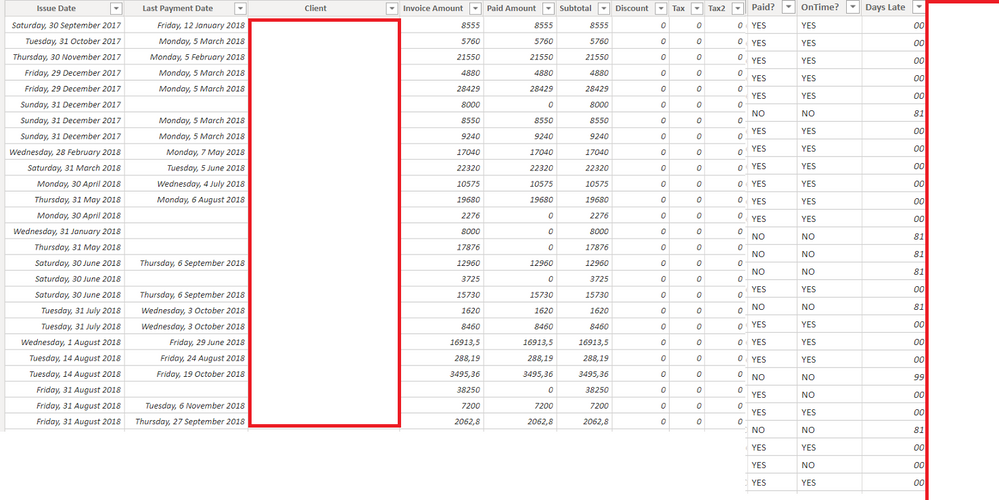
The columns "Paid?" // "OnTime?" // "DaysLate" are calculated columns, the last one is the one I am having problems with.
The problem is that I than get a date data type whiel I want an actuel number
Solved! Go to Solution.


- Mark as New
- Bookmark
- Subscribe
- Mute
- Subscribe to RSS Feed
- Permalink
- Report Inappropriate Content
Use the DATEDIFF() function to return an integer.
Did I answer your question? Mark my post as a solution!
Did my answers help arrive at a solution? Give it a kudos by clicking the Thumbs Up!
DAX is for Analysis. Power Query is for Data Modeling
Proud to be a Super User!
MCSA: BI Reporting
- Mark as New
- Bookmark
- Subscribe
- Mute
- Subscribe to RSS Feed
- Permalink
- Report Inappropriate Content
DaysLate = datediff(FactHarvest_Invoices[Last Payment Date] , FactHarvest_Invoices[Last Payment Date] , Day)-1
or
DaysLate = datediff(FactHarvest_Invoices[Last Payment Date] , FactHarvest_Invoices[Last Payment Date] , Month)
or
DaysLate = datediff(FactHarvest_Invoices[Last Payment Date] , FactHarvest_Invoices[Last Payment Date] , Day)
At the Microsoft Analytics Community Conference, global leaders and influential voices are stepping up to share their knowledge and help you master the latest in Microsoft Fabric, Copilot, and Purview. ✨
️ November 12th-14th, 2024
Online Event
Register Here
- Mark as New
- Bookmark
- Subscribe
- Mute
- Subscribe to RSS Feed
- Permalink
- Report Inappropriate Content
Use the DATEDIFF() function to return an integer.
Did I answer your question? Mark my post as a solution!
Did my answers help arrive at a solution? Give it a kudos by clicking the Thumbs Up!
DAX is for Analysis. Power Query is for Data Modeling
Proud to be a Super User!
MCSA: BI Reporting- Mark as New
- Bookmark
- Subscribe
- Mute
- Subscribe to RSS Feed
- Permalink
- Report Inappropriate Content
Hi @edhans that seemed to work, any idea how can substract the 1 month payment time tho?
Last Payment date - Issue Date = just the difference between the dates. But I want to know how many days have passed the 1 month payment date, if that makes any sense?
- Mark as New
- Bookmark
- Subscribe
- Mute
- Subscribe to RSS Feed
- Permalink
- Report Inappropriate Content
Well, how would you do it in Excel? For example, if the first date is Jan 1 and the 2nd is Mar 15, that is 74 days. How would you add/subtract a month from that? Assume 30 days? You cannot really add a month to an integer as month have 28-31 days. For example, I've always worked with days when dealing with AR agings, not months.
Did I answer your question? Mark my post as a solution!
Did my answers help arrive at a solution? Give it a kudos by clicking the Thumbs Up!
DAX is for Analysis. Power Query is for Data Modeling
Proud to be a Super User!
MCSA: BI Reporting- Mark as New
- Bookmark
- Subscribe
- Mute
- Subscribe to RSS Feed
- Permalink
- Report Inappropriate Content
- Mark as New
- Bookmark
- Subscribe
- Mute
- Subscribe to RSS Feed
- Permalink
- Report Inappropriate Content
Excellent @Anonymous - glad you figured out a solution that works!
Did I answer your question? Mark my post as a solution!
Did my answers help arrive at a solution? Give it a kudos by clicking the Thumbs Up!
DAX is for Analysis. Power Query is for Data Modeling
Proud to be a Super User!
MCSA: BI Reporting
Helpful resources

Power BI Monthly Update - October 2024
Check out the October 2024 Power BI update to learn about new features.

Fabric Community Update - October 2024
Find out what's new and trending in the Fabric Community.

| User | Count |
|---|---|
| 111 | |
| 105 | |
| 100 | |
| 77 | |
| 44 |


| User | Count |
|---|---|
| 143 | |
| 142 | |
| 122 | |
| 100 | |
| 57 |


