cancel
Showing results for 
Search instead for 
Did you mean: 

The FabCon + SQLCon recap series starts April 14th at 8am Pacific. If you’re tracking where AI is going inside Fabric, this first session is a can't miss. Register now

Reply
Anonymous
Not applicable

Calculate data with previous period/last month

Hi All,


I have a huge data set with transaction rows for each month. Since the report is generated on 1st of every month, it has month's first date as date against each of the rows for that month.

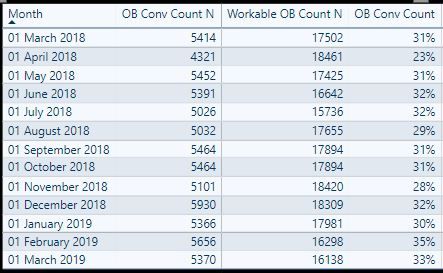
I have got 2 measures as shown in table 1) OB Conv Count N & 2) Workable OB Count N. I need to create a 3rd measure (OB Conv Count) which will take the value of OB Conv Count N & divide it with previous month's value of Workable OB Count N. Using previous month, Dateadd, Parallel Period doesn't seem to be working. In all the cases, the ratio takes the values for same month and displays it in the table as well. I want to avoid using calculated columns as there are many splicers on the page to enable filtering the data on various parameters. The table shown below reflects the values as per splicer selections. The only issue pending is OB Conv Count Ratio which needs current month numerator with previous month denominator. For e.g. For April, the value should be 4321/17502= 24.68%, but it shows 23% which is 4321/18461.


The data set does have a Date Dimension table for enabling fiscal year month numbering & calculations. Please help out here. Thanks in advance.OB Conv Snip.JPG
3 REPLIES 3
Anonymous
Not applicable

Hi @parry2k , 

Tried below:

Workable OB Count PM = CALCULATE([Workable OB Count N], DATEADD('FY 19'[Month].[Date], -1, MONTH))
It gives the result as:
Workable OB Count PM = CALCULATE([Workable OB Count N], DATEADD('FY 19'[Month].[Date], -1, MONTH))Workable OB Count PM = CALCULATE([Workable OB Count N], DATEADD('FY 19'[Month].[Date], -1, MONTH))
Replacing the 'FY 19'[Month].[Date] with column in Date_Dim table(Marked as Date table) returns blanks.
Requested Expression is
Workable OB Count N = calculate(COUNTA('FY 19'[COPF ID]), 'FY 19', 'FY 19'[Status]= "Work in Progress" || 'FY 19'[Status]= "Planned Delivery")

@Anonymous can you share pbix file? Remove any sensitive information before sharing, share thru one drive/google drive.


Subscribe to the @PowerBIHowTo YT channel for an upcoming video on List and Record functions in Power Query!!

Learn Power BI and Fabric - subscribe to our YT channel - Click here: @PowerBIHowTo

If my solution proved useful, I'd be delighted to receive Kudos. When you put effort into asking a question, it's equally thoughtful to acknowledge and give Kudos to the individual who helped you solve the problem. It's a small gesture that shows appreciation and encouragement! ❤


Did I answer your question? Mark my post as a solution. Proud to be a Super User! Appreciate your Kudos 🙂
Feel free to email me with any of your BI needs.

parry2k
Super User
Super User

@Anonymous lets start very simple and see if the calculation is working, create new measure for Previous Month and drop int the visual you shown and see if we get correct data


If it doesn't work, share expression of [Workable OB Count N] measure 


Workable OB Count PM = 
CALCULATE
(
[Workable OB Count N],
DATEASADD( Date[Date], -1, MONTH)
)


Subscribe to the @PowerBIHowTo YT channel for an upcoming video on List and Record functions in Power Query!!

Learn Power BI and Fabric - subscribe to our YT channel - Click here: @PowerBIHowTo

If my solution proved useful, I'd be delighted to receive Kudos. When you put effort into asking a question, it's equally thoughtful to acknowledge and give Kudos to the individual who helped you solve the problem. It's a small gesture that shows appreciation and encouragement! ❤


Did I answer your question? Mark my post as a solution. Proud to be a Super User! Appreciate your Kudos 🙂
Feel free to email me with any of your BI needs.

Helpful resources

Announcements
New to Fabric survey Carousel

New to Fabric Survey

If you have recently started exploring Fabric, we'd love to hear how it's going. Your feedback can help with product improvements.

Power BI DataViz World Championships carousel

Power BI DataViz World Championships - June 2026

A new Power BI DataViz World Championship is coming this June! Don't miss out on submitting your entry.

Join our Fabric User Panel

Join our Fabric User Panel

Share feedback directly with Fabric product managers, participate in targeted research studies and influence the Fabric roadmap.

March Power BI Update Carousel

Power BI Community Update - March 2026

Check out the March 2026 Power BI update to learn about new features.