Join us at FabCon Atlanta from March 16 - 20, 2026, for the ultimate Fabric, Power BI, AI and SQL community-led event. Save $200 with code FABCOMM.
Register now!Get Fabric Certified for FREE during Fabric Data Days. Don't miss your chance! Request now
Hi There!
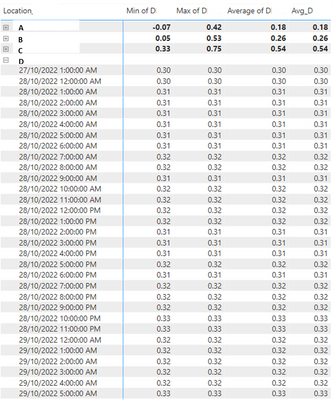
I have a table with several temperature records per location per day at different times. I'm trying to calculate the daily average, so I can run other calculations i.e. difference from annual average, cumulative difference, etc, but I can't get this daily average right.
I have a calendar table with both date_time and date_only, and tried several methods posted in the forum, but I can't get a static average per day.
Please see some sample data below. Thanks in advance for your help! 🙂
1. AVERAGEX ( VALUES (Table[Date_only]), [D])
2. CALCULATE (
AVERAGE(Table[D] ),
FILTER ( ALLSELECTED ( Table ), Table[Date_only ]=EARLIER(Table[Date_only ]
)))
3. Avg_D = CALCULATE(AverageX(Values('Table'[Date_only]), CALCULATE(SUM('Table)'[Values]))) ,filter(all('Table'[Date_only]),'Table)'[Date_only] <=max'Table'[Date_only])))
@Anonymous , if you plan to overall number
then you need a measure like, assuming D is a measure
calculate(AVERAGEX ( VALUES (Table[Date_only]), [D]), allselected())
If this does not help
Can you share sample data and sample output in table format? Or a sample pbix after removing sensitive data.
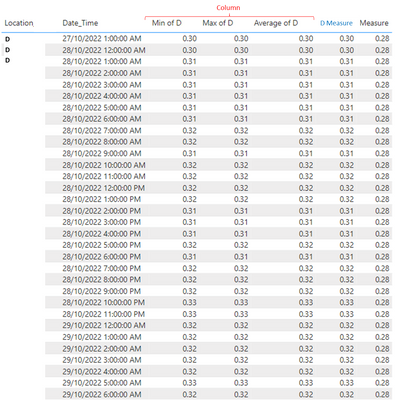
Thanks for your response @amitchandak! My data was in a column format so I created a measure (D_Measure) so I could apply your suggested measure: calculate(AVERAGEX ( VALUES (Table[Date_only]), [D]), allselected())
It looks like it's calculating an average over the whole dataset, not by day.
Thanks in advance for your suggestions!
Check out the November 2025 Power BI update to learn about new features.
Advance your Data & AI career with 50 days of live learning, contests, hands-on challenges, study groups & certifications and more!