Join us at FabCon Atlanta from March 16 - 20, 2026, for the ultimate Fabric, Power BI, AI and SQL community-led event. Save $200 with code FABCOMM.
Register now!The Power BI Data Visualization World Championships is back! Get ahead of the game and start preparing now! Learn more
I have a table of dimensional measurements, each entry representing an evaluation of a particular dimension on a particular part:
Measurement Table
| Measurment Number | Part Number | Dim_id | Out of Spec Flag |
1 | 001 | 001_dim_01 | 1 |
| 2 | 001 | 001_dim_02 | 0 |
| 3 | 001 | 001_dim_03 | 1 |
| 4 | 001 | 001_dim_04 | 0 |
| 5 | 002 | 002_dim_01 | 0 |
| 6 | 002 | 002_dim_02 | 0 |
| 7 | 001 | 001_dim_01 | 1 |
| 8 | 001 | 001_dim_02 | 1 |
I'd like to know how each dimension contributes to the overal "out of spec" count for a given part, but I'm struggling to have a measure that calculates for the Dim_id, the total number of times a the related part number is out of spec.
As an example of what I'd like:
If Part Number [001] was out of spec 4 times
and Dim_id [001_dim_01] was out of spec 2 times,
then [001_dim_01] contributes to 50% of the out of spec measurements for Part Number [001]
Resulting Table:
| Dim_id | Out of Spec Flag | DIM OOS | Part Number OOS | % OOS Contribution |
| 001_dim_01 | 1 | 2 | 4 | 50% |
| 001_dim_02 | 0 | 1 | 4 | 25% |
| 001_dim_03 | 1 | 1 | 4 | 25% |
| 001_dim_04 | 0 | 0 | 4 | 0% |
| 002_dim_01 | 0 | 0 | 0 | 0% |
| 002_dim_02 | 0 | 0 | 0 | 0% |
For some reason when I use the function:
CALCULATE(
SUM('Measurement Table'[Out of Spec Flag]),
ALLEXCEPT('Measurement Table', 'Measurement Table'[Part Number])
)
I still get the total sum of Out of Spec Flag in the table (the same for each dim)
Resulting Table:
| Dim_id | Out of Spec Flag | DIM OOS | Part Number OOS |
| 001_dim_01 | 1 | 2 | 4 |
| 001_dim_02 | 0 | 1 | 4 |
| 001_dim_03 | 1 | 1 | 4 |
| 001_dim_04 | 0 | 0 | 4 |
| 002_dim_01 | 0 | 0 | 4 |
| 002_dim_02 | 0 | 0 | 4 |
I also have a table of distinct Part Numbers with a relationship to the Measurement table, but when I use the function:
CALCULATE(
SUM('Measurement Table'[Out of Spec Flag]),
ALLEXCEPT('Part Numbers', 'Part Numbers'[Part Number])
)
The result is the total Out of Spec sum for the specific dim, not the sum for the related part number.
Resulting Table:
| Dim_id | Out of Spec Flag | DIM OOS | Part Number OOS |
| 001_dim_01 | 1 | 2 | 2 |
| 001_dim_02 | 0 | 1 | 1 |
| 001_dim_03 | 1 | 1 | 1 |
| 001_dim_04 | 0 | 0 | 0 |
| 002_dim_01 | 0 | 0 | 0 |
| 002_dim_02 | 0 | 0 | 0 |
Does anyone have insight into what could help?
Solved! Go to Solution.
Hi,
These measures work
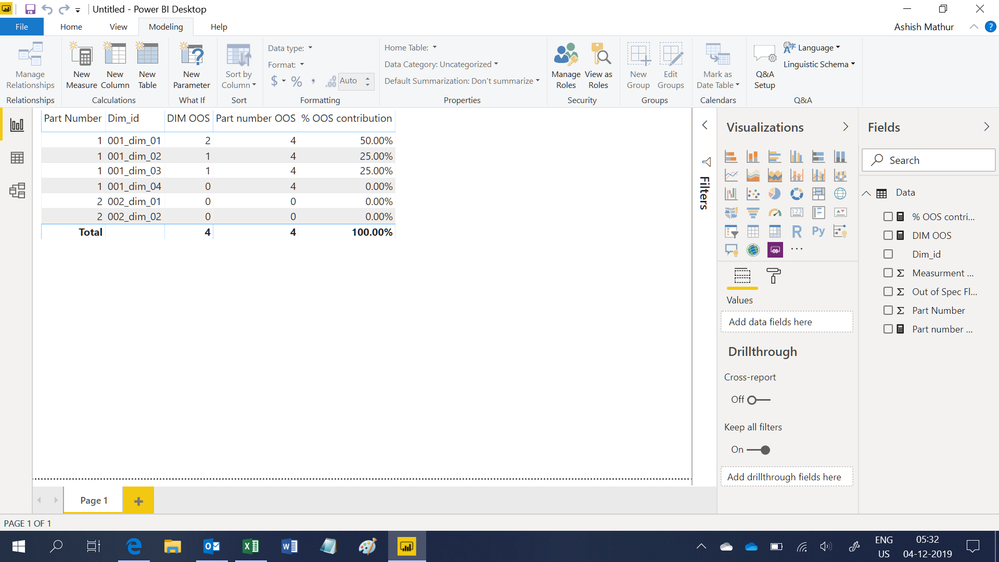
DIM OOS = SUM(Data[Out of Spec Flag])Part number OOS = CALCULATE([DIM OOS],ALL(Data[Dim_id]))% OOS contribution = if([Part number OOS]=0,0,[DIM OOS]/[Part number OOS])
Hope this helps.
Hi,
These measures work
DIM OOS = SUM(Data[Out of Spec Flag])Part number OOS = CALCULATE([DIM OOS],ALL(Data[Dim_id]))% OOS contribution = if([Part number OOS]=0,0,[DIM OOS]/[Part number OOS])
Hope this helps.
Hi Ashish,
Thank you for you response, but I think the measures as you have them written only work because the original table I provided did not have any OOS for Part Number 2. I've provided a more detailed table of example data below.
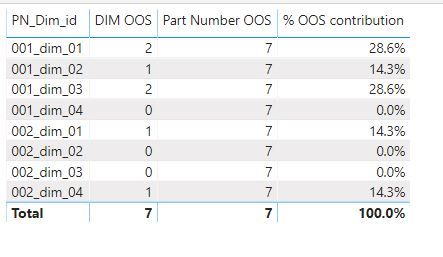
In this case, your measures would calculate a Part Number OOS of 7 for all parts rather than the correct number of 5 for Part 1 and 2 for Part 2. I apologize I didn't provide a better example table in the first post.
Updated Measurement Table
Measurement Number | Part Number | dim_id | PN_dim_id | OOS Flag |
1 | 1 | dim_01 | 001_dim_01 | 1 |
| 2 | 1 | dim_02 | 001_dim_02 | 0 |
| 3 | 1 | dim_03 | 001_dim_03 | 1 |
| 4 | 1 | dim_04 | 001_dim_04 | 0 |
| 5 | 2 | dim_01 | 002_dim_01 | 0 |
| 6 | 2 | dim_02 | 002_dim_02 | 0 |
| 7 | 2 | dim_03 | 002_dim_03 | 0 |
| 8 | 2 | dim_04 | 002_dim_04 | 1 |
| 9 | 1 | dim_01 | 001_dim_01 | 1 |
| 10 | 1 | dim_02 | 001_dim_02 | 1 |
| 11 | 1 | dim_03 | 001_dim_03 | 1 |
| 12 | 1 | dim_04 | 001_dim_04 | 0 |
| 13 | 2 | dim_01 | 002_dim_01 | 1 |
| 14 | 2 | dim_02 | 002_dim_02 | 0 |
| 15 | 2 | dim_03 | 002_dim_03 | 0 |
| 16 | 2 | dim_04 | 002_dim_04 | 0 |
Hi,
My suggested measures work perfectly well if you drag Part Number to the visual. See the screenshot.
Thank you, that's what I'll do.
Can you help me understand: If there's a relationship between the Dim_id and the Part Number, why isn't it possible to get the desired result without the Part Number field?
Hi,
It is only because of the Part Number field that you are being able to see duplicate Dim ID. If you remove that field, each Dim ID will appear only once.
The Power BI Data Visualization World Championships is back! Get ahead of the game and start preparing now!
| User | Count |
|---|---|
| 39 | |
| 39 | |
| 37 | |
| 29 | |
| 24 |
| User | Count |
|---|---|
| 120 | |
| 95 | |
| 70 | |
| 69 | |
| 65 |